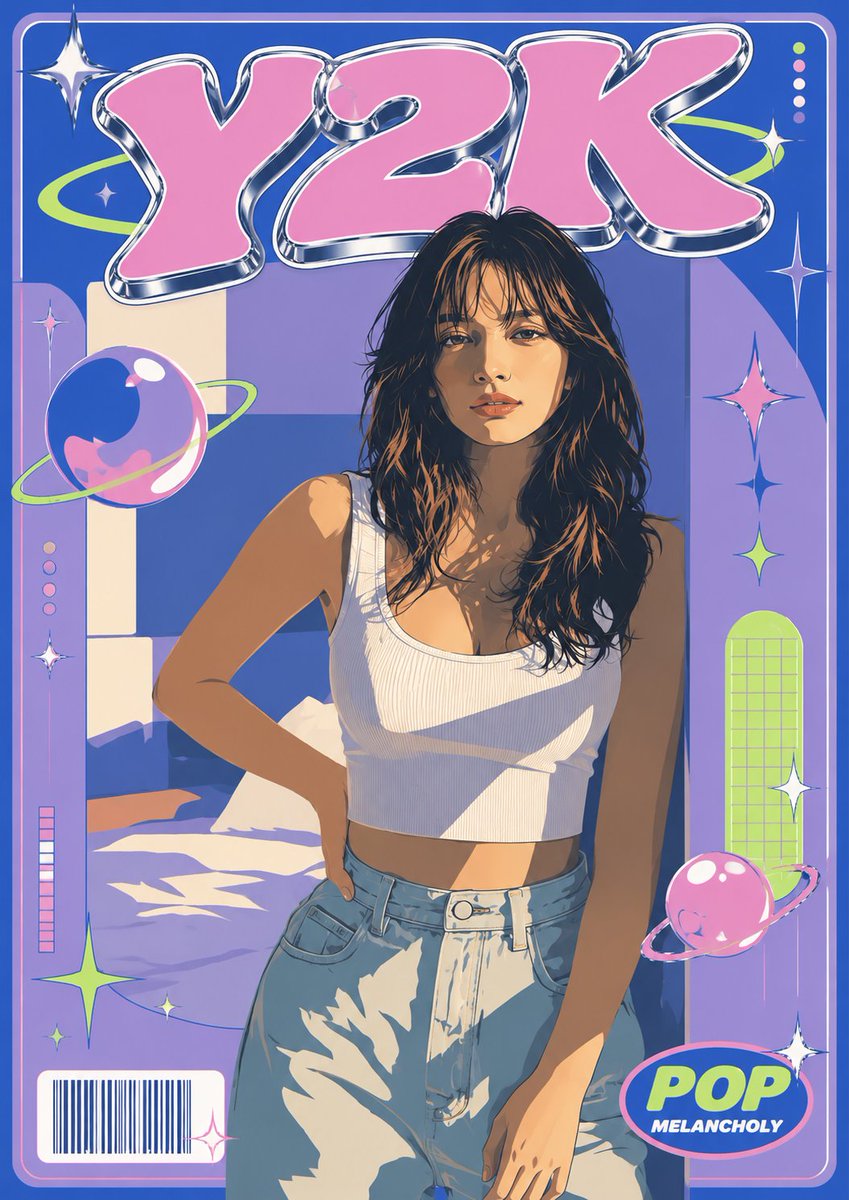
Y2K Vector Magazine Cover
Transforms a reference portrait into a flat vector Y2K retro magazine cover with chrome bubble typography, planets, sparkles, and pop editorial framing.
This is a GPT Image 2 prompt case for Graphic & Poster. Use the copy-ready prompt below to generate similar visuals, and review Awesome GPT Image 2 Prompts attribution plus commercial-use rights before reuse.
Free 1K preview
Generate one preview image instantly, no sign-up required.
Free text preview doesn’t preserve reference-image consistency.
Prompt
Copy-ready prompt
Using REFERENCE_0 as the main character and composition base, and REFERENCE_1 only as mood inspiration, transform the photo into a single vertical Y2K retro magazine-cover poster in clean flat vector illustration. Keep the woman’s identity, pose, hairstyle, hair color, outfit, body proportions, and sunlit bedroom setting from REFERENCE_0 recognizable, but simplify everything into bold cel-shaded vector shapes with crisp dark outlines, smooth gradients, and stylized high-contrast shadows.

Goal: Create a cute Y2K magazine surface with a subtle cool melancholy edge.

Canvas and layout: Vertical poster cover, full-bleed, with a rounded rectangular border and graphic magazine framing. Place the character centered in the lower/middle area, cropped similarly to a fashion cover. Add a large headline at the top reading {argument name="headline text" default="Y2K"} in oversized pink bubble letters with shiny chrome/silver 3D edging.

New graphic additions: Add exactly 2 glossy pink/blue ringed planets, 1 large planet on the left side and 1 smaller planet near the bottom-right. Add exactly 8 sparkle/star graphics distributed around the cover: one large chrome sparkle at top-left, one small sparkle near the left planet, one pink sparkle on the right, one blue sparkle on the right, one lime sparkle on the right, one white sparkle near the lower-right frame, one lime star near the lower-left, and one tiny white sparkle near the lower center-left. Add a lime orbital swoosh behind the headline, vertical decorative dot rows, a small barcode box at bottom-left, and a bottom-right oval badge reading {argument name="badge text" default="POP"} with the smaller subtitle {argument name="badge subtitle" default="MELANCHOLY"}.

Style: 2000s pop magazine cover, playful pastel cyber aesthetic, flat vector fashion illustration, blue/purple background blocks, pink and lime accents, glossy plastic/chrome effects on typography and icons, clean poster-print finish. Preserve the warm sunlight-and-shadow feeling from the source photo but render it as graphic shapes.

Constraints: Do not change the woman into a different person, do not add extra characters, do not add unreadable filler cover lines, keep all text limited to the headline, badge subtitle, and barcode-style graphic.
Prompt variables
Editable argument placeholders found in the prompt, with their default values.
Best for
- - Graphic & Poster visual exploration
- - Image generation and reference-image edits
- - Reusable briefs that keep source attribution visible
Change these parts
- - Subject, product, character, or scene
- - Aspect ratio, camera, lighting, and background
- - Brand, text, color, and output constraints
Recommended model and settings
- - Model: gpt-image-2
- - Input mode: Image to Image
- - Aspect ratio: source
- - Commercial status: review original source
How to use this prompt
- 1. Copy the prompt and preserve its structure for the first test.
- 2. Replace the subject, context, and publishing channel.
- 3. Change one camera, lighting, or style variable per iteration.
- 4. Inspect the output, source, text, and rights before reuse.
Limitations, source, and reuse cautions
- - Generated output is an editable draft, not factual, legal, or rights evidence.
- - Review the linked source, people, brands, logos, text, and third-party media before commercial use.
More cases in this category
Prioritized by category, input mode compatibility, quality, and lower risk.

Reuse and source notes
Use this prompt safely after previewing the case.
- 1.Copy the prompt or open it directly in Dovoo with the generation button.
- 2.Adjust variables, aspect ratio, and reference images for your own use case.
- 3.Before publishing or paid usage, verify source rights, attribution requirements, and brand or likeness risks.
Can I use this prompt commercially?
Commercial-use status is allowed. Review the original source, license, brand constraints, and legal requirements before paid usage.
Where does this case come from?
This case is imported from Awesome GPT Image 2 Prompts; keep attribution visible and check the source URL before reuse.