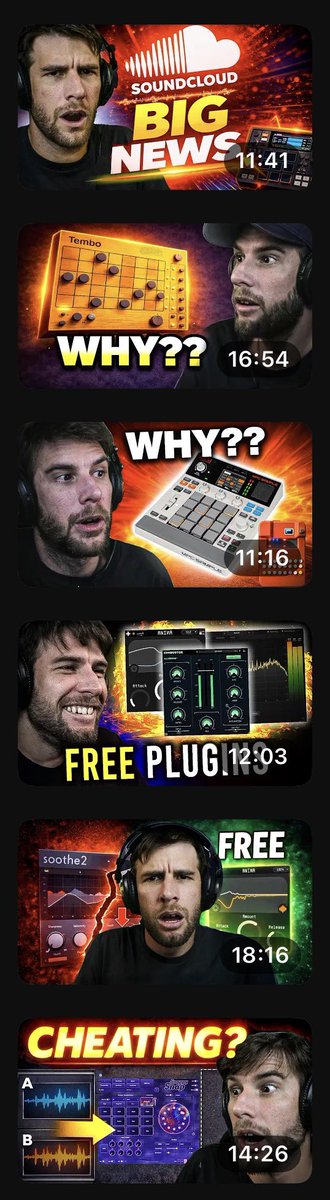
Music Tech YouTube Thumbnails
A prompt to generate a series of expressive YouTube thumbnails for music technology reviews and news, featuring a consistent host character.
This is a GPT Image 2 prompt case for Graphic & Poster. Use the copy-ready prompt below to generate similar visuals, and review Awesome GPT Image 2 Prompts attribution plus commercial-use rights before reuse.
Free 1K preview
Generate one preview image instantly, no sign-up required.
Free text preview doesn’t preserve reference-image consistency.
Prompt
Copy-ready prompt
Using the provided reference image as a style guide, generate a vertical compilation of six distinct YouTube thumbnail designs. Each thumbnail must feature the same male subject (a bearded man wearing headphones) but with different exaggerated facial expressions and poses to match the specific topic of each video.

1. **SoundCloud News:** The subject looks shocked/skeptical. Background features the SoundCloud logo and text 'BIG NEWS' in large yellow/white font. Duration: 11:41.
2. **Tembo Product:** The subject looks confused/questioning. Features an orange grid-like device (Tembo) and large text 'WHY??'. Duration: 16:54.
3. **Akai MPC Live II:** The subject looks surprised. Features a white Akai MPC controller and large text 'WHY??'. Duration: 11:16.
4. **Free Plugins:** The subject is smiling broadly. Features a dark plugin interface and large text 'FREE PLUGINS'. Duration: 12:03.
5. **Soothe2 Plugin:** The subject looks distressed/intense. Features the Soothe2 plugin interface and text 'FREE'. Duration: 18:16.
6. **Cheating?:** The subject looks suspicious/shocked. Features a purple plugin interface with waveform comparisons labeled A and B, and large red text 'CHEATING?'. Duration: 14:26.

Ensure all thumbnails have high contrast, vibrant colors, and professional lighting typical of tech/music production content.
Best for
- - Graphic & Poster visual exploration
- - Image generation and reference-image edits
- - Reusable briefs that keep source attribution visible
Change these parts
- - Subject, product, character, or scene
- - Aspect ratio, camera, lighting, and background
- - Brand, text, color, and output constraints
Recommended model and settings
- - Model: gpt-image-2
- - Input mode: Image to Image
- - Aspect ratio: source
- - Commercial status: review original source
How to use this prompt
- 1. Copy the prompt and preserve its structure for the first test.
- 2. Replace the subject, context, and publishing channel.
- 3. Change one camera, lighting, or style variable per iteration.
- 4. Inspect the output, source, text, and rights before reuse.
Limitations, source, and reuse cautions
- - Generated output is an editable draft, not factual, legal, or rights evidence.
- - Review the linked source, people, brands, logos, text, and third-party media before commercial use.
More cases in this category
Prioritized by category, input mode compatibility, quality, and lower risk.

Reuse and source notes
Use this prompt safely after previewing the case.
- 1.Copy the prompt or open it directly in Dovoo with the generation button.
- 2.Adjust variables, aspect ratio, and reference images for your own use case.
- 3.Before publishing or paid usage, verify source rights, attribution requirements, and brand or likeness risks.
Can I use this prompt commercially?
Commercial-use status is allowed. Review the original source, license, brand constraints, and legal requirements before paid usage.
Where does this case come from?
This case is imported from Awesome GPT Image 2 Prompts; keep attribution visible and check the source URL before reuse.