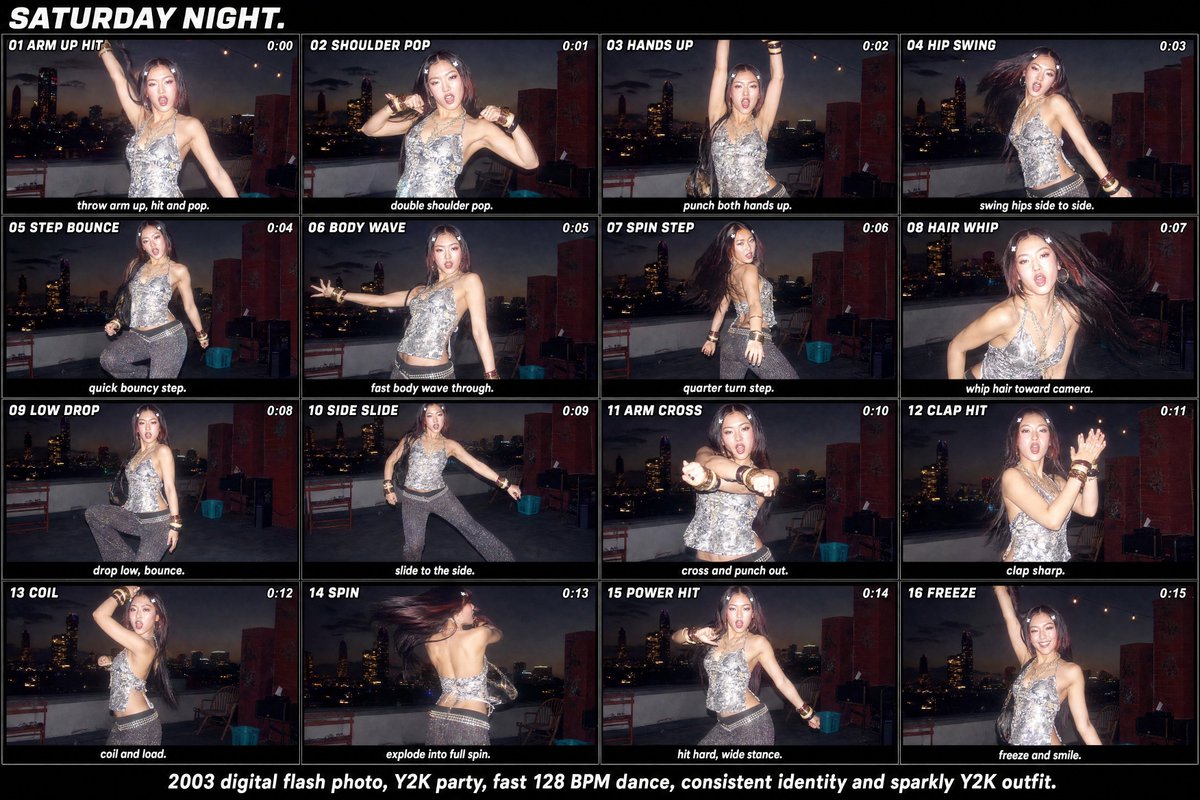
Y2K Rooftop Dance Tutorial Sheet
Generates a 16-panel Y2K flash-photo dance tutorial contact sheet from a single reference party photo.
This is a GPT Image 2 prompt case for Graphic & Poster. Use the copy-ready prompt below to generate similar visuals, and review Awesome GPT Image 2 Prompts attribution plus commercial-use rights before reuse.
Free 1K preview
Generate one preview image instantly, no sign-up required.
Free text preview doesn’t preserve reference-image consistency.
Prompt
Copy-ready prompt
Using the provided reference image as the subject, outfit, rooftop party setting, and Y2K flash-photo style base, transform it into a wide 16-panel dance tutorial contact sheet titled {argument name="headline text" default="SATURDAY NIGHT."}. Keep the same person identity, sparkly Y2K outfit, rooftop skyline at night, direct-flash digital camera look, and party energy, but generate distinct dance poses across the panels rather than one pose.

Canvas and layout: Create a horizontal black poster/contact-sheet layout with exactly 16 rectangular frames arranged in a 4 columns × 4 rows grid. Each frame should look like a flash snapshot from the same rooftop session, separated by thin black borders. Add bold white italic all-caps typography.

Panel sequence: Include exactly these 16 numbered dance-step panels, each with a small title at the top-left, a timestamp at the top-right, and a short instruction caption along the bottom:
1. “01 ARM UP HIT” — timestamp “0:00” — caption “throw arm up, hit and pop.”
2. “02 SHOULDER POP” — timestamp “0:01” — caption “double shoulder pop.”
3. “03 HANDS UP” — timestamp “0:02” — caption “punch both hands up.”
4. “04 HIP SWING” — timestamp “0:03” — caption “swing hips side to side.”
5. “05 STEP BOUNCE” — timestamp “0:04” — caption “quick bouncy step.”
6. “06 BODY WAVE” — timestamp “0:05” — caption “fast body wave through.”
7. “07 SPIN STEP” — timestamp “0:06” — caption “quarter turn step.”
8. “08 HAIR WHIP” — timestamp “0:07” — caption “whip hair toward camera.”
9. “09 LOW DROP” — timestamp “0:08” — caption “drop low, bounce.”
10. “10 SIDE SLIDE” — timestamp “0:09” — caption “slide to the side.”
11. “11 ARM CROSS” — timestamp “0:10” — caption “cross and punch out.”
12. “12 CLAP HIT” — timestamp “0:11” — caption “clap sharp.”
13. “13 COIL” — timestamp “0:12” — caption “coil and load.”
14. “14 SPIN” — timestamp “0:13” — caption “explode into full spin.”
15. “15 POWER HIT” — timestamp “0:14” — caption “hit hard, wide stance.”
16. “16 FREEZE” — timestamp “0:15” — caption “freeze and smile.”

Bottom footer: Add one centered white caption below the grid: {argument name="footer text" default="2003 digital flash photo, Y2K party, fast 128 BPM dance, consistent identity and sparkly Y2K outfit."}

Style constraints: Make it feel like an early-2000s digital-camera party dance breakdown, with motion blur in hair and limbs where appropriate, harsh flash highlights, dark skyline backgrounds, and consistent subject identity in every frame. Do not add extra panels, extra steps, logos, watermarks, or unrelated text.
Prompt variables
Editable argument placeholders found in the prompt, with their default values.
Best for
- - Graphic & Poster visual exploration
- - Image generation and reference-image edits
- - Reusable briefs that keep source attribution visible
Change these parts
- - Subject, product, character, or scene
- - Aspect ratio, camera, lighting, and background
- - Brand, text, color, and output constraints
Recommended model and settings
- - Model: gpt-image-2
- - Input mode: Image to Image
- - Aspect ratio: source
- - Commercial status: review original source
How to use this prompt
- 1. Copy the prompt and preserve its structure for the first test.
- 2. Replace the subject, context, and publishing channel.
- 3. Change one camera, lighting, or style variable per iteration.
- 4. Inspect the output, source, text, and rights before reuse.
Limitations, source, and reuse cautions
- - Generated output is an editable draft, not factual, legal, or rights evidence.
- - Review the linked source, people, brands, logos, text, and third-party media before commercial use.
More cases in this category
Prioritized by category, input mode compatibility, quality, and lower risk.




Reuse and source notes
Use this prompt safely after previewing the case.
- 1.Copy the prompt or open it directly in Dovoo with the generation button.
- 2.Adjust variables, aspect ratio, and reference images for your own use case.
- 3.Before publishing or paid usage, verify source rights, attribution requirements, and brand or likeness risks.
Can I use this prompt commercially?
Commercial-use status is allowed. Review the original source, license, brand constraints, and legal requirements before paid usage.
Where does this case come from?
This case is imported from Awesome GPT Image 2 Prompts; keep attribution visible and check the source URL before reuse.