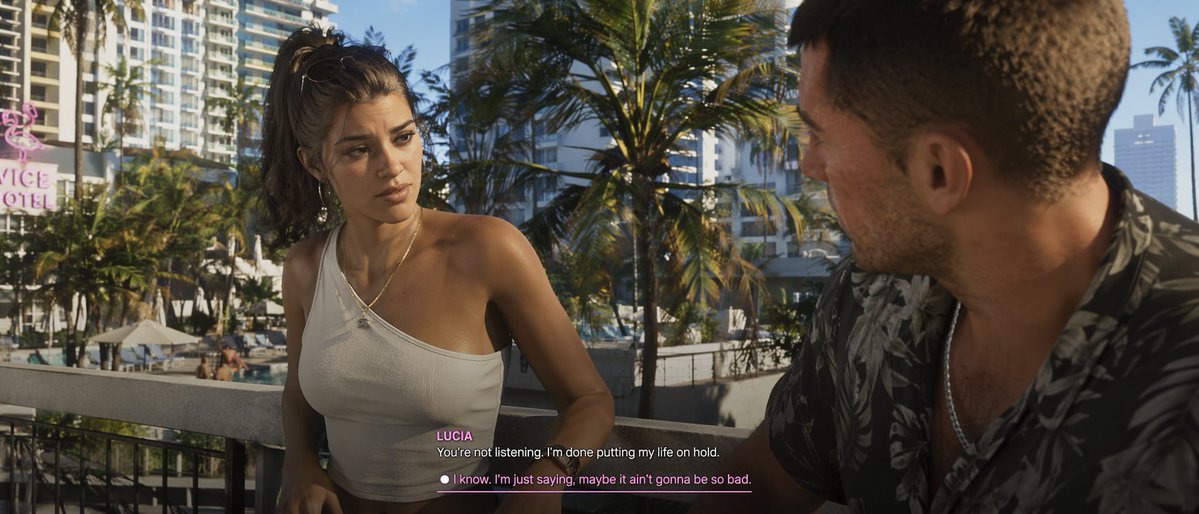
Cinematic Video Game Cutscene with Subtitles
Generates a photorealistic video game cutscene screenshot featuring two characters conversing with customizable subtitle UI.
This is a GPT Image 2 prompt case for Anime & Game. Use the copy-ready prompt below to generate similar visuals, and review Awesome GPT Image 2 Prompts attribution plus commercial-use rights before reuse.
Free 1K preview
Generate one preview image instantly, no sign-up required.
Prompt
Copy-ready prompt
A cinematic game cutscene screenshot featuring hyperrealistic 3D graphics in a modern open-world game style. Two characters are having a serious conversation on a {argument name="setting" default="photorealistic modern video game cutscene"}. On the left is a young Latina woman with long, messy brown hair in a high ponytail, wearing a white one-shoulder ribbed crop top, and hoop earrings and a delicate gold necklace, looking intently at the other person. On the right is a white man, shown from a shoulder-back side angle, with short brown hair, wearing a dark short-sleeved shirt with a tropical leaf pattern, and a silver necklace. In the background, palm trees, a swimming pool below, skyscrapers, and a pink neon sign reading "{argument name="location sign" default="VICE HOTEL"}" are visible. The lighting is bright and warm, evoking the effect of afternoon sunlight. A video game subtitle UI is located in the bottom center. The speaker's name "{argument name="female character name" default="LUCIA"}" is displayed in pink text above the white dialogue text: "{argument name="female dialogue" default="You're not listening. I'm done putting my life on hold."}". Below is a selectable dialogue option with white dots and a pink underline, reading: "{argument name="male dialogue choice" default="I know. I'm just saying, maybe it ain't gonna be so bad."}".Prompt variables
Editable argument placeholders found in the prompt, with their default values.
Best for
- - Anime & Game visual exploration
- - Image generation and reference-image edits
- - Reusable briefs that keep source attribution visible
Change these parts
- - Subject, product, character, or scene
- - Aspect ratio, camera, lighting, and background
- - Brand, text, color, and output constraints
Recommended model and settings
- - Model: gpt-image-2
- - Input mode: Text to Image
- - Aspect ratio: source
- - Commercial status: review original source
How to use this prompt
- 1. Copy the prompt and preserve its structure for the first test.
- 2. Replace the subject, context, and publishing channel.
- 3. Change one camera, lighting, or style variable per iteration.
- 4. Inspect the output, source, text, and rights before reuse.
Limitations, source, and reuse cautions
- - Generated output is an editable draft, not factual, legal, or rights evidence.
- - Review the linked source, people, brands, logos, text, and third-party media before commercial use.
More cases in this category
Prioritized by category, input mode compatibility, quality, and lower risk.
Reuse and source notes
Use this prompt safely after previewing the case.
- 1.Copy the prompt or open it directly in Dovoo with the generation button.
- 2.Adjust variables, aspect ratio, and reference images for your own use case.
- 3.Before publishing or paid usage, verify source rights, attribution requirements, and brand or likeness risks.
Can I use this prompt commercially?
Commercial-use status is allowed. Review the original source, license, brand constraints, and legal requirements before paid usage.
Where does this case come from?
This case is imported from Awesome GPT Image 2 Prompts; keep attribution visible and check the source URL before reuse.