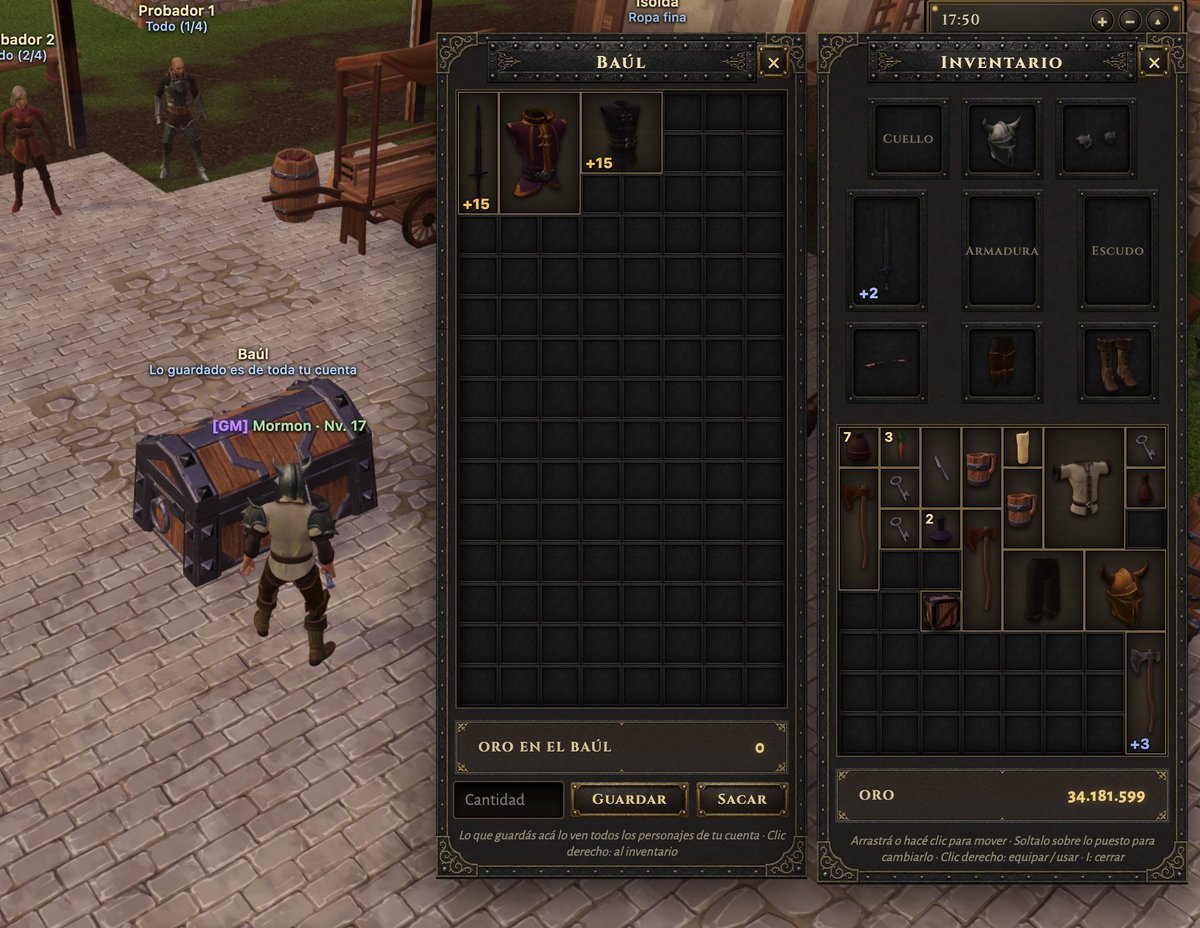
Medieval MMORPG Inventory UI Screenshot
A detailed mockup of a fantasy game's user interface showing a shared bank chest and character inventory screen with equipment slots and item grids.
This is a GPT Image 2 prompt case for Anime & Game. Use the copy-ready prompt below to generate similar visuals, and review Awesome GPT Image 2 Prompts attribution plus commercial-use rights before reuse.
Free 1K preview
Generate one preview image instantly, no sign-up required.
Prompt
Copy-ready prompt
Goal: Create a realistic screenshot of a medieval MMORPG inventory and storage interface, specifically featuring a chest (Baúl) and character equipment panel.
Canvas: Landscape orientation, high resolution, mimicking a game client window.
Layout: Split composition. The left third shows the 3D game world with a cobblestone street, a wooden cart, an NPC, and a player character standing next to a large open treasure chest. The right two-thirds are occupied by two vertical UI panels overlaying the scene.
Sections:
1. Left Panel (Storage): Header reads "BAÚL" in gold serif font on a dark metal background. Contains a grid of empty dark slots. Top row has three items: a sword (+15), a purple robe (+15), and black boots (+15). Bottom section displays "ORO EN EL BAÚL" with value 0, and buttons labeled "Cantidad", "GUARDAR", and "SACAR".
2. Right Panel (Inventory): Header reads "INVENTARIO". Top section is an equipment paper-doll layout with slots labeled "CUELLO", "ARMADURA", "ESCUDO" containing a helmet, breastplate, and shield icons. Below is a mixed grid of inventory items including potions, keys, axes, and armor pieces. Bottom section displays total "ORO" as 34.181.599.
Visual style: Dark fantasy aesthetic. UI frames have ornate gold filigree corners and riveted metal textures. Fonts are classic serif (Times New Roman style) in white and gold. Lighting is ambient daylight.
Text content: Preserve Spanish labels exactly as seen: "BAÚL", "INVENTARIO", "ORO EN EL BAÚL", "GUARDAR", "SACAR", "CANTIDAD", "CUELLO", "ARMADURA", "ESCUDO", "ORO".
Best for
- - Anime & Game visual exploration
- - Image generation and reference-image edits
- - Reusable briefs that keep source attribution visible
Change these parts
- - Subject, product, character, or scene
- - Aspect ratio, camera, lighting, and background
- - Brand, text, color, and output constraints
Recommended model and settings
- - Model: gpt-image-2
- - Input mode: Text to Image
- - Aspect ratio: source
- - Commercial status: review original source
How to use this prompt
- 1. Copy the prompt and preserve its structure for the first test.
- 2. Replace the subject, context, and publishing channel.
- 3. Change one camera, lighting, or style variable per iteration.
- 4. Inspect the output, source, text, and rights before reuse.
Limitations, source, and reuse cautions
- - Generated output is an editable draft, not factual, legal, or rights evidence.
- - Review the linked source, people, brands, logos, text, and third-party media before commercial use.
More cases in this category
Prioritized by category, input mode compatibility, quality, and lower risk.
Reuse and source notes
Use this prompt safely after previewing the case.
- 1.Copy the prompt or open it directly in Dovoo with the generation button.
- 2.Adjust variables, aspect ratio, and reference images for your own use case.
- 3.Before publishing or paid usage, verify source rights, attribution requirements, and brand or likeness risks.
Can I use this prompt commercially?
Commercial-use status is allowed. Review the original source, license, brand constraints, and legal requirements before paid usage.
Where does this case come from?
This case is imported from Awesome GPT Image 2 Prompts; keep attribution visible and check the source URL before reuse.