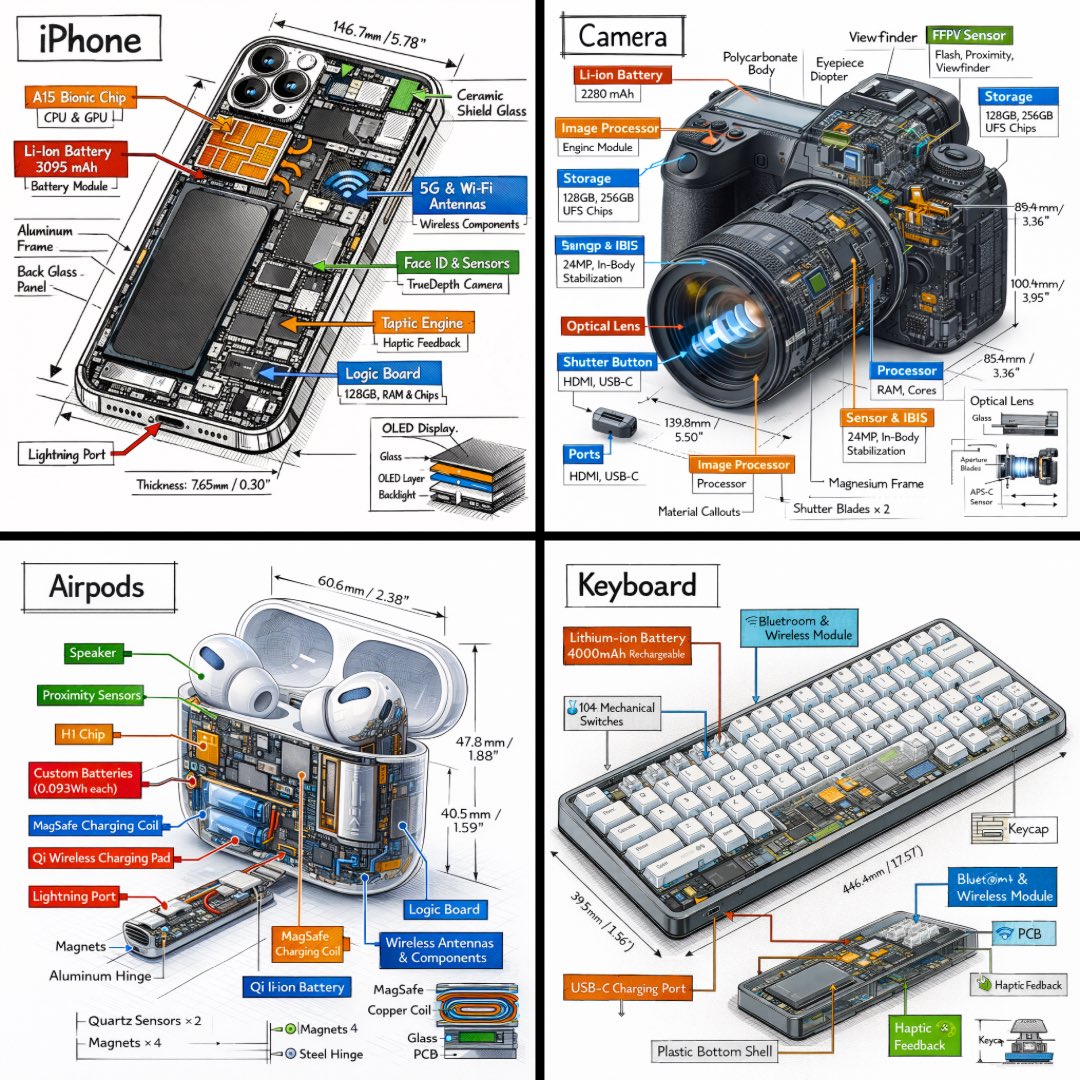
Technical Isometric Teardown Infographic
Generates professional engineering-style isometric infographics with hand-drawn annotations, color-coded callouts, and technical diagrams of any object.
This is a GPT Image 2 prompt case for Graphic & Poster. Use the copy-ready prompt below to generate similar visuals, and review Awesome GPT Image 2 Prompts attribution plus commercial-use rights before reuse.
Free 1K preview
Generate one preview image instantly, no sign-up required.
Prompt
Copy-ready prompt
Generate a technical infographic of {argument name="object" default="OBJECT"} rendered from a {argument name="viewpoint" default="45-degree isometric 3D viewpoint"}, with the object slightly tilted to expose depth and three-dimensional structure.

Blend a photorealistic render of the object with hand-drawn black ink technical annotations on a clean pure-white background. Include:
- Color-coded callout boxes labeling each key component
- Transparent / cutaway sections that reveal internal parts
- Precise measurements, dimensions, and scale markers
- Material descriptions and quantity counts
- Color-coded directional arrows for function and flow: RED for power/battery, BLUE for data/connectivity, ORANGE for thermal/processor, GREEN for sensors/haptics
- Simple schematics or cross-section diagrams where useful

Place the "{argument name="object" default="OBJECT"}" title inside a hand-sketched technical frame in the top-left corner.
Style: black architectural-pen linework, sketchy yet precise; the object remains fully visible; vibe of a professional engineering teardown or museum exhibit. Clean layout with balanced negative space.
Perspective: 45-degree isometric tilt that dramatically reveals depth, dimension, and internal architecture, like a product engineering manual.
Color usage: roughly 10-15% accent density, black dominant, white background.
Output: 1080x1080, ultra-crisp, optimized for social feeds.
Prompt variables
Editable argument placeholders found in the prompt, with their default values.
Best for
- - Graphic & Poster visual exploration
- - Image generation and reference-image edits
- - Reusable briefs that keep source attribution visible
Change these parts
- - Subject, product, character, or scene
- - Aspect ratio, camera, lighting, and background
- - Brand, text, color, and output constraints
Recommended model and settings
- - Model: gpt-image-2
- - Input mode: Text to Image
- - Aspect ratio: source
- - Commercial status: review original source
How to use this prompt
- 1. Copy the prompt and preserve its structure for the first test.
- 2. Replace the subject, context, and publishing channel.
- 3. Change one camera, lighting, or style variable per iteration.
- 4. Inspect the output, source, text, and rights before reuse.
Limitations, source, and reuse cautions
- - Generated output is an editable draft, not factual, legal, or rights evidence.
- - Review the linked source, people, brands, logos, text, and third-party media before commercial use.
More cases in this category
Prioritized by category, input mode compatibility, quality, and lower risk.
Reuse and source notes
Use this prompt safely after previewing the case.
- 1.Copy the prompt or open it directly in Dovoo with the generation button.
- 2.Adjust variables, aspect ratio, and reference images for your own use case.
- 3.Before publishing or paid usage, verify source rights, attribution requirements, and brand or likeness risks.
Can I use this prompt commercially?
Commercial-use status is allowed. Review the original source, license, brand constraints, and legal requirements before paid usage.
Where does this case come from?
This case is imported from Awesome GPT Image 2 Prompts; keep attribution visible and check the source URL before reuse.