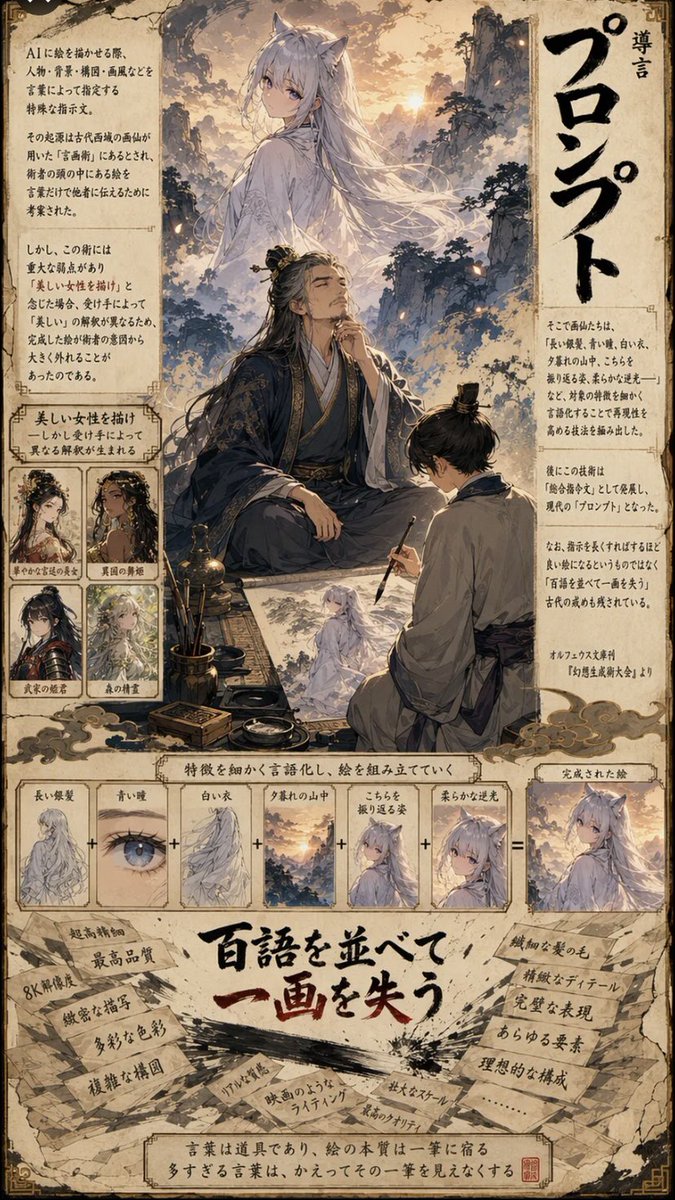
Manga Infographic: AI Prompt Engineering
A stylized manga page illustrating the concept of prompt engineering for AI image generation, featuring a kitsune character and a breakdown of visual elements.
This is a GPT Image 2 prompt case for Graphic & Poster. Use the copy-ready prompt below to generate similar visuals, and review Awesome GPT Image 2 Prompts attribution plus commercial-use rights before reuse.
Free 1K preview
Generate one preview image instantly, no sign-up required.
Prompt
Copy-ready prompt
A vertical, highly detailed manga-style infographic page with a parchment-like background. The layout is divided into three main sections: a top illustration area, a middle diagrammatic breakdown, and a bottom text-heavy conclusion.

Top Section:
- A large, ethereal illustration of a woman with long white hair and fox ears (a kitsune) standing on a mountain peak at sunset. She wears flowing white robes.
- Below her, an elderly man with long black hair tied back, wearing dark blue traditional Chinese robes, sits cross-legged holding a calligraphy brush, looking up thoughtfully.
- To his right, a younger man in grey robes kneels, sketching the kitsune onto paper.
- Surrounding this scene are blocks of Japanese text explaining the concept of 'Prompt' (プロンプト).
- On the left side, there are four small square character portraits labeled with descriptions like 'Beautiful Woman', 'Dancer', etc., showing variations of female characters.
- Large vertical Japanese text on the right reads 'Introduction to Prompts'.

Middle Section:
- A horizontal flow diagram titled 'Verbalizing features to compose a picture'.
- It shows a sequence of six small square images connected by plus signs (+), leading to an equals sign (=) and a final result image.
- The sequence includes: 1. Long silver hair, 2. Blue eyes, 3. White clothes, 4. Mountain sunset, 5. Looking back pose, 6. Soft backlighting.
- The final result is the complete image of the kitsune from the top section.

Bottom Section:
- A large, bold Japanese headline in red and black ink style: "Listing hundreds of words loses one stroke" (百語を並べて一画を失う).
- Surrounding the headline are torn pieces of paper with handwritten notes listing negative effects of over-prompting, such as '8K resolution', 'ultra-high quality', 'complex composition', 'unnatural lighting', 'film-like lighting', 'large scale', 'highest quality'.
- At the very bottom, a concluding sentence in a box states that words are tools, but too many obscure the essence of the single stroke.
Best for
- - Graphic & Poster visual exploration
- - Image generation and reference-image edits
- - Reusable briefs that keep source attribution visible
Change these parts
- - Subject, product, character, or scene
- - Aspect ratio, camera, lighting, and background
- - Brand, text, color, and output constraints
Recommended model and settings
- - Model: gpt-image-2
- - Input mode: Text to Image
- - Aspect ratio: source
- - Commercial status: review original source
How to use this prompt
- 1. Copy the prompt and preserve its structure for the first test.
- 2. Replace the subject, context, and publishing channel.
- 3. Change one camera, lighting, or style variable per iteration.
- 4. Inspect the output, source, text, and rights before reuse.
Limitations, source, and reuse cautions
- - Generated output is an editable draft, not factual, legal, or rights evidence.
- - Review the linked source, people, brands, logos, text, and third-party media before commercial use.
More cases in this category
Prioritized by category, input mode compatibility, quality, and lower risk.
Reuse and source notes
Use this prompt safely after previewing the case.
- 1.Copy the prompt or open it directly in Dovoo with the generation button.
- 2.Adjust variables, aspect ratio, and reference images for your own use case.
- 3.Before publishing or paid usage, verify source rights, attribution requirements, and brand or likeness risks.
Can I use this prompt commercially?
Commercial-use status is allowed. Review the original source, license, brand constraints, and legal requirements before paid usage.
Where does this case come from?
This case is imported from Awesome GPT Image 2 Prompts; keep attribution visible and check the source URL before reuse.