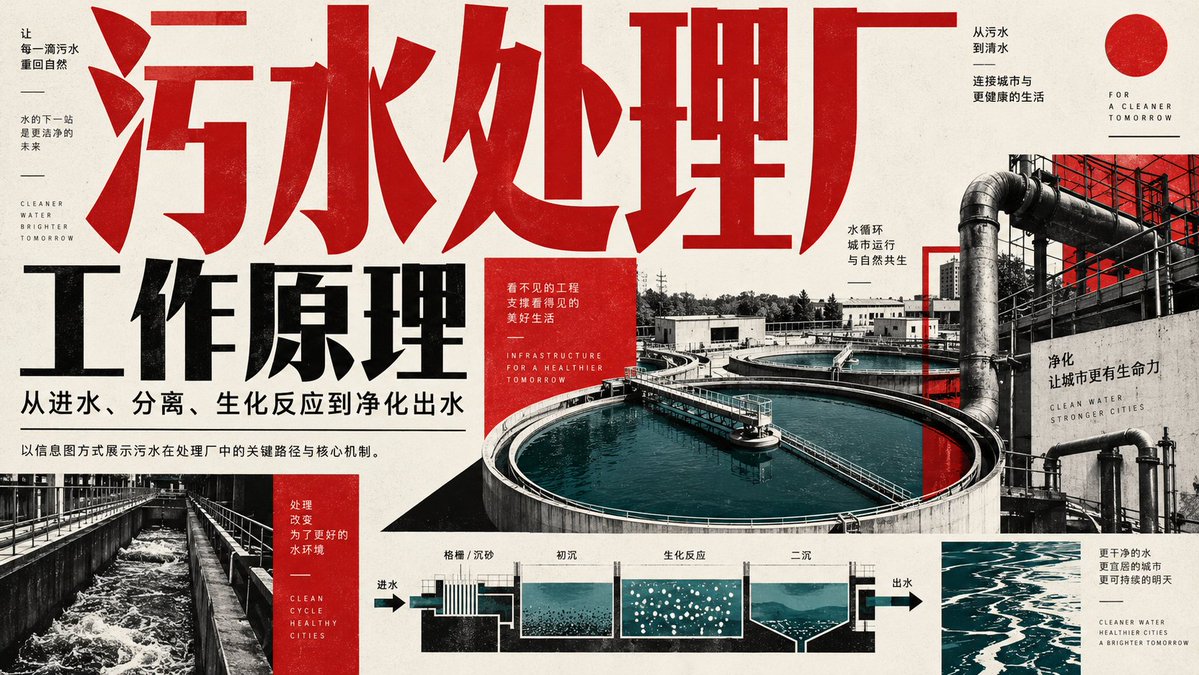
Wastewater Treatment Plant Infographic
A detailed industrial-style infographic poster illustrating the workflow and principles of a wastewater treatment plant, featuring process diagrams and bold typography.
This is a GPT Image 2 prompt case for Graphic & Poster. Use the copy-ready prompt below to generate similar visuals, and review Awesome GPT Image 2 Prompts attribution plus commercial-use rights before reuse.
Free 1K preview
Generate one preview image instantly, no sign-up required.
Prompt
Copy-ready prompt
Create a horizontal infographic poster explaining how a wastewater treatment plant works. The design style should be industrial, modern, and high contrast, using a dark red, black, white, and teal/blue color scheme for water elements.

**Layout and Text Elements:**
1.  **Top Left/Center (Title):** A large, bold, distressed red Chinese character spanning the top “污水处理厂” (Wastewater Treatment Plant). Below that, large bold black text “工作原理” (Working Principle). Below that, smaller black text: “从进水、分离、生化反应到净化出水” (From inflow, separation, biochemical reaction to purified water discharge).
2.  **Left Sidebar:** Vertically arranged, containing small text blocks. Top text block: “让每一滴污水重回自然” (Let every drop of wastewater return to nature), “水的下一站是更洁净的未来” (The next stop for water is a cleaner future), English text “CLEANER WATER BRIGHTER TOMORROW”. Bottom text block (red background): “处理改变为了更好的水环境” (Treatment changes for a better water environment), English text “CLEAN CYCLE HEALTHY CITIES”.
3.  **Right Side (Background Image):** A large photographic collage showing a bird's-eye view of circular clarification pools filled with turquoise water, connected by pipes and walkways. Overlaid text on the right: “从污水到清水” (From wastewater to clean water), “连接城市与更健康的生活” (Connecting cities to healthier lives), “FOR A CLEANER TOMORROW”, “水循环 城市运行 与自然共生” (Water cycle, city operation, and coexistence with nature), “净化 让城市更有生命力” (Purification makes the city more vibrant), “CLEAN WATER STRONGER CITIES”.
4.  **Bottom Center (Flowchart):** A schematic cross-section showing the process of water flowing through different stages. Arrows indicate direction from left to right. Labels above each section: “格栅 / 沉砂” (Grit Chamber / Sand Trap), “初沉” (Primary Sedimentation), “生化反应” (Biochemical Reaction) (depicted with bubbles), “二沉” (Secondary Sedimentation). Labels at both ends: “进水” (Inflow) on the left, “出水” (Outflow) on the right.
5.  **Bottom Right:** Small text block: “更干净的水 更宜居的城市 更可持续的明天” (Cleaner water, more livable cities, a more sustainable tomorrow), English text “CLEANER WATER HEALTHIER CITIES A BRIGHTER TOMORROW”.
6.  **Center Red Box:** A small red box with white text: “看不见的工程 支撑看得见的美好生活” (Invisible engineering supports the visible good life), English text “INFRASTRUCTURE FOR A HEALTHIER TOMORROW”.

**Visual Style Details:**
*   Use a grain texture overlay on the entire image to create a printed paper feel.
*   Chinese font typography should use a bold sans-serif font.
*   Water in photos and charts should be presented in a unique teal/turquoise/blue-green color against gray/red/black backgrounds.
Best for
- - Graphic & Poster visual exploration
- - Image generation and reference-image edits
- - Reusable briefs that keep source attribution visible
Change these parts
- - Subject, product, character, or scene
- - Aspect ratio, camera, lighting, and background
- - Brand, text, color, and output constraints
Recommended model and settings
- - Model: gpt-image-2
- - Input mode: Text to Image
- - Aspect ratio: source
- - Commercial status: review original source
How to use this prompt
- 1. Copy the prompt and preserve its structure for the first test.
- 2. Replace the subject, context, and publishing channel.
- 3. Change one camera, lighting, or style variable per iteration.
- 4. Inspect the output, source, text, and rights before reuse.
Limitations, source, and reuse cautions
- - Generated output is an editable draft, not factual, legal, or rights evidence.
- - Review the linked source, people, brands, logos, text, and third-party media before commercial use.
More cases in this category
Prioritized by category, input mode compatibility, quality, and lower risk.

Reuse and source notes
Use this prompt safely after previewing the case.
- 1.Copy the prompt or open it directly in Dovoo with the generation button.
- 2.Adjust variables, aspect ratio, and reference images for your own use case.
- 3.Before publishing or paid usage, verify source rights, attribution requirements, and brand or likeness risks.
Can I use this prompt commercially?
Commercial-use status is allowed. Review the original source, license, brand constraints, and legal requirements before paid usage.
Where does this case come from?
This case is imported from Awesome GPT Image 2 Prompts; keep attribution visible and check the source URL before reuse.