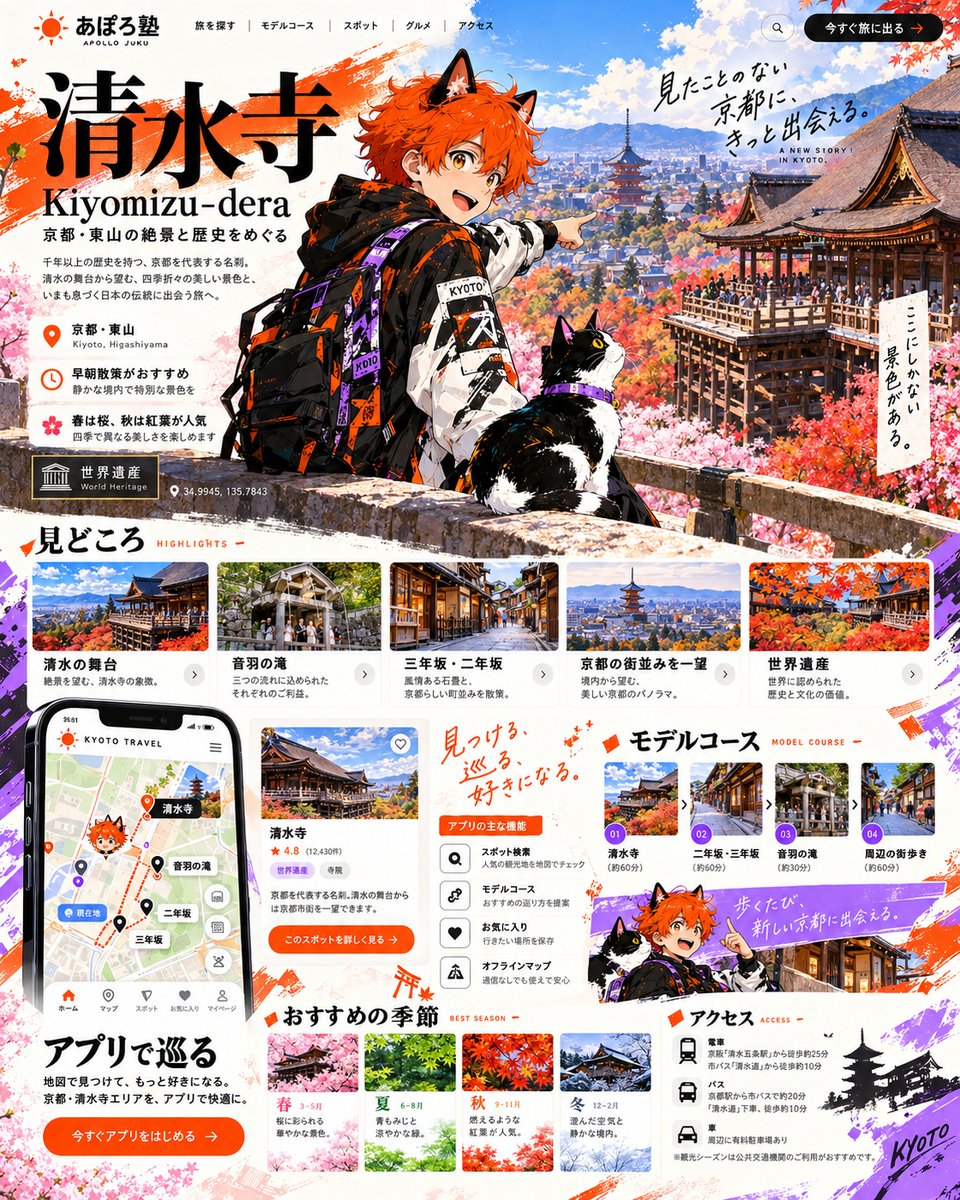
Kiyomizu-dera Travel LP with Anime Mascot
A detailed vertical infographic-style landing page for Kiyomizu-dera tourism, combining an anime character guide with real scenic photos, app UI mockups, and structured travel information.
This is a GPT Image 2 prompt case for Graphic & Poster. Use the copy-ready prompt below to generate similar visuals, and review Awesome GPT Image 2 Prompts attribution plus commercial-use rights before reuse.
Free 1K preview
Generate one preview image instantly, no sign-up required.
Prompt
Copy-ready prompt
Goal: Create a comprehensive, high-density vertical travel landing page (LP) for Kiyomizu-dera in Kyoto.
Canvas: Vertical aspect ratio (approx. 4:5), featuring a vibrant mix of anime illustration and realistic photography with a clean white background accented by orange and purple brushstrokes.
Layout:
1. Header: Top navigation bar with logo 'あぽろ塾 APOLLO JUKU' on the left, menu items (Search, Model Course, Spot, Gourmet, Access) in center, and an orange CTA button '今すぐ旅に出る' on right.
2. Hero Section: Large title '清水寺 Kiyomizu-dera' in bold black serif font. Subtitle '京都・東山の絶景と歴史をめぐる'. A central anime character (orange hair, cat ears, streetwear jacket with 'KYOTO' text) pointing right, accompanied by a tuxedo cat. Background shows a panoramic view of Kyoto with autumn foliage and pagodas. Floating handwritten text: '見たことのない京都に、きっと出会える。' and 'ここにしかない景色がある。'. Location info block: '京都・東山', '早朝散策がおすすめ', '春は桜、秋は紅葉が人気'. World Heritage badge and coordinates '34.9945, 135.7843'.
3. Highlights Section ('見どころ'): Horizontal scrollable cards showing photos of '清水の舞台', '音羽の滝', '三年坂・二年坂', '京都の街並みを一望', '世界遺産'. Each card has a photo, title, and short description.
4. App & Features Section: Left side features a smartphone mockup displaying a map app interface with pins for Kiyomizu-dera, Otowa Waterfall, etc. Center column lists 'アプリの主な機能' (App Main Features) with icons: Spot Search, Model Course, Favorites, Offline Map. Right side is 'モデルコース' (Model Course) with numbered steps 01-04 showing route thumbnails.
5. Seasonal Recommendations ('おすすめの季節'): Four distinct seasonal blocks (Spring, Summer, Autumn, Winter) with corresponding landscape photos and brief text descriptions.
6. Access Section ('アクセス'): Bottom right area listing transport options (Train, Bus, Car) with specific station names and walking times. Includes a small silhouette of a pagoda and 'Kyoto' script.
Visual style: Modern Japanese web design aesthetic. High contrast between the colorful anime mascot and the serene real-world photography. Use of orange (#FF5722 approx) and purple accents. Clean sans-serif typography for body text, elegant serif for headings.
Text content: Preserve all Japanese text exactly as shown in the image, including section headers like '見どころ', 'モデルコース', 'アクセス', and the specific location names.
Best for
- - Graphic & Poster visual exploration
- - Image generation and reference-image edits
- - Reusable briefs that keep source attribution visible
Change these parts
- - Subject, product, character, or scene
- - Aspect ratio, camera, lighting, and background
- - Brand, text, color, and output constraints
Recommended model and settings
- - Model: gpt-image-2
- - Input mode: Text to Image
- - Aspect ratio: source
- - Commercial status: review original source
How to use this prompt
- 1. Copy the prompt and preserve its structure for the first test.
- 2. Replace the subject, context, and publishing channel.
- 3. Change one camera, lighting, or style variable per iteration.
- 4. Inspect the output, source, text, and rights before reuse.
Limitations, source, and reuse cautions
- - Generated output is an editable draft, not factual, legal, or rights evidence.
- - Review the linked source, people, brands, logos, text, and third-party media before commercial use.
More cases in this category
Prioritized by category, input mode compatibility, quality, and lower risk.




Reuse and source notes
Use this prompt safely after previewing the case.
- 1.Copy the prompt or open it directly in Dovoo with the generation button.
- 2.Adjust variables, aspect ratio, and reference images for your own use case.
- 3.Before publishing or paid usage, verify source rights, attribution requirements, and brand or likeness risks.
Can I use this prompt commercially?
Commercial-use status is allowed. Review the original source, license, brand constraints, and legal requirements before paid usage.
Where does this case come from?
This case is imported from Awesome GPT Image 2 Prompts; keep attribution visible and check the source URL before reuse.