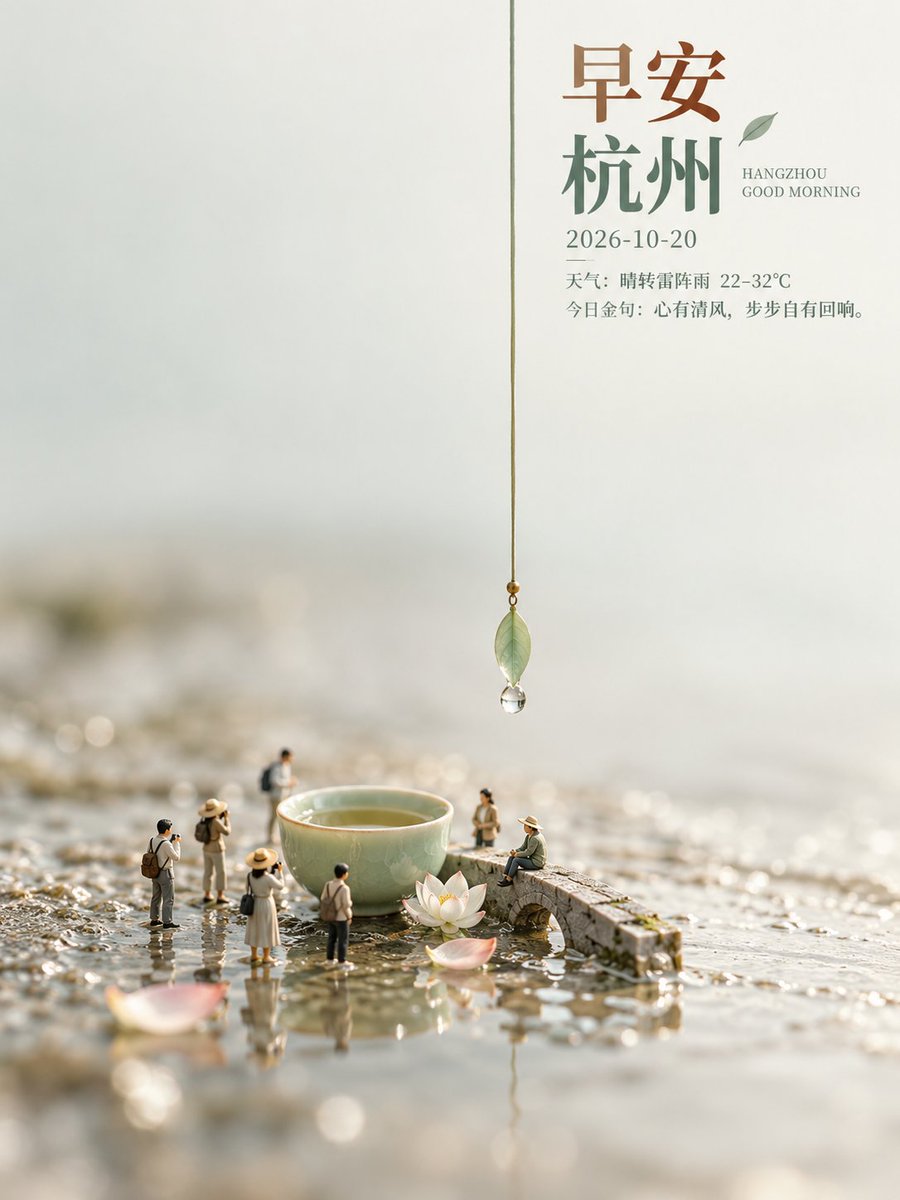
Hangzhou Good Morning Miniature Tea Scene
A vertical poster design featuring a miniature diorama of tiny people around a tea bowl and stone bridge, overlaid with Hangzhou morning greetings and weather information.
This is a GPT Image 2 prompt case for Graphic & Poster. Use the copy-ready prompt below to generate similar visuals, and review Awesome GPT Image 2 Prompts attribution plus commercial-use rights before reuse.
Free 1K preview
Generate one preview image instantly, no sign-up required.
Prompt
Copy-ready prompt
Create a serene and elegant high-definition vertical poster. The main subject of the image is a miniature landscape scene placed on a wet, reflective stone surface. The focal point is a celadon teacup filled with tea, next to which stands a small stone arch bridge covered in moss. A pure white lotus flower rests quietly at the bottom of the teacup. Around it are scattered about 6 miniature figures: some are standing and taking photos, one is sitting on the bridge, and the rest are strolling. A thin thread hangs from the top center of the image, suspending a semi-transparent green leaf pendant with a water droplet at its tip, positioned directly above the teacup. The background uses a soft blur to present a hazy color scheme of light gray and beige. The upper right corner overlays elegant Chinese and English typography: large brown serif font “早安” (zao an - good morning), dark green serif font “杭州” (Hangzhou), followed by “HANGZHOU GOOD MORNING”, the date “2026-10-20”, weather information “Weather: Sunny to Thunderstorms 22-32°C”, and a poetic quote “今日金句:心有清风,步步自有回响。” (Today's quote: If you have a clear breeze in your heart, every step will have an echo.). The overall style uses macro photography to create a shallow depth of field.
Best for
- - Graphic & Poster visual exploration
- - Image generation and reference-image edits
- - Reusable briefs that keep source attribution visible
Change these parts
- - Subject, product, character, or scene
- - Aspect ratio, camera, lighting, and background
- - Brand, text, color, and output constraints
Recommended model and settings
- - Model: gpt-image-2
- - Input mode: Text to Image
- - Aspect ratio: source
- - Commercial status: review original source
How to use this prompt
- 1. Copy the prompt and preserve its structure for the first test.
- 2. Replace the subject, context, and publishing channel.
- 3. Change one camera, lighting, or style variable per iteration.
- 4. Inspect the output, source, text, and rights before reuse.
Limitations, source, and reuse cautions
- - Generated output is an editable draft, not factual, legal, or rights evidence.
- - Review the linked source, people, brands, logos, text, and third-party media before commercial use.
More cases in this category
Prioritized by category, input mode compatibility, quality, and lower risk.



Reuse and source notes
Use this prompt safely after previewing the case.
- 1.Copy the prompt or open it directly in Dovoo with the generation button.
- 2.Adjust variables, aspect ratio, and reference images for your own use case.
- 3.Before publishing or paid usage, verify source rights, attribution requirements, and brand or likeness risks.
Can I use this prompt commercially?
Commercial-use status is allowed. Review the original source, license, brand constraints, and legal requirements before paid usage.
Where does this case come from?
This case is imported from Awesome GPT Image 2 Prompts; keep attribution visible and check the source URL before reuse.