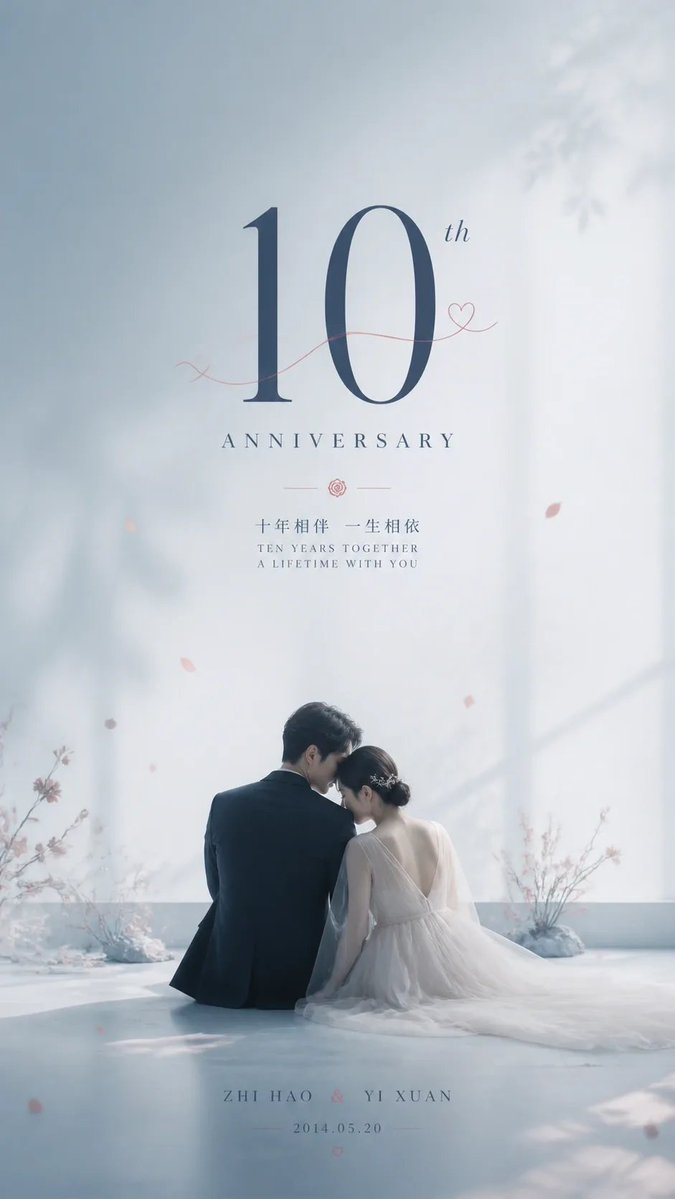
Ethereal Blue Wedding Anniversary Poster
A romantic, minimalist wedding anniversary poster design featuring a couple seen from behind against a misty blue background with elegant typography.
This is a GPT Image 2 prompt case for Graphic & Poster. Use the copy-ready prompt below to generate similar visuals, and review Awesome GPT Image 2 Prompts attribution plus commercial-use rights before reuse.
Free 1K preview
Generate one preview image instantly, no sign-up required.
Prompt
Copy-ready prompt
Create a vertical, high-resolution wedding anniversary poster with an ethereal and minimalist aesthetic. The background is a soft, misty light blue gradient featuring delicate shadows of tree branches on the left side. In the upper center, place large, elegant serif text reading "10th" in dark navy blue, with a thin red line drawing a heart shape next to it. Below this, write "ANNIVERSARY" in spaced-out capital letters. Further down, include two lines of smaller text: Chinese characters "十年相伴 一生相依" followed by English text "TEN YEARS TOGETHER A LIFETIME WITH YOU", separated by a small rose icon. At the bottom center, display the names "ZHI HAO & YI XUAN" and the date "2014.05.20" in a small, clean font. The main subject is a couple sitting on a smooth, reflective white floor, viewed from behind. The man wears a dark suit and has short black hair; the woman wears a backless white tulle wedding dress with her hair up in a bun adorned with flowers. They are leaning their heads together affectionately. Surround them with sparse, floating pink flower petals and blurred floral arrangements on the floor.
Best for
- - Graphic & Poster visual exploration
- - Image generation and reference-image edits
- - Reusable briefs that keep source attribution visible
Change these parts
- - Subject, product, character, or scene
- - Aspect ratio, camera, lighting, and background
- - Brand, text, color, and output constraints
Recommended model and settings
- - Model: gpt-image-2
- - Input mode: Text to Image
- - Aspect ratio: source
- - Commercial status: review original source
How to use this prompt
- 1. Copy the prompt and preserve its structure for the first test.
- 2. Replace the subject, context, and publishing channel.
- 3. Change one camera, lighting, or style variable per iteration.
- 4. Inspect the output, source, text, and rights before reuse.
Limitations, source, and reuse cautions
- - Generated output is an editable draft, not factual, legal, or rights evidence.
- - Review the linked source, people, brands, logos, text, and third-party media before commercial use.
More cases in this category
Prioritized by category, input mode compatibility, quality, and lower risk.



Reuse and source notes
Use this prompt safely after previewing the case.
- 1.Copy the prompt or open it directly in Dovoo with the generation button.
- 2.Adjust variables, aspect ratio, and reference images for your own use case.
- 3.Before publishing or paid usage, verify source rights, attribution requirements, and brand or likeness risks.
Can I use this prompt commercially?
Commercial-use status is allowed. Review the original source, license, brand constraints, and legal requirements before paid usage.
Where does this case come from?
This case is imported from Awesome GPT Image 2 Prompts; keep attribution visible and check the source URL before reuse.