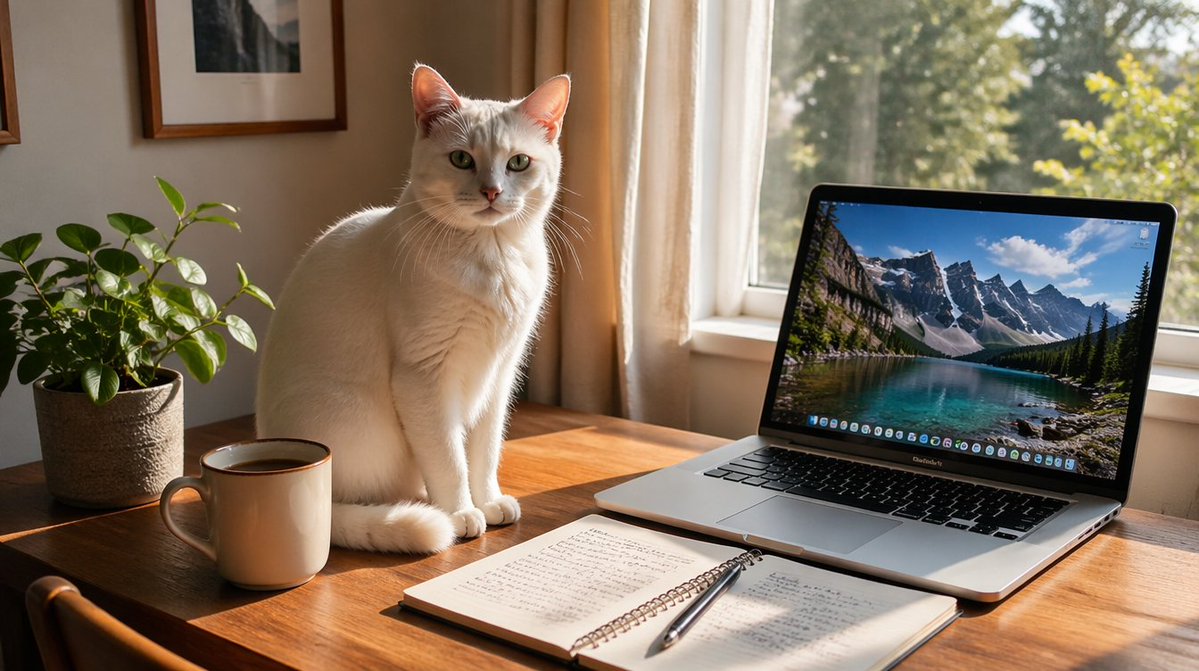
Sunlit Desk with White Cat and Laptop
This prompt generates a cozy realistic lifestyle photo of a white cat on a sunlit desk beside a laptop, coffee, notebook, and houseplant, ideal for home office or calm productivity visuals.
This is a GPT Image 2 prompt case for Interior & Architecture. Use the copy-ready prompt below to generate similar visuals, and review Awesome GPT Image 2 Prompts attribution plus commercial-use rights before reuse.
Free 1K preview
Generate one preview image instantly, no sign-up required.
Prompt
Copy-ready prompt
A cozy sunlit home office scene photographed in a realistic lifestyle style. A white short-haired cat with pale green eyes sits upright on a warm wooden desk near the center-left, facing the camera with a calm attentive expression, its tail curled around its front paws. To the left of the cat is 1 leafy potted houseplant in a textured beige pot and 1 ceramic mug filled with dark coffee. In front of the cat lies 1 open spiral notebook with handwritten notes and 1 silver pen resting diagonally across the pages. On the right side of the desk is 1 open laptop angled slightly toward the viewer, showing a vivid wallpaper of a turquoise lake and dramatic snow-capped mountain peaks under a blue sky. Behind the desk is a large window with soft cream curtains, bright golden morning sunlight streaming in from the right and casting natural shadows across the desk. Include 2 framed wall pictures partially visible on the left wall. The atmosphere should feel peaceful, productive, and warmly domestic, with soft cinematic lighting, crisp details, shallow depth of field, and high-end editorial photography realism.
Best for
- - Interior & Architecture visual exploration
- - Image generation and reference-image edits
- - Reusable briefs that keep source attribution visible
Change these parts
- - Subject, product, character, or scene
- - Aspect ratio, camera, lighting, and background
- - Brand, text, color, and output constraints
Recommended model and settings
- - Model: gpt-image-2
- - Input mode: Text to Image
- - Aspect ratio: source
- - Commercial status: review original source
How to use this prompt
- 1. Copy the prompt and preserve its structure for the first test.
- 2. Replace the subject, context, and publishing channel.
- 3. Change one camera, lighting, or style variable per iteration.
- 4. Inspect the output, source, text, and rights before reuse.
Limitations, source, and reuse cautions
- - Generated output is an editable draft, not factual, legal, or rights evidence.
- - Review the linked source, people, brands, logos, text, and third-party media before commercial use.
More cases in this category
Prioritized by category, input mode compatibility, quality, and lower risk.
Reuse and source notes
Use this prompt safely after previewing the case.
- 1.Copy the prompt or open it directly in Dovoo with the generation button.
- 2.Adjust variables, aspect ratio, and reference images for your own use case.
- 3.Before publishing or paid usage, verify source rights, attribution requirements, and brand or likeness risks.
Can I use this prompt commercially?
Commercial-use status is allowed. Review the original source, license, brand constraints, and legal requirements before paid usage.
Where does this case come from?
This case is imported from Awesome GPT Image 2 Prompts; keep attribution visible and check the source URL before reuse.