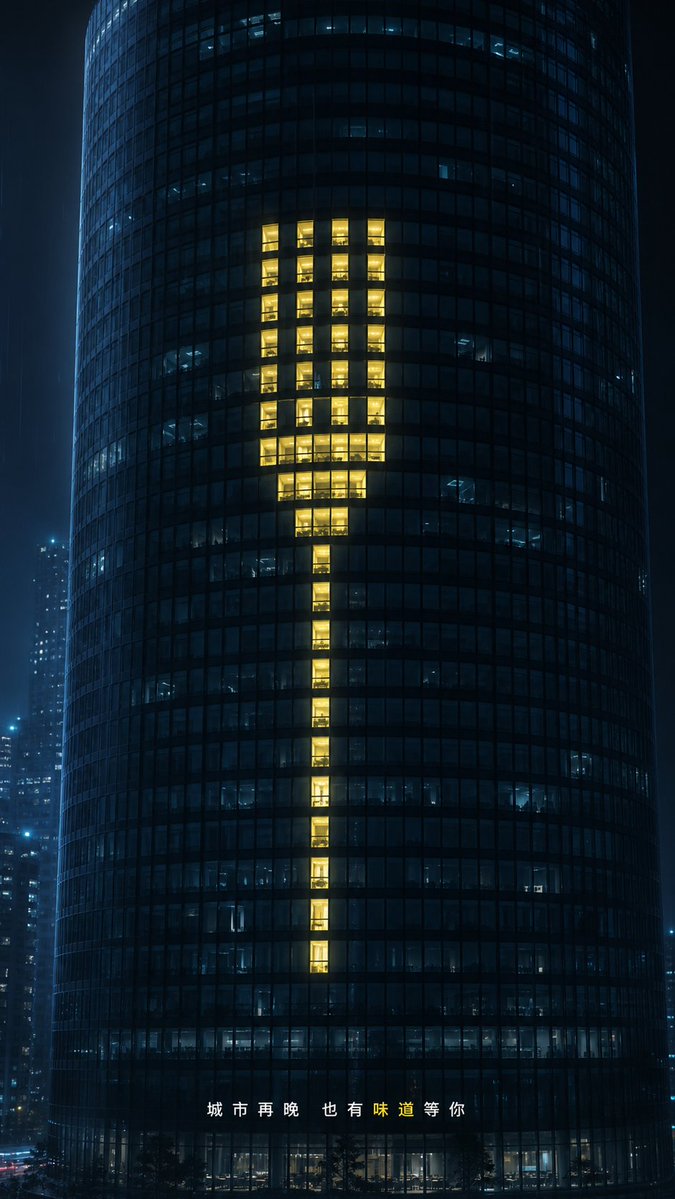
Glowing Exclamation Skyscraper
A cinematic night city ad visual where lit office windows form a warm exclamation mark on a dark glass tower.
This is a GPT Image 2 prompt case for Interior & Architecture. Use the copy-ready prompt below to generate similar visuals, and review Awesome GPT Image 2 Prompts attribution plus commercial-use rights before reuse.
Free 1K preview
Generate one preview image instantly, no sign-up required.
Prompt
Copy-ready prompt
Create a cinematic nighttime commercial visual, with the background being a dark cylindrical glass office skyscraper located in a blue-black city in the rain. The tower fills the vertical frame, shot from the front with a slight telephoto compression, its curved facade composed of dense square small windows. Most windows are closed or dimly lit in a cold blue hue, with glimpses of the interior office scenes. In the center of the tower, create 60 warm golden yellow glowing windows arranged in the shape of a giant minimalist fork: with 4 slender parallel tines at the top, a compact wider neck below, and a narrow elongated handle extending downwards. The glowing windows should present a realistic sense of people working inside, rather than a flat graphic overlay, requiring warm interior lighting, reflections, and subtle highlights and shadows. Add out-of-focus distant skyscrapers on either side to create a slight rainy mist, a moist city atmosphere, and a restrained luxury advertising aesthetic. At the bottom center, place spaced Chinese text {argument name="bottom caption" default="The city, no matter how late, always has a flavor waiting for you."}, with the character “味” highlighted in warm yellow and the rest of the text in white. Use {argument name="building type" default="9:16"}, {argument name="window symbol" default="Fork"}, {argument name="accent light color" default="Warm golden yellow"}, and {argument name="city mood" default="Quiet rainy night at midnight"}. 9:16 vertical composition, photorealistic, high contrast, elegant, minimalist, no Logo, no extra text, no one in the foreground.Prompt variables
Editable argument placeholders found in the prompt, with their default values.
Best for
- - Interior & Architecture visual exploration
- - Image generation and reference-image edits
- - Reusable briefs that keep source attribution visible
Change these parts
- - Subject, product, character, or scene
- - Aspect ratio, camera, lighting, and background
- - Brand, text, color, and output constraints
Recommended model and settings
- - Model: gpt-image-2
- - Input mode: Text to Image
- - Aspect ratio: source
- - Commercial status: review original source
How to use this prompt
- 1. Copy the prompt and preserve its structure for the first test.
- 2. Replace the subject, context, and publishing channel.
- 3. Change one camera, lighting, or style variable per iteration.
- 4. Inspect the output, source, text, and rights before reuse.
Limitations, source, and reuse cautions
- - Generated output is an editable draft, not factual, legal, or rights evidence.
- - Review the linked source, people, brands, logos, text, and third-party media before commercial use.
More cases in this category
Prioritized by category, input mode compatibility, quality, and lower risk.
Reuse and source notes
Use this prompt safely after previewing the case.
- 1.Copy the prompt or open it directly in Dovoo with the generation button.
- 2.Adjust variables, aspect ratio, and reference images for your own use case.
- 3.Before publishing or paid usage, verify source rights, attribution requirements, and brand or likeness risks.
Can I use this prompt commercially?
Commercial-use status is allowed. Review the original source, license, brand constraints, and legal requirements before paid usage.
Where does this case come from?
This case is imported from Awesome GPT Image 2 Prompts; keep attribution visible and check the source URL before reuse.