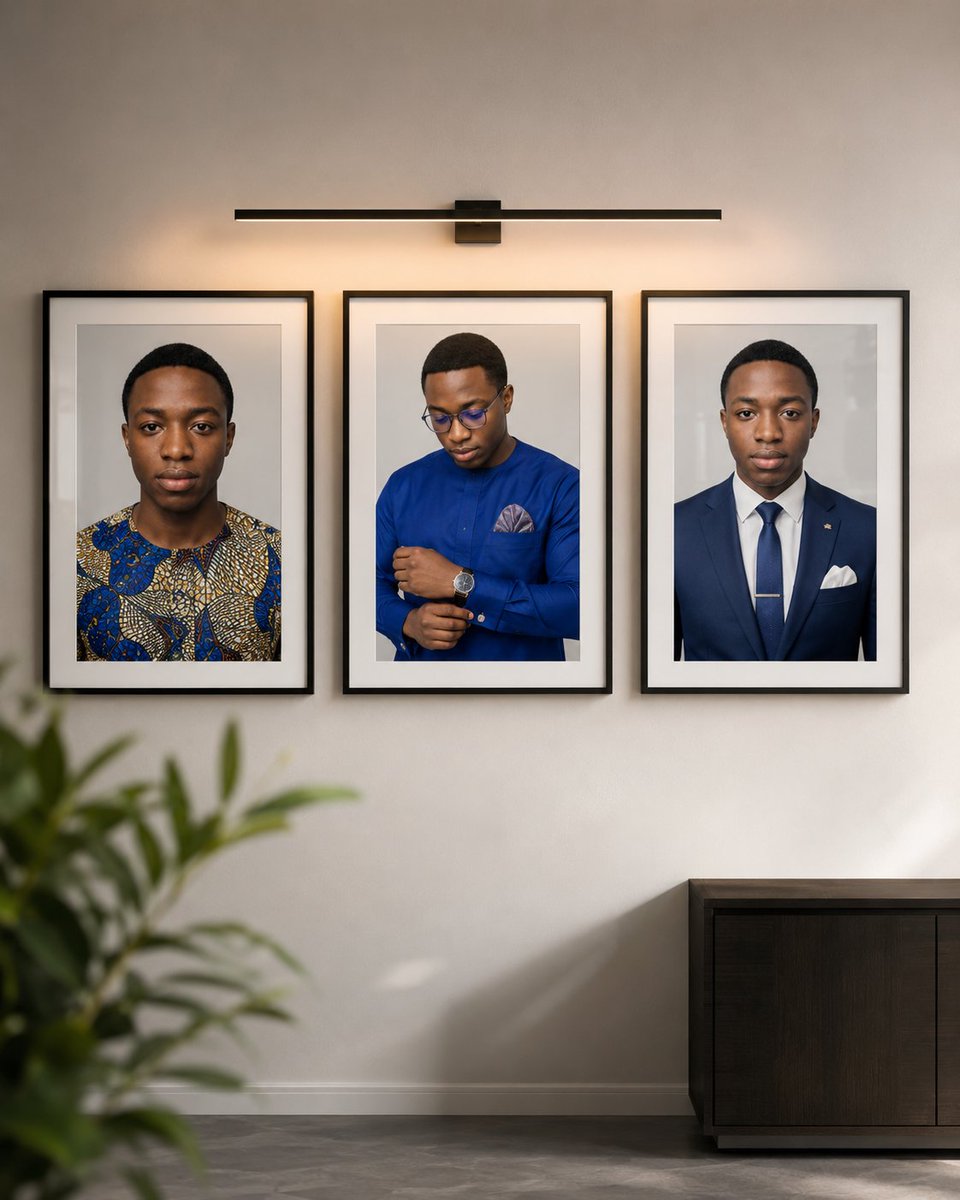
Luxury Three-Portrait Gallery Wall
Generates a realistic upscale interior mockup with three framed portrait photos on a softly lit gallery wall.
This is a GPT Image 2 prompt case for Interior & Architecture. Use the copy-ready prompt below to generate similar visuals, and review Awesome GPT Image 2 Prompts attribution plus commercial-use rights before reuse.
Free 1K preview
Generate one preview image instantly, no sign-up required.
Prompt
Copy-ready prompt
Create a hyperrealistic mockup of a modern gallery wall, placed in a luxurious interior setting, using a 4:5 portrait aspect ratio. Showcase a smooth, matte off-white wall with three framed portrait photographs arranged horizontally with equal spacing. Each frame is portrait-oriented, featuring a slim black metal or wood frame, white matting, and a glass surface with subtle reflections and realistic shadows. The three framed photos depict the same {argument name="portrait subject" default="a young Black man facing forward in a patterned blue and gold traditional shirt"} in three different professional portrait styles: the leftmost frame shows a head and shoulders shot, wearing {argument name="left outfit" default="a young Black man in a royal blue formal shirt with glasses, looking down while adjusting his cuff, with a pocket square and wristwatch"}; the middle frame shows him looking down adjusting his cuff or watch, wearing {argument name="center outfit" default="a young Black man facing forward in a navy suit, white shirt, blue tie, tie bar, and white pocket square"}; and the rightmost frame shows a formal, front-facing business portrait, wearing {argument name="right outfit" default="Navy blue suit, white shirt, navy blue tie, tie clip and white pocket square"}. A slender black picture light is centered above the frames, casting a warm, soft glow onto the wall and the top edges of the frames. A blurred indoor plant is included in the lower left foreground, and a dark modern wood side table is placed in the lower right, with a minimalist white baseboard and a gray stone or polished concrete floor. The lighting should present a warm, high-end, serene gallery atmosphere with soft natural shadows and a shallow depth of field in the foreground. No text, no logos, no watermarks, no additional frames, strictly maintain the three portraits.Prompt variables
Editable argument placeholders found in the prompt, with their default values.
Best for
- - Interior & Architecture visual exploration
- - Image generation and reference-image edits
- - Reusable briefs that keep source attribution visible
Change these parts
- - Subject, product, character, or scene
- - Aspect ratio, camera, lighting, and background
- - Brand, text, color, and output constraints
Recommended model and settings
- - Model: gpt-image-2
- - Input mode: Text to Image
- - Aspect ratio: source
- - Commercial status: review original source
How to use this prompt
- 1. Copy the prompt and preserve its structure for the first test.
- 2. Replace the subject, context, and publishing channel.
- 3. Change one camera, lighting, or style variable per iteration.
- 4. Inspect the output, source, text, and rights before reuse.
Limitations, source, and reuse cautions
- - Generated output is an editable draft, not factual, legal, or rights evidence.
- - Review the linked source, people, brands, logos, text, and third-party media before commercial use.
More cases in this category
Prioritized by category, input mode compatibility, quality, and lower risk.
Reuse and source notes
Use this prompt safely after previewing the case.
- 1.Copy the prompt or open it directly in Dovoo with the generation button.
- 2.Adjust variables, aspect ratio, and reference images for your own use case.
- 3.Before publishing or paid usage, verify source rights, attribution requirements, and brand or likeness risks.
Can I use this prompt commercially?
Commercial-use status is allowed. Review the original source, license, brand constraints, and legal requirements before paid usage.
Where does this case come from?
This case is imported from Awesome GPT Image 2 Prompts; keep attribution visible and check the source URL before reuse.