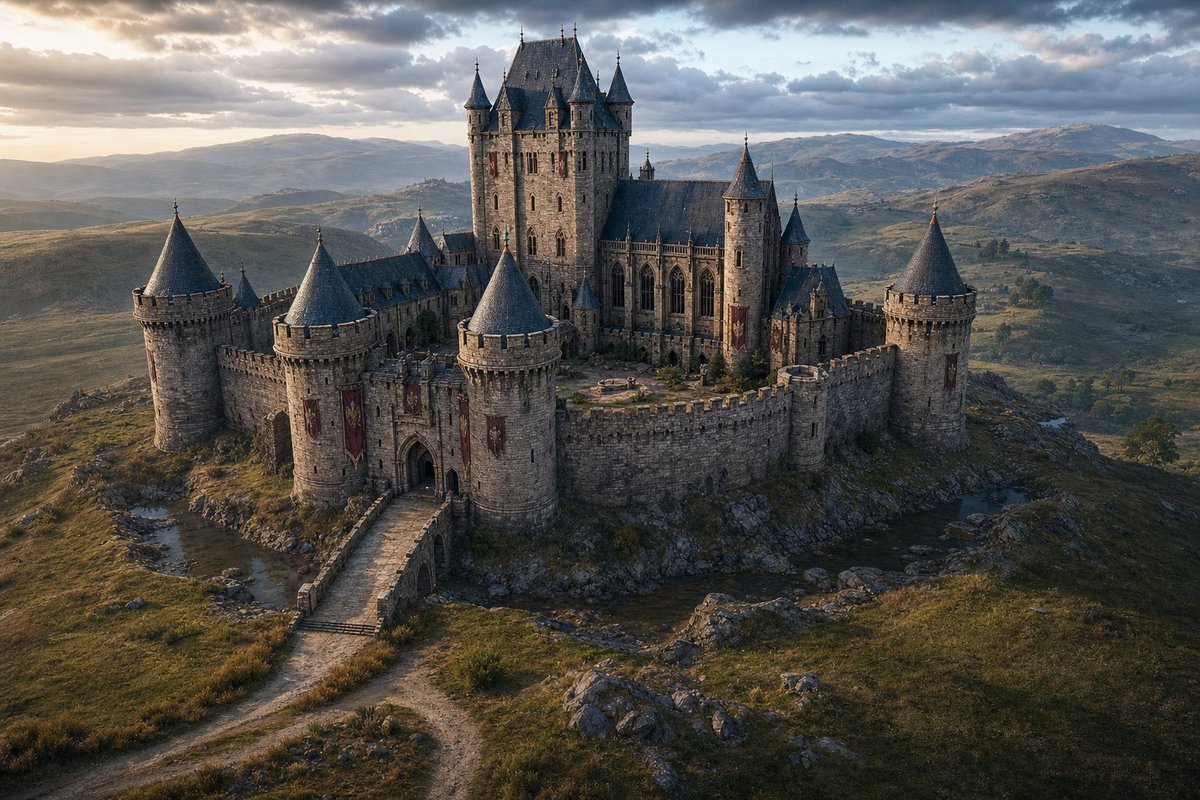
Cinematic Medieval Hilltop Castle
Generates a photorealistic fantasy medieval castle exterior in a vast natural highland setting for concept art or cinematic worldbuilding.
This is a GPT Image 2 prompt case for Interior & Architecture. Use the copy-ready prompt below to generate similar visuals, and review Awesome GPT Image 2 Prompts attribution plus commercial-use rights before reuse.
Free 1K preview
Generate one preview image instantly, no sign-up required.
Prompt
Copy-ready prompt
Create a cinematic ultra-realistic aerial wide shot of a {argument name="castle type" default="grand medieval Gothic stone castle"} standing alone on a rocky hilltop in a vast natural highland landscape. The castle has weathered gray masonry, crenellated curtain walls, arched gatehouse, a stone bridge and winding dirt road leading to the entrance, red vertical banners, narrow lancet windows, steep dark slate roofs, and an inner courtyard. Include exactly 10 prominent roofed vertical structures: 5 large round curtain-wall towers with conical slate roofs around the perimeter, 4 tall corner turrets on the central keep, and 1 smaller rear spire. The central keep should rise highest, with cathedral-like Gothic windows and a dramatic fortified silhouette. Surround it with rolling hills, scattered rocks, sparse grasses, small streams, distant mountains, and a wide cloudy sky. Lighting is {argument name="time of day" default="golden hour near sunset"}, with warm low sunlight from the left breaking through dramatic clouds, cool blue-gray shadows, and atmospheric haze over the distant valleys. Use a high-end fantasy film production look, photorealistic materials, detailed stone texture, realistic terrain, volumetric clouds, natural color grading, 16:9 landscape composition, viewed from a slightly elevated drone perspective. No people, no modern objects, no text, no watermark.Prompt variables
Editable argument placeholders found in the prompt, with their default values.
Best for
- - Interior & Architecture visual exploration
- - Image generation and reference-image edits
- - Reusable briefs that keep source attribution visible
Change these parts
- - Subject, product, character, or scene
- - Aspect ratio, camera, lighting, and background
- - Brand, text, color, and output constraints
Recommended model and settings
- - Model: gpt-image-2
- - Input mode: Text to Image
- - Aspect ratio: source
- - Commercial status: review original source
How to use this prompt
- 1. Copy the prompt and preserve its structure for the first test.
- 2. Replace the subject, context, and publishing channel.
- 3. Change one camera, lighting, or style variable per iteration.
- 4. Inspect the output, source, text, and rights before reuse.
Limitations, source, and reuse cautions
- - Generated output is an editable draft, not factual, legal, or rights evidence.
- - Review the linked source, people, brands, logos, text, and third-party media before commercial use.
More cases in this category
Prioritized by category, input mode compatibility, quality, and lower risk.
Reuse and source notes
Use this prompt safely after previewing the case.
- 1.Copy the prompt or open it directly in Dovoo with the generation button.
- 2.Adjust variables, aspect ratio, and reference images for your own use case.
- 3.Before publishing or paid usage, verify source rights, attribution requirements, and brand or likeness risks.
Can I use this prompt commercially?
Commercial-use status is allowed. Review the original source, license, brand constraints, and legal requirements before paid usage.
Where does this case come from?
This case is imported from Awesome GPT Image 2 Prompts; keep attribution visible and check the source URL before reuse.