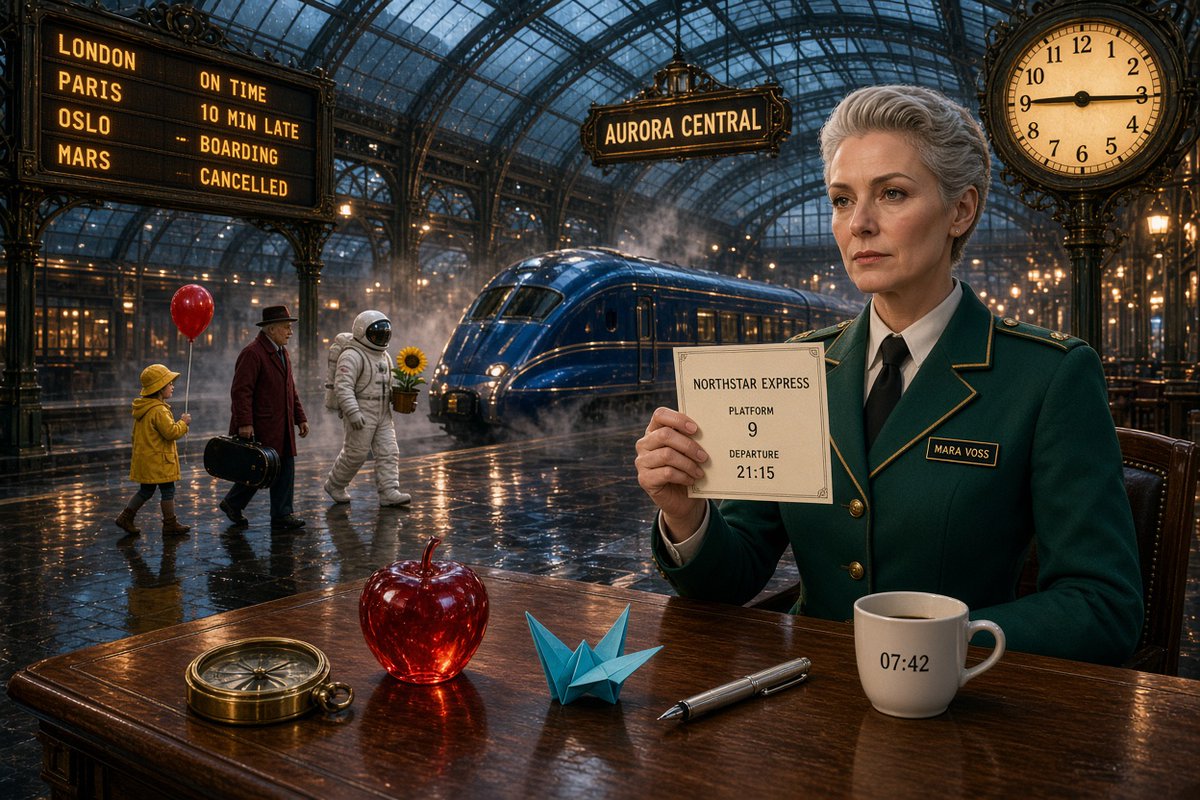
Aurora Central Station Typography Scene
A detailed cinematic railway station prompt designed to test exact text rendering, object counts, reflections, characters, and clock accuracy.
This is a GPT Image 2 prompt case for Interior & Architecture. Use the copy-ready prompt below to generate similar visuals, and review Awesome GPT Image 2 Prompts attribution plus commercial-use rights before reuse.
Free 1K preview
Generate one preview image instantly, no sign-up required.
Prompt
Copy-ready prompt
Goal: Create a cinematic ultra-detailed scene inside a grand Victorian glass-roof railway station at night, wet reflective floor, warm lamps, mist and steam around a sleek blue train, with exact readable typography and object counts.

Canvas: 3:2 horizontal widescreen composition, photorealistic, dramatic teal-and-amber color grade, sharp foreground details, deep background perspective, rainy glass ceiling with iron arches.

Main subject: On the right foreground, a stern elegant middle-aged woman station official named {argument name="character name" default="Mara Voss"} with short silver-gray hair, light skin, wearing a dark emerald-green tailored uniform jacket with gold piping, brass buttons, white shirt, and black tie. Her name badge must read "MARA VOSS". She sits at a polished wooden table and holds a cream paper ticket facing the viewer.

Ticket text: The ticket must be readable and centered with exactly these lines: "NORTHSTAR EXPRESS", "PLATFORM", "9", "DEPARTURE", "21:15". Add a thin decorative border.

Foreground table objects: Include exactly 5 discrete objects on the wooden table, left to right: 1 brass compass, 1 translucent red glass apple, 1 blue origami crane, 1 silver fountain pen, and 1 white coffee mug. The mug must show the exact printed time "07:42".

Background people and props: Include exactly 4 walking figures on the left midground: 1 child in a yellow raincoat holding exactly 1 red balloon, 1 older man in a dark hat and burgundy coat carrying exactly 1 black suitcase, 1 astronaut in a white spacesuit carrying exactly 1 potted sunflower, and the seated station official in the foreground as the fifth human figure overall. Do not add extra people.

Train and station details: Place exactly 1 glossy deep-blue streamlined train in the center background, partly surrounded by steam. Hang a station sign above it reading "AURORA CENTRAL". On the upper left, create a large departure board with exactly 4 destination rows and exact text: "LONDON — ON TIME", "PARIS — 10 MIN LATE", "OSLO — BOARDING", "MARS — CANCELLED". On the upper right, place one ornate round analog clock showing exactly {argument name="clock time" default="9:15"}.

Visual style: High-end cinematic realism, precise typography, accurate reflections of lights and figures on the wet floor and glossy table, ornate black ironwork, warm golden signage, cool blue night atmosphere, shallow-to-medium depth of field but all important text legible.

Constraints: Preserve all exact text strings, counts, and times. No misspellings, no extra signs with competing text, no watermark, no border, no surreal distortions beyond the astronaut and Mars destination.
Prompt variables
Editable argument placeholders found in the prompt, with their default values.
Best for
- - Interior & Architecture visual exploration
- - Image generation and reference-image edits
- - Reusable briefs that keep source attribution visible
Change these parts
- - Subject, product, character, or scene
- - Aspect ratio, camera, lighting, and background
- - Brand, text, color, and output constraints
Recommended model and settings
- - Model: gpt-image-2
- - Input mode: Text to Image
- - Aspect ratio: source
- - Commercial status: review original source
How to use this prompt
- 1. Copy the prompt and preserve its structure for the first test.
- 2. Replace the subject, context, and publishing channel.
- 3. Change one camera, lighting, or style variable per iteration.
- 4. Inspect the output, source, text, and rights before reuse.
Limitations, source, and reuse cautions
- - Generated output is an editable draft, not factual, legal, or rights evidence.
- - Review the linked source, people, brands, logos, text, and third-party media before commercial use.
More cases in this category
Prioritized by category, input mode compatibility, quality, and lower risk.
Reuse and source notes
Use this prompt safely after previewing the case.
- 1.Copy the prompt or open it directly in Dovoo with the generation button.
- 2.Adjust variables, aspect ratio, and reference images for your own use case.
- 3.Before publishing or paid usage, verify source rights, attribution requirements, and brand or likeness risks.
Can I use this prompt commercially?
Commercial-use status is allowed. Review the original source, license, brand constraints, and legal requirements before paid usage.
Where does this case come from?
This case is imported from Awesome GPT Image 2 Prompts; keep attribution visible and check the source URL before reuse.