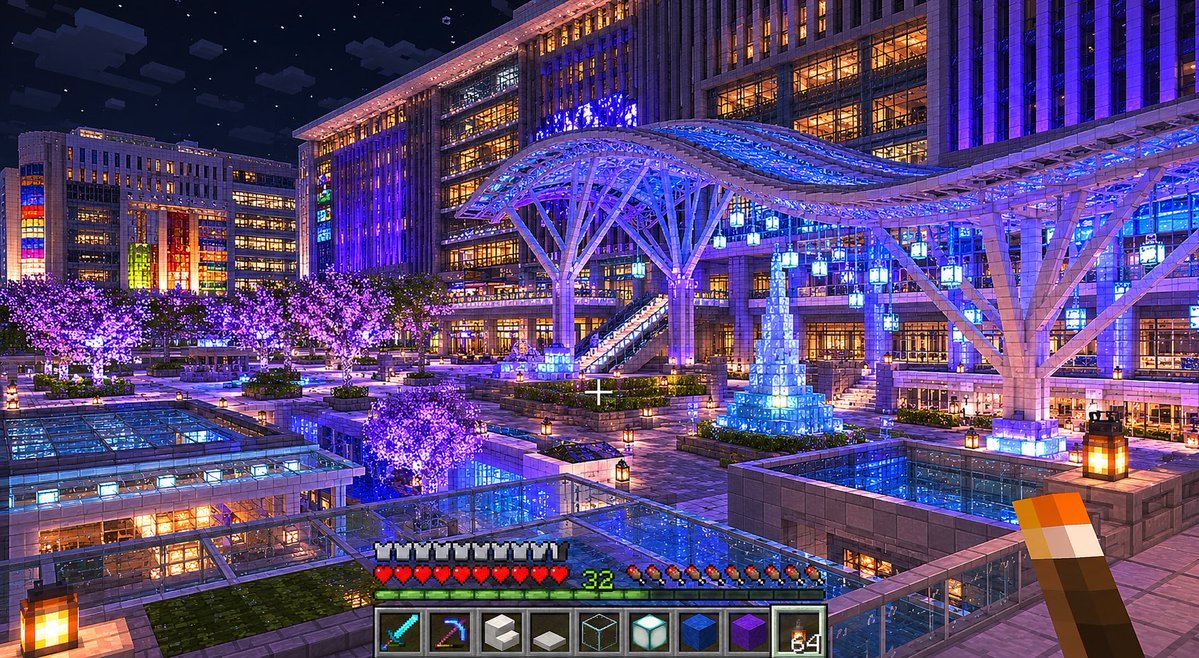
Minecraft Night Plaza Transformation
Transforms a real nighttime city plaza photo into a polished vanilla Minecraft first-person architectural screenshot.
This is a GPT Image 2 prompt case for 动漫游戏. Use the copy-ready prompt below to generate similar visuals, and review Awesome GPT Image 2 Prompts attribution plus commercial-use rights before reuse.
Need the full prompt set? Use the 动漫游戏 topic hub for more related examples, or open the GPT Image 2 prompt library for the full example index, reusable structures, and source attribution.
Prompt
Copy-ready prompt
使用提供的参考图像,将场景重构为高质量的 Minecraft 原版建筑截图。不要追求照片级真实感,而要呈现出仿佛由 Minecraft 专家建筑师使用原版方块在 Minecraft 内部完整还原该真实夜间城市广场的效果。

保留参考图中的主要构图和地标:夜间城市广场、大型车站式建筑、宽阔的照明天幕、前景的玻璃屋顶结构、人群/集市般的广场活动、发光的树木以及中央蓝光装饰塔。将所有几何形状转换为具有清晰体素边缘、Minecraft 光照和逼真方块材质的方块结构。

添加游戏内 Minecraft 截图展示:第一人称视角,带有居中准星,右下角手持火把,底部显示标准生存模式 HUD。包含 9 个快捷栏位,从左至右依次显示以下物品:钻石剑、附魔镐、白色方块、灰色台阶/方块、玻璃方块、海晶灯、蓝色方块、紫色方块和火把堆。显示护甲图标、红色心形生命值、饥饿值图标以及绿色的等级数字 {argument name="player level" default="32"}。

风格与质量:仅限原版 Minecraft,不使用模组,不使用非 Minecraft 风格的着色器,但要运用精美的高质量光照、浓郁的蓝紫色照明、温暖的窗户光芒、星空、反光玻璃表面以及精细的方块布局。保持相同的宽幅景观构图,尺寸约为 {argument name="image size" default="1536x864"},并呈现出精致的游戏截图质感。
Prompt variables
Editable argument placeholders found in the prompt, with their default values.
Variable
player level
Default
32
Variable
image size
Default
1536x864
More cases in this category
Prioritized by category, input mode compatibility, quality, and lower risk.


Reuse and source notes
Use this prompt safely after previewing the case.
- 1.Copy the prompt or open it directly in Dovoo with the generation button.
- 2.Adjust variables, aspect ratio, and reference images for your own use case.
- 3.Before publishing or paid usage, verify source rights, attribution requirements, and brand or likeness risks.
Can I use this prompt commercially?
Commercial-use status is allowed. Review the original source, license, brand constraints, and legal requirements before paid usage.
Where does this case come from?
This case is imported from Awesome GPT Image 2 Prompts; keep attribution visible and check the source URL before reuse.