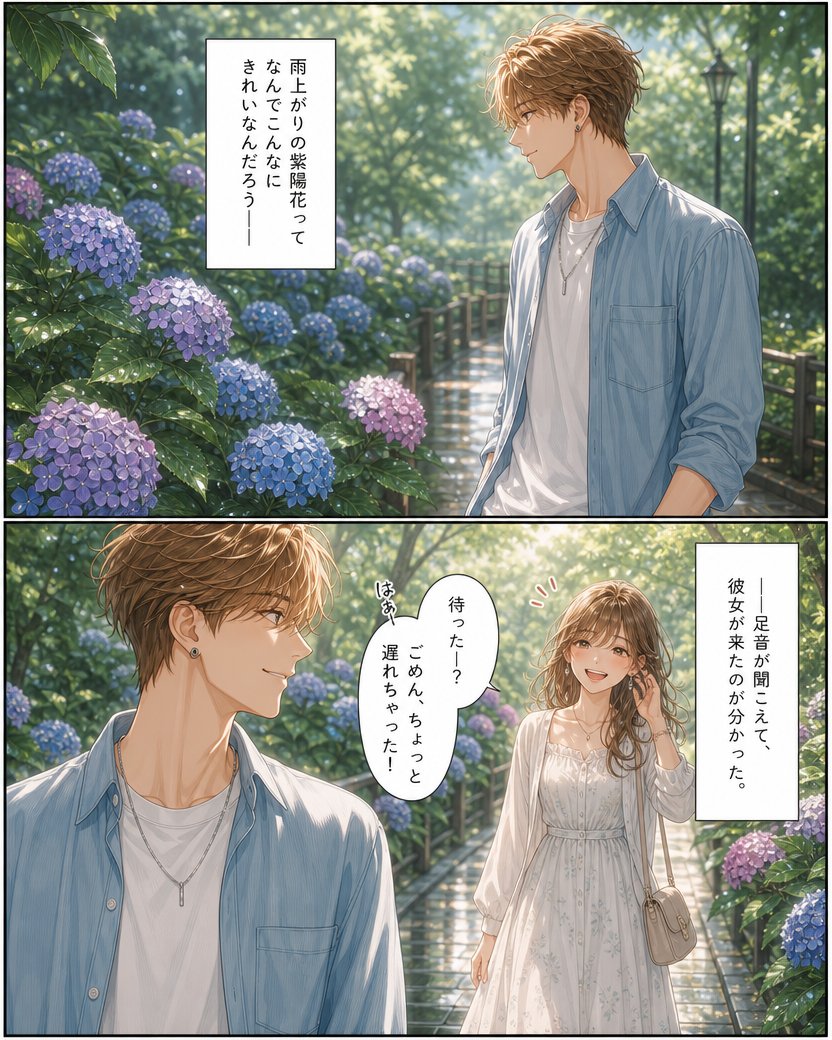
Rainy Hydrangea Romance Manga Page
A two-panel Japanese shoujo manga scene of a young couple meeting on a rain-wet hydrangea garden path, useful for romantic comic page generation.
This is a GPT Image 2 prompt case for Anime & Game. Use the copy-ready prompt below to generate similar visuals, and review Awesome GPT Image 2 Prompts attribution plus commercial-use rights before reuse.
Free 1K preview
Generate one preview image instantly, no sign-up required.
Prompt
Copy-ready prompt
Objective: Create an exquisite two-panel manga page featuring a young girl, set in a hydrangea garden after the rain, presenting a post-rain cinematic feel, delicate lines, soft watercolor coloring, and a romantic dramatic rhythm.

Canvas: A vertical manga page with a 4:5 aspect ratio, precisely divided into 2 horizontal panels by two thin black lines: one wide panel at the top and one wide panel at the bottom. Adopt a refined Japanese romantic manga style, including highly detailed vegetation, bright wet pebbles, bokeh sunlight, and soft pastel tones.

Layout: Panel 1 occupies the upper half. Showcase a tall young man, a half-body shot, standing beside a garden path surrounded by hydrangeas after the rain on the right side. His facial area is blurred, with messy light brown hair, wearing a light blue open-front shirt over a white t-shirt, a simple silver necklace, and a small black earring. On the left side and in the foreground, display lush, wet hydrangeas, with 9 clearly visible flowers: 3 purple, 4 blue, and 2 pale lavender pink. Add a vertical white narration box near the upper left center.

Panel 2 occupies the lower half. Continue with the same garden path, with the young man now in the left foreground, a close-up shot facing right. In the right mid-ground, show a young woman walking towards him. Her facial area is blurred, with long wavy light brown hair, wearing a white sleeveless floral dress with a sheer white cardigan, and carrying a small beige shoulder bag. In this panel, display 6 clear hydrangeas around the path: 2 purple, 3 blue, and 1 pink. Add 2 text elements to Panel 2: a vertical white narration box in the upper right corner, and a white oval speech bubble between the two people, with a tiny red exclamation mark near the woman.

Text Content: Use Japanese vertical manga font. The narration box in the upper panel should display {argument name="top narration text" default="a stylish young Japanese man with wavy light brown hair"}. The narration box in the lower right corner should display {argument name="arrival narration text" default="雨上がりの紫陽花って\nなんでこんなに\nきれいなんだろう—"}. The speech bubble should display {argument name="speech bubble text" default="a young Japanese woman with long softly curled brown hair"}. Add a tiny handwritten breathing sound next to the bubble, reading {argument name="small sound effect" default="はぁ"}.

Subject Details: The male character should look fashionable and gentle, in his early twenties, slender, wearing rolled-up sleeves on his light blue shirt. The female character should look romantic and delicate, in her early twenties, slender, wearing a flowing white dress, and wearing delicate accessories. Both faces should remain deliberately blank/blurred, without drawing facial features.

Visual Style: Highly detailed anime manga illustration, semi-realistic background, raindrops glistening on leaves, warm morning light filtering through trees, wet and reflective path, soft depth of field, elegant shoujo romantic atmosphere, clear panel borders, no watermarks, no extra panels, no extra speech bubbles.
Prompt variables
Editable argument placeholders found in the prompt, with their default values.
Best for
- - Anime & Game visual exploration
- - Image generation and reference-image edits
- - Reusable briefs that keep source attribution visible
Change these parts
- - Subject, product, character, or scene
- - Aspect ratio, camera, lighting, and background
- - Brand, text, color, and output constraints
Recommended model and settings
- - Model: gpt-image-2
- - Input mode: Text to Image
- - Aspect ratio: source
- - Commercial status: review original source
How to use this prompt
- 1. Copy the prompt and preserve its structure for the first test.
- 2. Replace the subject, context, and publishing channel.
- 3. Change one camera, lighting, or style variable per iteration.
- 4. Inspect the output, source, text, and rights before reuse.
Limitations, source, and reuse cautions
- - Generated output is an editable draft, not factual, legal, or rights evidence.
- - Review the linked source, people, brands, logos, text, and third-party media before commercial use.
Related prompt packs
More cases in this category
Prioritized by category, input mode compatibility, quality, and lower risk.

Reuse and source notes
Use this prompt safely after previewing the case.
- 1.Copy the prompt or open it directly in Dovoo with the generation button.
- 2.Adjust variables, aspect ratio, and reference images for your own use case.
- 3.Before publishing or paid usage, verify source rights, attribution requirements, and brand or likeness risks.
Can I use this prompt commercially?
Commercial-use status is allowed. Review the original source, license, brand constraints, and legal requirements before paid usage.
Where does this case come from?
This case is imported from Awesome GPT Image 2 Prompts; keep attribution visible and check the source URL before reuse.