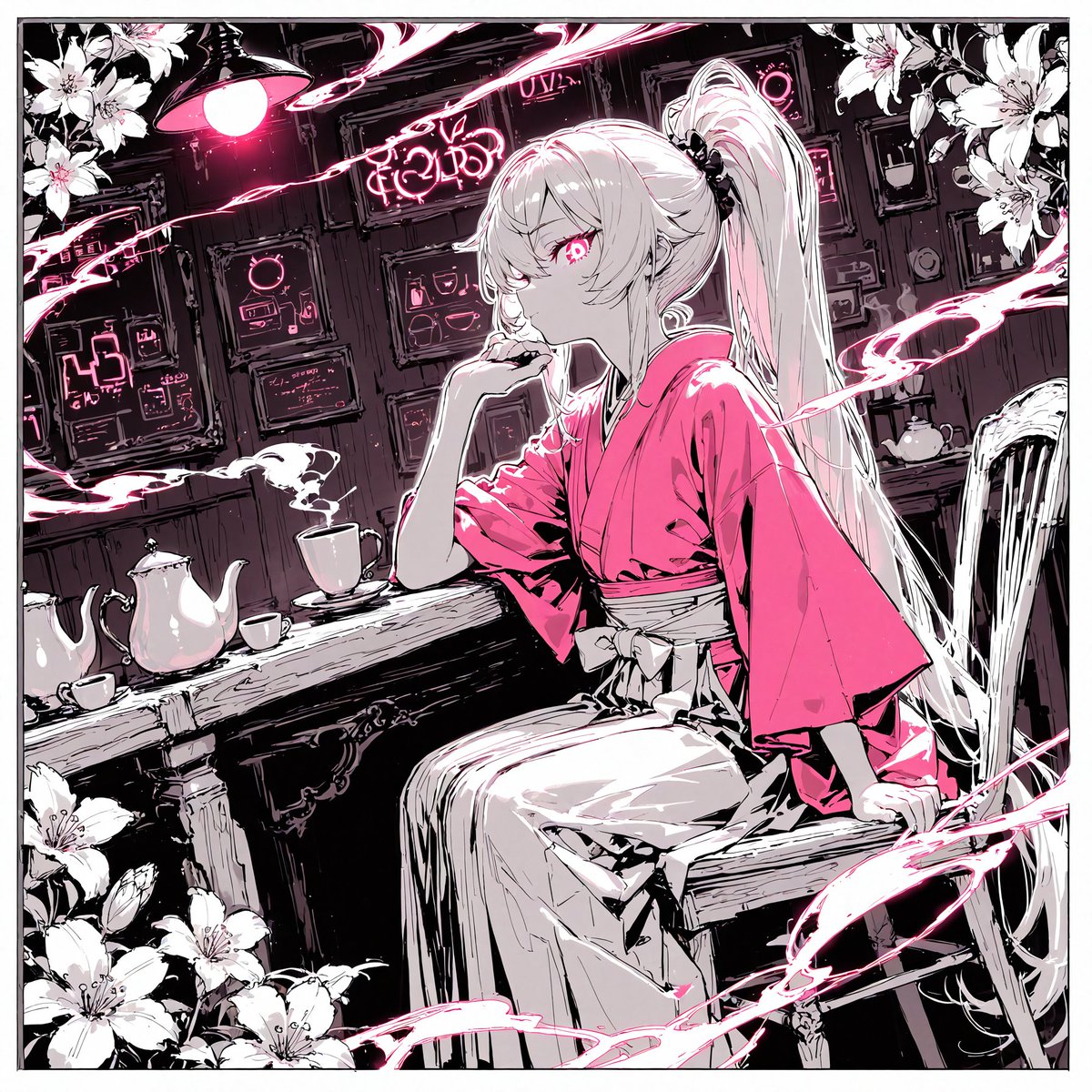
Cyberpunk Kimono Tea Room
A detailed prompt for generating a monochrome anime cyberpunk café scene with a kimono-clad girl, tea set, lilies, and neon pink magical accents.
This is a GPT Image 2 prompt case for Anime & Game. Use the copy-ready prompt below to generate similar visuals, and review Awesome GPT Image 2 Prompts attribution plus commercial-use rights before reuse.
Free 1K preview
Generate one preview image instantly, no sign-up required.
Prompt
Copy-ready prompt
Create a square anime illustration in a high-contrast monochrome manga style with vivid hot-pink accents. Show {argument name="character name" default="a mysterious young woman"} seated sideways on a wooden chair at a rustic counter inside a dim retro cyberpunk tea room or café. She has very long {argument name="hair color" default="silver-white"} hair tied into a high ponytail that cascades behind her, pale skin, sharp bangs, and one glowing pink eye visible as she gazes to the left with a calm, aloof expression, resting her chin on one hand. Dress her in a bright {argument name="kimono color" default="hot pink"} kimono-style top with wide sleeves, a light obi bow at the waist, and a long pale pleated skirt. The café background is dense with dark wooden panels, framed futuristic control screens, tiny interface diagrams, signs, cables, and a hanging lamp with a glowing pink bulb. On the counter place exactly five tea items: one large white teapot on the far left, two small teacups near it, one steaming mug in front of the character, and one small teapot or kettle on a rear shelf to the right. Surround the composition with exactly four clusters of white lilies: upper left corner, upper right corner, lower left corner, and lower right edge. Add sweeping ribbon-like pink energy trails and brush strokes crossing the image diagonally, with several white streaks and ink splatters, giving motion and magical atmosphere. Use thick black linework, sketchy crosshatching, limited palette of black, white, gray, and neon pink, detailed manga shading, dramatic lighting, slightly tilted perspective, ornate cluttered background, no readable modern watermark, no extra characters.Prompt variables
Editable argument placeholders found in the prompt, with their default values.
Best for
- - Anime & Game visual exploration
- - Image generation and reference-image edits
- - Reusable briefs that keep source attribution visible
Change these parts
- - Subject, product, character, or scene
- - Aspect ratio, camera, lighting, and background
- - Brand, text, color, and output constraints
Recommended model and settings
- - Model: gpt-image-2
- - Input mode: Text to Image
- - Aspect ratio: source
- - Commercial status: review original source
How to use this prompt
- 1. Copy the prompt and preserve its structure for the first test.
- 2. Replace the subject, context, and publishing channel.
- 3. Change one camera, lighting, or style variable per iteration.
- 4. Inspect the output, source, text, and rights before reuse.
Limitations, source, and reuse cautions
- - Generated output is an editable draft, not factual, legal, or rights evidence.
- - Review the linked source, people, brands, logos, text, and third-party media before commercial use.
Related prompt packs
More cases in this category
Prioritized by category, input mode compatibility, quality, and lower risk.

Reuse and source notes
Use this prompt safely after previewing the case.
- 1.Copy the prompt or open it directly in Dovoo with the generation button.
- 2.Adjust variables, aspect ratio, and reference images for your own use case.
- 3.Before publishing or paid usage, verify source rights, attribution requirements, and brand or likeness risks.
Can I use this prompt commercially?
Commercial-use status is allowed. Review the original source, license, brand constraints, and legal requirements before paid usage.
Where does this case come from?
This case is imported from Awesome GPT Image 2 Prompts; keep attribution visible and check the source URL before reuse.