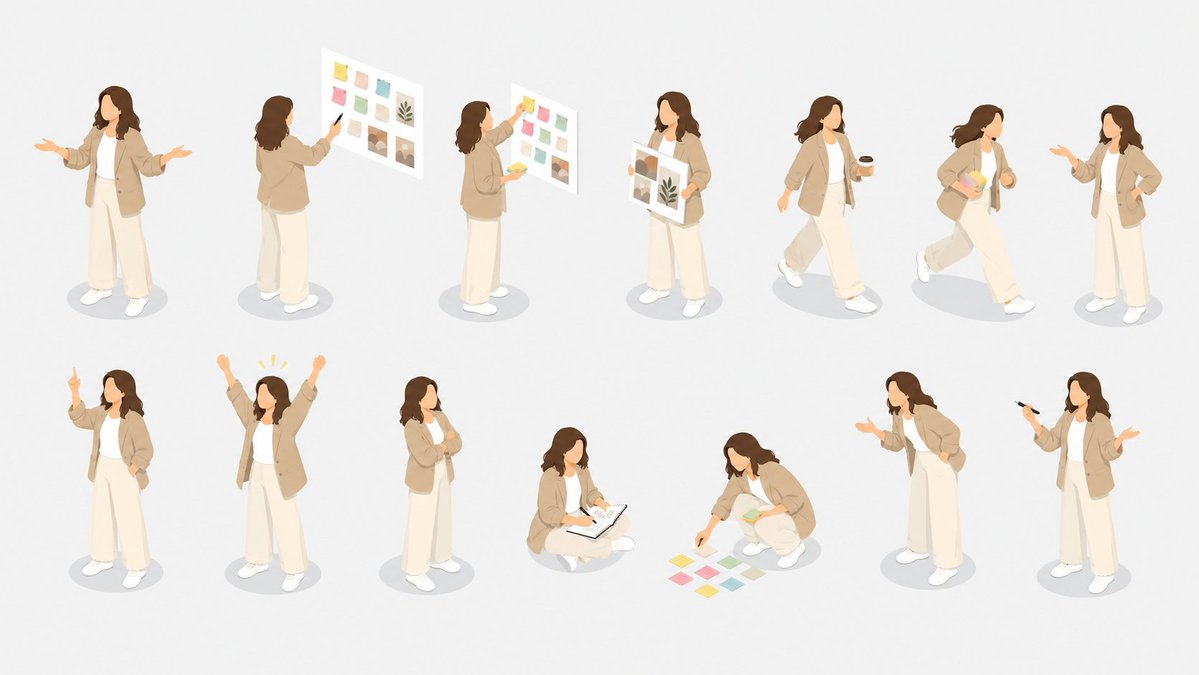
Isometric Presenter Pose Sheet
Generates a clean isometric illustration set of one female business presenter in 14 different presentation and planning poses for slides, websites, or UI assets.
This is a GPT Image 2 prompt case for Illustration & Art. Use the copy-ready prompt below to generate similar visuals, and review Awesome GPT Image 2 Prompts attribution plus commercial-use rights before reuse.
Free 1K preview
Generate one preview image instantly, no sign-up required.
Free text preview doesn’t preserve reference-image consistency.
Prompt
Copy-ready prompt
Goal: Create an isometric character pose sheet showing the same faceless female presenter in many business presentation situations, suitable for a clean illustration library.

Canvas: Wide horizontal 16:9 canvas on a very light warm gray background, with generous spacing and soft oval gray shadows under each character. No borders, no title, no labels, no watermark.

Subject details: The repeated character is {argument name="character name" default="a young female business presenter"} with shoulder-length wavy {argument name="hair color" default="dark brown hair"}, no facial features, soft peach skin tone, wearing a beige oversized blazer, white inner top, loose cream wide-leg trousers, and white sneakers. Keep the same outfit and proportions across every pose. Use a soft modern isometric vector style, rounded shapes, muted pastel colors, minimal detail, clean edges, subtle depth, and a friendly corporate presentation mood.

Layout: Arrange exactly 14 separate full-body character poses in two loose rows of 7 across the canvas, each figure isolated and evenly spaced, all viewed from a consistent three-quarter isometric angle.

Visible poses, exactly 14:
1. Standing front-facing with both arms open as if explaining to an audience.
2. Standing with back turned, pointing at a floating presentation board filled with small pastel color swatches and image tiles.
3. Side view, placing colorful sticky notes onto a floating board.
4. Standing front view holding a large mood-board sheet with color blocks, image thumbnails, and a leaf motif.
5. Walking to the right while holding a black coffee cup.
6. Walking quickly to the right while carrying a stack of pastel papers or sticky notes.
7. Standing and gesturing conversationally with one hand while the other hand rests near the waist.
8. Standing with one index finger raised as if making an important point.
9. Standing with both arms raised in celebration, with small yellow emphasis marks above the head.
10. Standing in a thinking pose with one hand at the chin and the other arm folded.
11. Sitting cross-legged on the floor, writing or sketching in an open notebook or clipboard.
12. Crouching and arranging exactly 8 pastel sticky notes on the floor, with a small stack of notes in one hand.
13. Standing in a leaning presentation pose, one hand extended as if inviting discussion.
14. Standing with a black marker or pen raised in one hand and the other hand open in a presenting gesture.

Presentation props: Include only minimal presentation materials: floating white boards, pastel sticky notes, a notebook, coffee cup, pen, and paper sheets. Use {argument name="accent colors" default="soft yellow, pink, mint green, teal, beige, and muted brown"} for sticky notes and board graphics.

Constraints: Keep all characters faceless, do not add text, do not add extra people, do not change outfits between poses, keep the background clean and uncluttered, and maintain a cohesive isometric illustration set.
Prompt variables
Editable argument placeholders found in the prompt, with their default values.
Best for
- - Illustration & Art visual exploration
- - Image generation and reference-image edits
- - Reusable briefs that keep source attribution visible
Change these parts
- - Subject, product, character, or scene
- - Aspect ratio, camera, lighting, and background
- - Brand, text, color, and output constraints
Recommended model and settings
- - Model: gpt-image-2
- - Input mode: Image to Image
- - Aspect ratio: source
- - Commercial status: review original source
How to use this prompt
- 1. Copy the prompt and preserve its structure for the first test.
- 2. Replace the subject, context, and publishing channel.
- 3. Change one camera, lighting, or style variable per iteration.
- 4. Inspect the output, source, text, and rights before reuse.
Limitations, source, and reuse cautions
- - Generated output is an editable draft, not factual, legal, or rights evidence.
- - Review the linked source, people, brands, logos, text, and third-party media before commercial use.
Related prompt packs
More cases in this category
Prioritized by category, input mode compatibility, quality, and lower risk.


Reuse and source notes
Use this prompt safely after previewing the case.
- 1.Copy the prompt or open it directly in Dovoo with the generation button.
- 2.Adjust variables, aspect ratio, and reference images for your own use case.
- 3.Before publishing or paid usage, verify source rights, attribution requirements, and brand or likeness risks.
Can I use this prompt commercially?
Commercial-use status is allowed. Review the original source, license, brand constraints, and legal requirements before paid usage.
Where does this case come from?
This case is imported from Awesome GPT Image 2 Prompts; keep attribution visible and check the source URL before reuse.