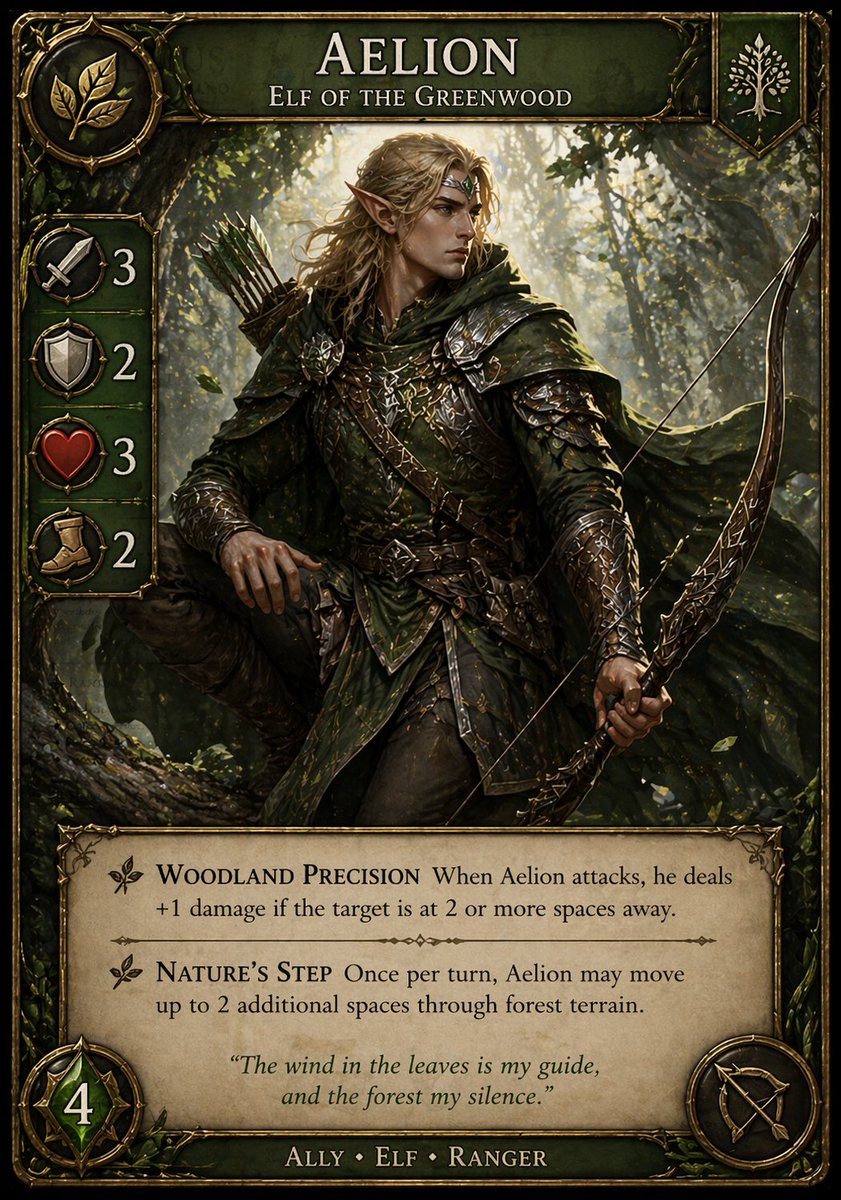
Fantasy Elf Ranger Trading Card
This prompt generates a polished collectible fantasy card featuring an elf ranger with readable rules text, ideal for custom trading card game prototypes and concept art.
This is a GPT Image 2 prompt case for Anime & Game. Use the copy-ready prompt below to generate similar visuals, and review Awesome GPT Image 2 Prompts attribution plus commercial-use rights before reuse.
Free 1K preview
Generate one preview image instantly, no sign-up required.
Prompt
Copy-ready prompt
A highly detailed fantasy trading card in a premium collectible card game style, vertical layout with an ornate antique gold frame, dark emerald-green enamel panels, and intricate vine-and-leaf embellishments. The card title at the top reads {argument name="character name" default="AELION"} in large elegant serif capitals, with the subtitle "ELF OF THE GREENWOOD" beneath it. In the central illustration, depict a realistic high-fantasy elf ranger standing in a sun-dappled forest. He has long {argument name="hair color" default="golden blond"} hair, pointed ears, and wears layered dark green leather-and-metal armor with engraved details, a hooded cloak, belts, bracers, and woodland-themed ornamentation. He carries an ornate recurved bow in one hand and a quiver of arrows on his back, posed alertly as if tracking prey through the trees. The forest background is lush, atmospheric, and cinematic, with shafts of warm light filtering through branches and leaves. The overall palette is green, bronze, gold, and earthy brown, with a moody heroic tone and realistic painterly rendering. On the upper left, include a circular faction crest showing 3 gold leaves. On the upper right, include a small shield emblem with a white tree icon. Along the left edge, place exactly 4 vertically stacked stat icons in circular medallions with large numbers beside them: a sword with 3, a shield with 2, a heart with 3, and a boot with 2. At the bottom left, add a large green gem-like badge with the number 4. At the bottom right, add a circular class or weapon icon showing a bow-and-arrow symbol. In a parchment text box across the lower third, include exactly 2 ability entries with decorative leaf bullets and serif typography. The first ability name is "WOODLAND PRECISION" followed by the rules text: "When Aelion attacks, he deals +1 damage if the target is at 2 or more spaces away." The second ability name is "NATURE’S STEP" followed by the rules text: "Once per turn, Aelion may move up to 2 additional spaces through forest terrain." Centered below the abilities, add an italic flavor quote: {argument name="quote" default="The wind in the leaves is my guide, and the forest my silence."} At the very bottom, on a dark green nameplate, write the type line "ALLY • ELF • RANGER". Use crisp, legible text, polished card-game UI design, balanced margins, and a finished professional TCG product look similar to a premium fantasy strategy card.Prompt variables
Editable argument placeholders found in the prompt, with their default values.
Best for
- - Anime & Game visual exploration
- - Image generation and reference-image edits
- - Reusable briefs that keep source attribution visible
Change these parts
- - Subject, product, character, or scene
- - Aspect ratio, camera, lighting, and background
- - Brand, text, color, and output constraints
Recommended model and settings
- - Model: gpt-image-2
- - Input mode: Text to Image
- - Aspect ratio: source
- - Commercial status: review original source
How to use this prompt
- 1. Copy the prompt and preserve its structure for the first test.
- 2. Replace the subject, context, and publishing channel.
- 3. Change one camera, lighting, or style variable per iteration.
- 4. Inspect the output, source, text, and rights before reuse.
Limitations, source, and reuse cautions
- - Generated output is an editable draft, not factual, legal, or rights evidence.
- - Review the linked source, people, brands, logos, text, and third-party media before commercial use.
More cases in this category
Prioritized by category, input mode compatibility, quality, and lower risk.
Reuse and source notes
Use this prompt safely after previewing the case.
- 1.Copy the prompt or open it directly in Dovoo with the generation button.
- 2.Adjust variables, aspect ratio, and reference images for your own use case.
- 3.Before publishing or paid usage, verify source rights, attribution requirements, and brand or likeness risks.
Can I use this prompt commercially?
Commercial-use status is allowed. Review the original source, license, brand constraints, and legal requirements before paid usage.
Where does this case come from?
This case is imported from Awesome GPT Image 2 Prompts; keep attribution visible and check the source URL before reuse.