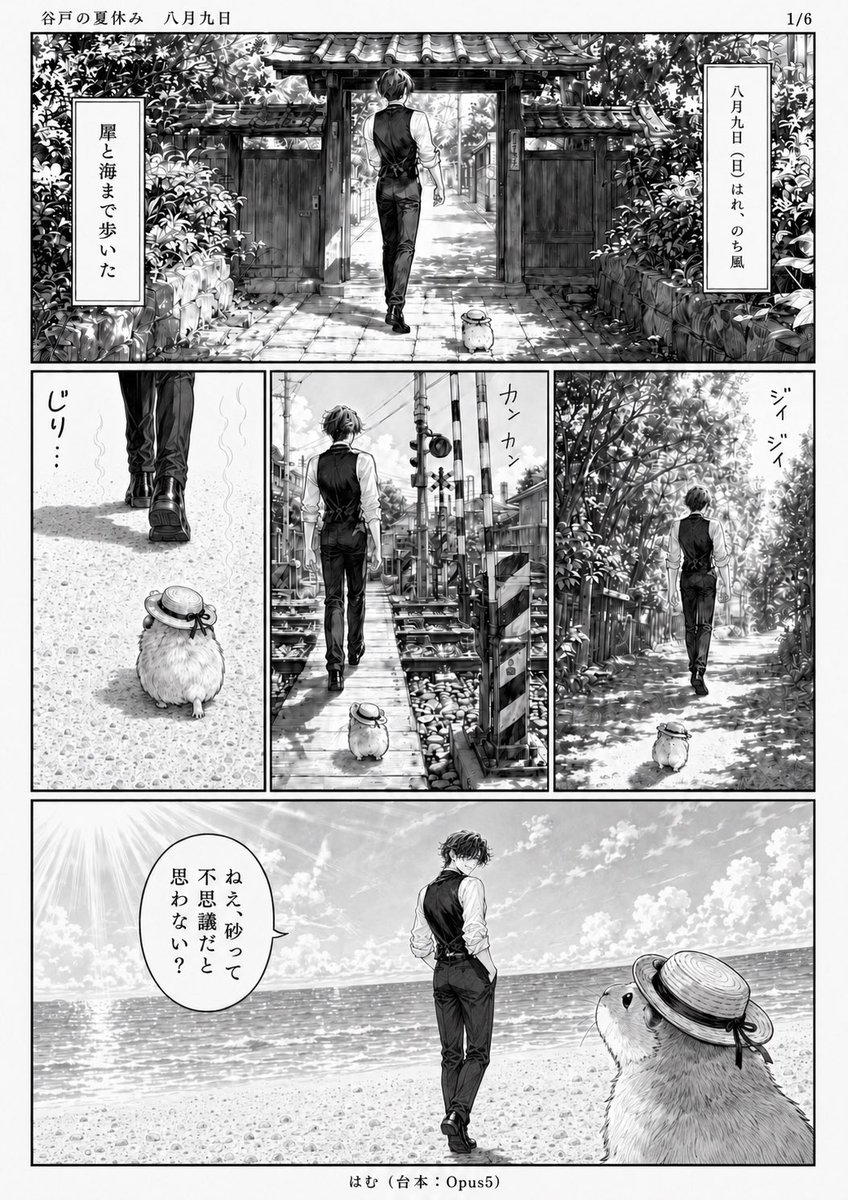
Monochrome Summer Manga Walk
Generates a detailed black-and-white Japanese manga page about a young man and a large hamster walking through a summer town to the beach.
This is a GPT Image 2 prompt case for Anime & Game. Use the copy-ready prompt below to generate similar visuals, and review Awesome GPT Image 2 Prompts attribution plus commercial-use rights before reuse.
Free 1K preview
Generate one preview image instantly, no sign-up required.
Prompt
Copy-ready prompt
Goal: Create a black-and-white manga page titled {argument name="series title" default="谷戸の夏休み 八月九日"}, page indicator 1/6, showing a quiet summer walk to the sea by a slim young man and an oversized hamster companion.

Canvas: Vertical manga page, clean white margins, monochrome screentone and ink wash, detailed shoujo/seinen background art, high contrast summer sunlight, fine hatching, realistic architecture and foliage. Place a small footer centered at the bottom: 「はむ(台本:Opus5)」.

Layout: Use exactly 5 comic panels arranged as follows: 1 large panoramic top panel spanning the page width; 3 equal vertical panels across the middle row; 1 large panoramic bottom panel spanning the page width. Thin black panel borders and generous gutters.

Characters: The main character is {argument name="main character" default="a tall slim young man with slightly messy dark hair"}, seen mostly from behind, wearing a white long-sleeve shirt with rolled sleeves, a fitted black vest, black trousers, and dark dress shoes. His posture is calm and slightly aloof, walking with hands relaxed or in pockets. The companion is {argument name="animal companion" default="a very large fluffy hamster"}, round-bodied and knee-high to the man, wearing a small straw boater hat tied with a dark ribbon; it follows him everywhere and looks up at him in the final panel.

Panel details: Panel 1, wide top: the man walks away through an old tiled-roof wooden gate on a stone path, surrounded by dense summer greenery and stone walls; the hamster trails behind. Add two vertical narration boxes: left box 「崖と海まで歩いた」 and right box 「八月九日(日)はれのち風」. Panel 2, middle left: close low view of the man’s legs and shoes walking ahead on a sunlit gravel path, with the hamster behind in the foreground; add small sound text 「じり…」. Panel 3, middle center: the pair walk along a narrow railway crossing or seaside town pedestrian path, with crossing signals, utility poles, tracks, and crates; add sound text 「カンカン」. Panel 4, middle right: the pair walk down a leafy lane under bright dappled sunlight; add cicada sound text 「ジイジイ」. Panel 5, wide bottom: open beach scene with sparkling ocean horizon, bright sky, clouds, and strong sun rays at the upper left; the man stands near the shoreline facing the sea, while the oversized hamster fills the right foreground looking up at him. Add one speech balloon from the hamster or near the hamster reading {argument name="speech balloon text" default="ねえ、砂って不思議だと思わない?"}.

Visual style: Nostalgic Japanese summer vacation manga, cinematic quiet pacing, extremely detailed hand-drawn backgrounds, realistic light through trees, shimmering sea, subtle screentones, no color. Keep all visible Japanese text hand-lettered vertically where appropriate. Avoid extra panels, extra characters, watermarks, or modern UI elements.
Prompt variables
Editable argument placeholders found in the prompt, with their default values.
Best for
- - Anime & Game visual exploration
- - Image generation and reference-image edits
- - Reusable briefs that keep source attribution visible
Change these parts
- - Subject, product, character, or scene
- - Aspect ratio, camera, lighting, and background
- - Brand, text, color, and output constraints
Recommended model and settings
- - Model: gpt-image-2
- - Input mode: Text to Image
- - Aspect ratio: source
- - Commercial status: review original source
How to use this prompt
- 1. Copy the prompt and preserve its structure for the first test.
- 2. Replace the subject, context, and publishing channel.
- 3. Change one camera, lighting, or style variable per iteration.
- 4. Inspect the output, source, text, and rights before reuse.
Limitations, source, and reuse cautions
- - Generated output is an editable draft, not factual, legal, or rights evidence.
- - Review the linked source, people, brands, logos, text, and third-party media before commercial use.
More cases in this category
Prioritized by category, input mode compatibility, quality, and lower risk.


Reuse and source notes
Use this prompt safely after previewing the case.
- 1.Copy the prompt or open it directly in Dovoo with the generation button.
- 2.Adjust variables, aspect ratio, and reference images for your own use case.
- 3.Before publishing or paid usage, verify source rights, attribution requirements, and brand or likeness risks.
Can I use this prompt commercially?
Commercial-use status is allowed. Review the original source, license, brand constraints, and legal requirements before paid usage.
Where does this case come from?
This case is imported from Awesome GPT Image 2 Prompts; keep attribution visible and check the source URL before reuse.