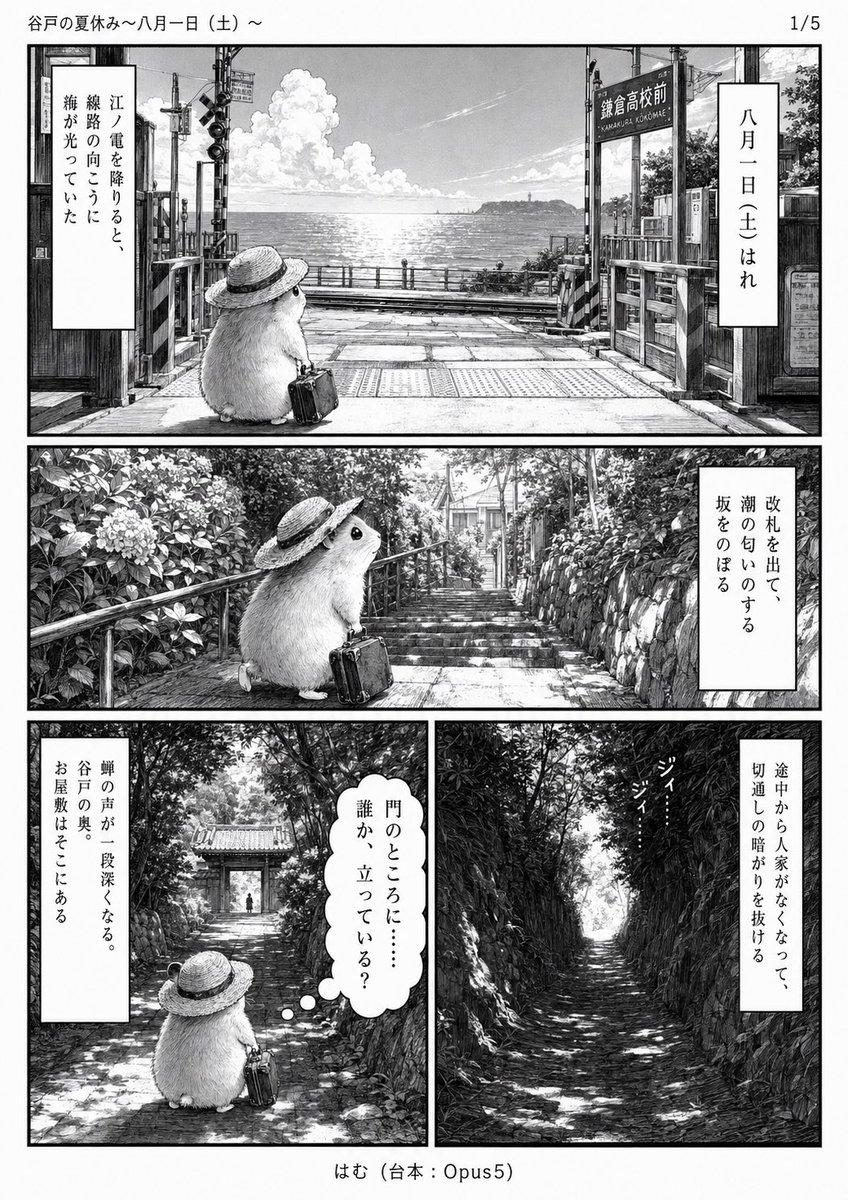
Monochrome Summer Hamster Manga Page
Generates a detailed black-and-white Japanese manga page featuring a straw-hatted hamster traveling through a coastal town and wooded valley.
This is a GPT Image 2 prompt case for Anime & Game. Use the copy-ready prompt below to generate similar visuals, and review Awesome GPT Image 2 Prompts attribution plus commercial-use rights before reuse.
Free 1K preview
Generate one preview image instantly, no sign-up required.
Prompt
Copy-ready prompt
Goal: Create a monochrome manga page titled {argument name="manga title" default="谷戸の夏休み〜八月一日(土)〜"}, page indicator “1/5”, adapting a quiet summer-vacation short story into a detailed Japanese comic page.

Canvas: Vertical manga manuscript page, black-and-white ink with grayscale screentone, clean white margins, thin black outer border around each panel, reading as a polished printed manga page. Top margin shows the title at upper left and “1/5” at upper right. Bottom center credit reads “はむ(台本:Opus5)”.

Layout: Use exactly 4 panels arranged in three tiers: Panel 1 is a wide full-width establishing shot across the top; Panel 2 is a wide full-width panel across the middle; Panels 3 and 4 are two equal vertical panels side by side on the bottom row.

Main character: A small fluffy hamster-like creature named {argument name="character name" default="はむ"}, round body, soft fur, tiny feet, black bead eyes, wearing a broad straw hat with a dark ribbon, carrying a small vintage travel suitcase. The character appears exactly 3 times: once in Panel 1 sitting at a railroad crossing, once in Panel 2 climbing steps, and once in Panel 3 seen from behind in a wooded path. Panel 4 contains no character, only the empty path.

Panel details:
1. Top panel: A coastal railway crossing at Kamakura/Koshigoe in midsummer, with crossing gates, signal lights, wooden posts, station sign, rails, and the bright ocean beyond. A large cumulus cloud floats over the sparkling sea; distant coastline visible. The hamster sits near the foreground facing the sea, suitcase beside it. Include two vertical caption boxes: right box says “八月一日(土)はれ”; left box says “江ノ電を降りると、線路の向こうに海が光っていた”.
2. Middle panel: The hamster walks up a stone stairway bordered by hydrangeas and dense summer greenery, handrail on the left, old houses and a narrow lane visible at the top of the stairs. Include one vertical caption box on the right saying “改札を出て、潮の匂いのする坂をのぼる”.
3. Bottom-left panel: A shaded old stone path leading toward a tiled-roof gate or small temple entrance deep in a quiet valley, dappled sunlight through trees. The hamster stands in the foreground from behind holding the suitcase and looking ahead. Include one vertical caption box on the left saying “蝉の声が一段深くなる。谷戸の奥。お屋敷はそこにある”. Include one rounded thought bubble near the hamster saying “門のところに……誰か、立っている?”.
4. Bottom-right panel: A narrow, empty, darker cut-through path with steep stone walls and thick foliage on both sides, strong shadow and bright opening in the distance. Include one vertical caption box on the right saying “途中から人気がなくなって、切通しの暗がりを抜ける”. Add small sound-effect text in the foliage reading “ジイ……ジイ……”.

Visual style: Highly detailed hand-drawn manga linework, realistic backgrounds with nostalgic Showa-era atmosphere, cinematic perspective, delicate hatching, screentone shading, high contrast summer sunlight, quiet mysterious mood, no color. The page should feel like a gentle literary slice-of-life mystery set in Kamakura during summer.

Constraints: Preserve all visible Japanese text exactly as written. Do not add extra panels, characters, speech balloons, modern UI elements, watermarks, or color. Keep the page readable as Japanese manga with vertical caption boxes.
Prompt variables
Editable argument placeholders found in the prompt, with their default values.
Best for
- - Anime & Game visual exploration
- - Image generation and reference-image edits
- - Reusable briefs that keep source attribution visible
Change these parts
- - Subject, product, character, or scene
- - Aspect ratio, camera, lighting, and background
- - Brand, text, color, and output constraints
Recommended model and settings
- - Model: gpt-image-2
- - Input mode: Text to Image
- - Aspect ratio: source
- - Commercial status: review original source
How to use this prompt
- 1. Copy the prompt and preserve its structure for the first test.
- 2. Replace the subject, context, and publishing channel.
- 3. Change one camera, lighting, or style variable per iteration.
- 4. Inspect the output, source, text, and rights before reuse.
Limitations, source, and reuse cautions
- - Generated output is an editable draft, not factual, legal, or rights evidence.
- - Review the linked source, people, brands, logos, text, and third-party media before commercial use.
More cases in this category
Prioritized by category, input mode compatibility, quality, and lower risk.



Reuse and source notes
Use this prompt safely after previewing the case.
- 1.Copy the prompt or open it directly in Dovoo with the generation button.
- 2.Adjust variables, aspect ratio, and reference images for your own use case.
- 3.Before publishing or paid usage, verify source rights, attribution requirements, and brand or likeness risks.
Can I use this prompt commercially?
Commercial-use status is allowed. Review the original source, license, brand constraints, and legal requirements before paid usage.
Where does this case come from?
This case is imported from Awesome GPT Image 2 Prompts; keep attribution visible and check the source URL before reuse.