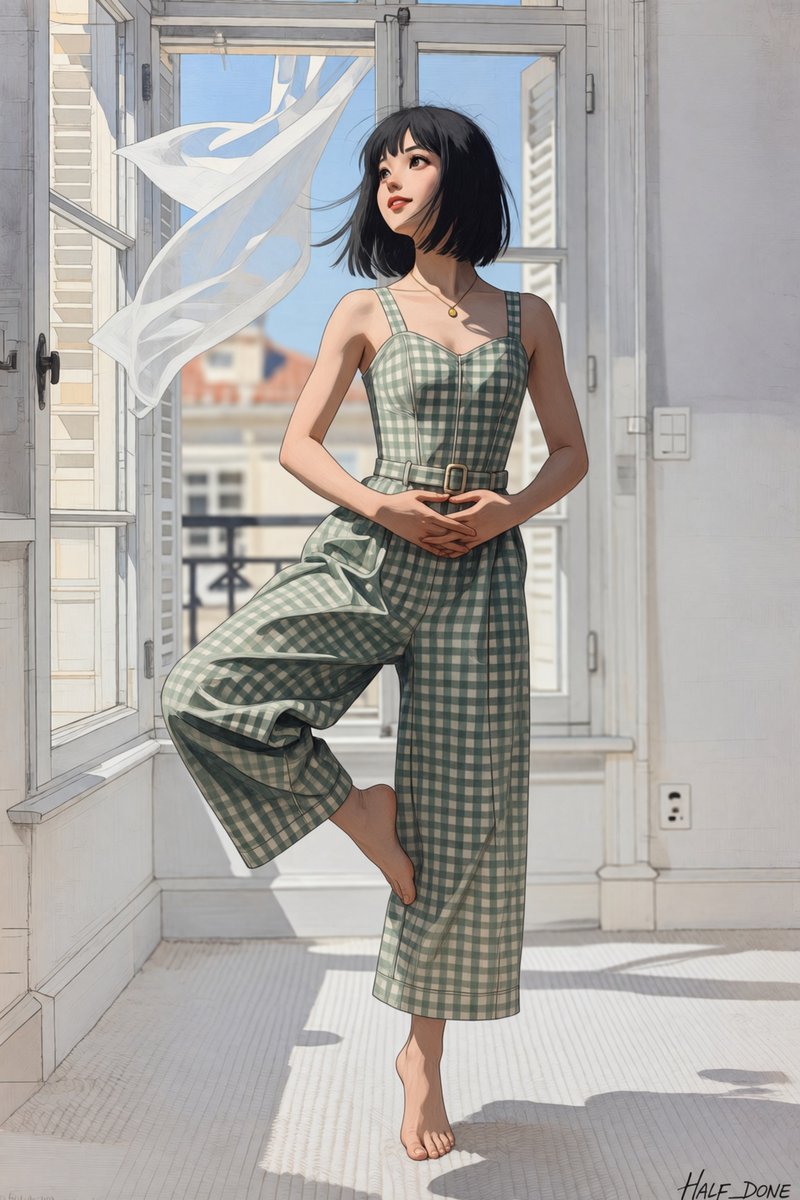
Barefoot Window Pirouette
A vertical anime-style illustration prompt for a barefoot woman posing gracefully in a sunlit apartment with an open window and flowing curtain.
This is a GPT Image 2 prompt case for Anime & Game. Use the copy-ready prompt below to generate similar visuals, and review Awesome GPT Image 2 Prompts attribution plus commercial-use rights before reuse.
Free 1K preview
Generate one preview image instantly, no sign-up required.
Prompt
Copy-ready prompt
Create a polished anime-style digital illustration of {argument name="character name" default="a young woman"} standing barefoot in a graceful ballet pirouette-like pose inside a bright European apartment. She has {argument name="hair color" default="short black bob hair with wispy bangs"}, fair skin, delicate facial features, soft red lips, and a calm upward gaze toward the open window. She wears a sleeveless {argument name="outfit pattern" default="sage green and cream gingham wide-leg jumpsuit"} with a fitted bodice, square neckline, thin straps, a narrow belt with a small buckle, cropped flowing trousers, and a small gold pendant necklace. Her hands are gently clasped at her waist, one leg supports her on bare toes while the other knee is lifted and bent across her body; emphasize that she is barefoot, with no ballet shoes or footwear. The room has tall white French doors and open casement windows, pale gray-white walls, a light textured floor, and strong morning sunlight casting long angular shadows. Outside the window is a softly blurred city balcony and neighboring buildings under a clear blue sky. A sheer white curtain billows dramatically inward from the breeze on the left side, creating a flowing ribbon shape. Use refined linework, soft watercolor-like shading, subtle painterly texture, elegant proportions, natural anatomy, cinematic lighting, airy atmosphere, pastel colors, and a clean high-resolution vertical composition. Add a small artist signature reading {argument name="signature text" default="HALF_DONE"} in the bottom-right corner. Avoid extra people, avoid text other than the signature, avoid shoes, avoid distorted feet or hands.Prompt variables
Editable argument placeholders found in the prompt, with their default values.
Best for
- - Anime & Game visual exploration
- - Image generation and reference-image edits
- - Reusable briefs that keep source attribution visible
Change these parts
- - Subject, product, character, or scene
- - Aspect ratio, camera, lighting, and background
- - Brand, text, color, and output constraints
Recommended model and settings
- - Model: gpt-image-2
- - Input mode: Text to Image
- - Aspect ratio: source
- - Commercial status: review original source
How to use this prompt
- 1. Copy the prompt and preserve its structure for the first test.
- 2. Replace the subject, context, and publishing channel.
- 3. Change one camera, lighting, or style variable per iteration.
- 4. Inspect the output, source, text, and rights before reuse.
Limitations, source, and reuse cautions
- - Generated output is an editable draft, not factual, legal, or rights evidence.
- - Review the linked source, people, brands, logos, text, and third-party media before commercial use.
More cases in this category
Prioritized by category, input mode compatibility, quality, and lower risk.


Reuse and source notes
Use this prompt safely after previewing the case.
- 1.Copy the prompt or open it directly in Dovoo with the generation button.
- 2.Adjust variables, aspect ratio, and reference images for your own use case.
- 3.Before publishing or paid usage, verify source rights, attribution requirements, and brand or likeness risks.
Can I use this prompt commercially?
Commercial-use status is allowed. Review the original source, license, brand constraints, and legal requirements before paid usage.
Where does this case come from?
This case is imported from Awesome GPT Image 2 Prompts; keep attribution visible and check the source URL before reuse.