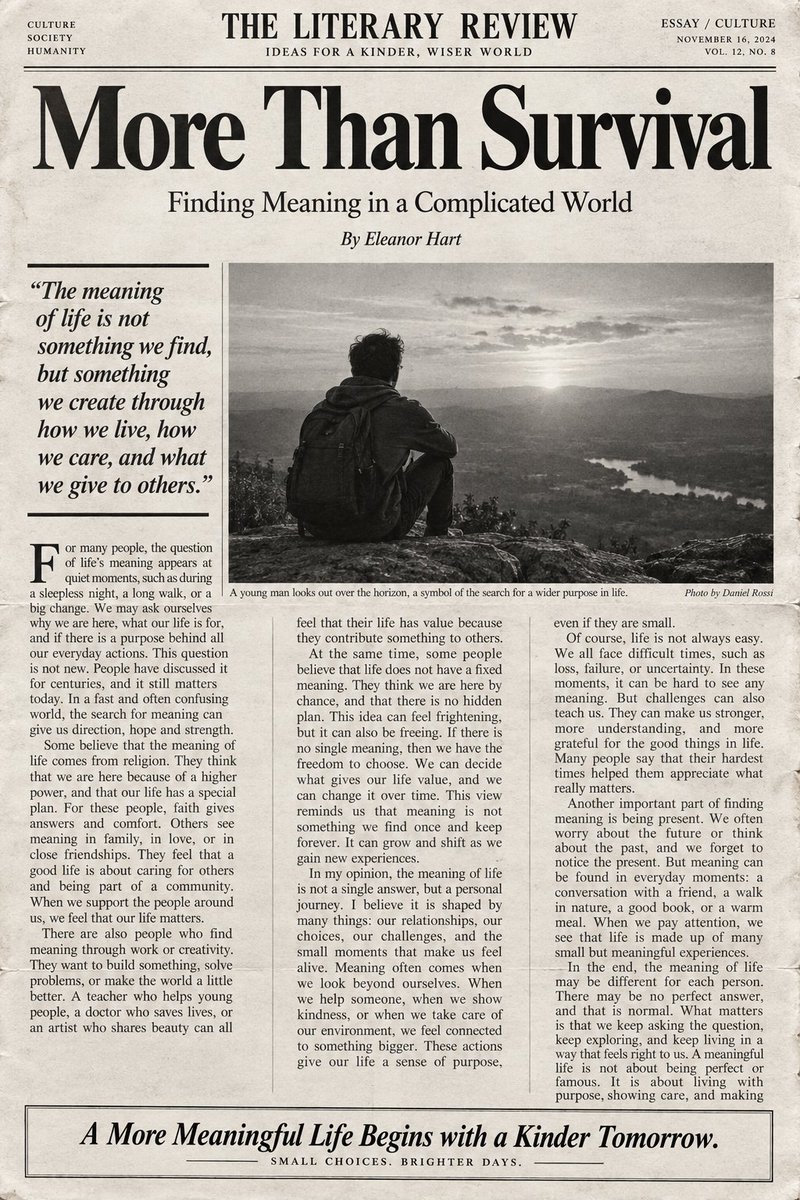
English Editorial Newspaper Layout
Generates a high-end, black-and-white editorial layout for English articles, designed for various CEFR language levels with a professional newspaper aesthetic.
This is a GPT Image 2 prompt case for Graphic & Poster. Use the copy-ready prompt below to generate similar visuals, and review Awesome GPT Image 2 Prompts attribution plus commercial-use rights before reuse.
Free 1K preview
Generate one preview image instantly, no sign-up required.
Prompt
Copy-ready prompt
Subject: {argument name="subject" default="Cultural Commentary"} / English Level: {argument name="English level" default="B2"} / Word Count: {argument name="word count" default="400"}

Generate a high-end black-and-white editorial-style English article layout that resembles a premium literary magazine, cultural journal, or newspaper feature page.

The article language must be English, and writing must strictly follow the CEFR English level specified in the first line. The English level can be A1, A2, B1, B2, C1, or C2; "Subject" is the article topic; "Word Count" is the target number of English words.

English difficulty requirements:
- A1: Very basic, high-frequency vocabulary and simple short sentences.
- A2: Common life vocabulary, simple connectives, and basic compound sentences.
- B1: Richer daily and abstract vocabulary, including reasons, examples, and opinions.
- B2: Mature argumentative expression, rich vocabulary, and complex sentence structures with logical layers.
- C1: Advanced, accurate, and natural English with literary quality.
- C2: Near-native cultural commentary or literary editorial level with nuanced rhetoric and abstract concepts.

The article must center on the specified subject and stay within ±10% of the word count. The layout should include a clean masthead at the top (e.g., "THE LITERARY REVIEW"), a large elegant high-contrast serif font for the main headline, an author byline, and a three-column editorial grid. Include a prominent bold italic pull-quote on the left and a large black-and-white documentary photograph in the center with a caption. The overall aesthetic should be restrained, rational, and scholarly, using off-white newsprint textures with slight ink bleed and grain. Only black, dark gray, and cream-white colors are allowed. The bottom should feature an information box with a large italic call to action.
Prompt variables
Editable argument placeholders found in the prompt, with their default values.
Best for
- - Graphic & Poster visual exploration
- - Image generation and reference-image edits
- - Reusable briefs that keep source attribution visible
Change these parts
- - Subject, product, character, or scene
- - Aspect ratio, camera, lighting, and background
- - Brand, text, color, and output constraints
Recommended model and settings
- - Model: gpt-image-2
- - Input mode: Text to Image
- - Aspect ratio: source
- - Commercial status: review original source
How to use this prompt
- 1. Copy the prompt and preserve its structure for the first test.
- 2. Replace the subject, context, and publishing channel.
- 3. Change one camera, lighting, or style variable per iteration.
- 4. Inspect the output, source, text, and rights before reuse.
Limitations, source, and reuse cautions
- - Generated output is an editable draft, not factual, legal, or rights evidence.
- - Review the linked source, people, brands, logos, text, and third-party media before commercial use.
More cases in this category
Prioritized by category, input mode compatibility, quality, and lower risk.
Reuse and source notes
Use this prompt safely after previewing the case.
- 1.Copy the prompt or open it directly in Dovoo with the generation button.
- 2.Adjust variables, aspect ratio, and reference images for your own use case.
- 3.Before publishing or paid usage, verify source rights, attribution requirements, and brand or likeness risks.
Can I use this prompt commercially?
Commercial-use status is allowed. Review the original source, license, brand constraints, and legal requirements before paid usage.
Where does this case come from?
This case is imported from Awesome GPT Image 2 Prompts; keep attribution visible and check the source URL before reuse.