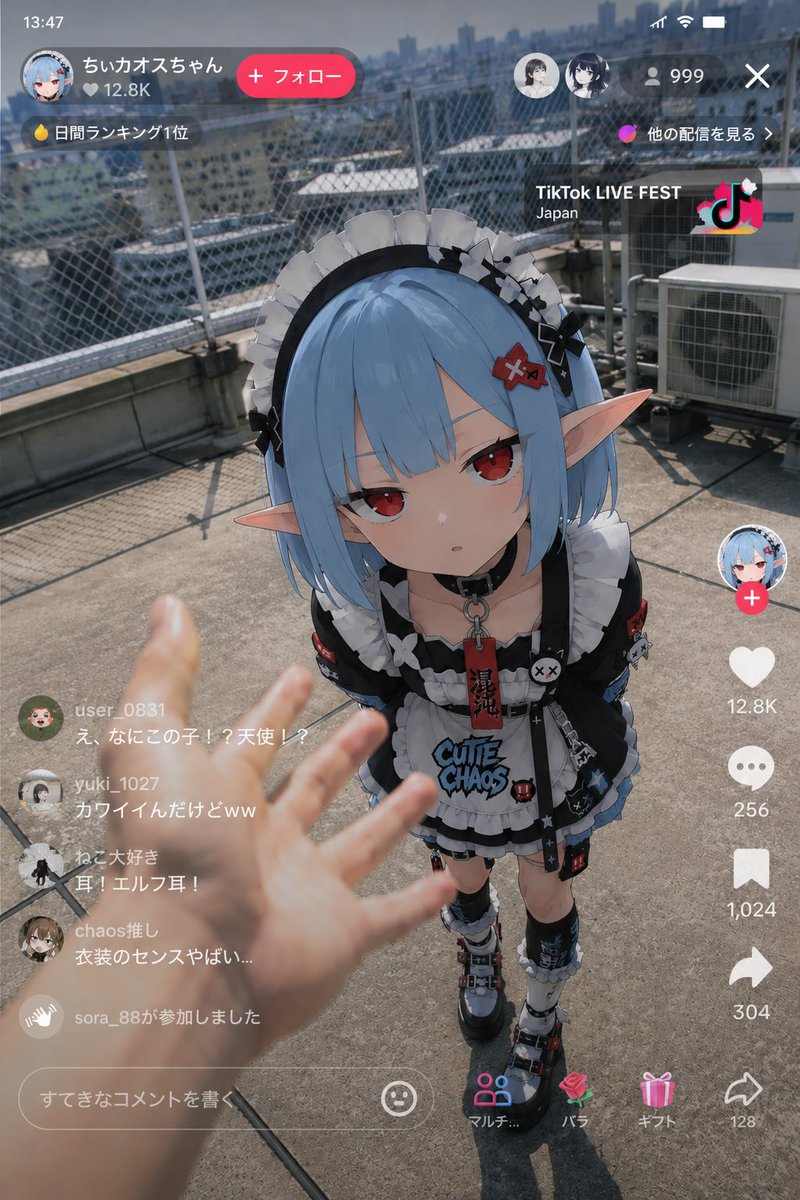
Anime Character Real-World Stream i2i
An advanced image-to-image prompt to blend anime characters into realistic smartphone livestream interfaces and urban settings with human interaction.
This is a GPT Image 2 prompt case for 动漫游戏. Use the copy-ready prompt below to generate similar visuals, and review Awesome GPT Image 2 Prompts attribution plus commercial-use rights before reuse.
Prompt
Copy-ready prompt
使用参考图像作为角色设计的基础,描绘“一个 {argument name="character" default="Anime characters"} 出现在现实世界 {argument name="scene" default="live streaming"} 中的瞬间”。

准确保持角色作为动漫插画的氛围。

绝不能破坏角色的身份特征。不要将其变成真人。角色部分需保持动漫插画的表现形式。

垂直智能手机直播屏幕。TikTok LIVE、YouTube Live、Instagram Live,常见的垂直直播 UI。

背景不固定。随机生成真实的城市空间或具有生活气息的真实空间。示例:{argument name="background example" default="建筑物屋顶"}、便利店前、游戏厅、车站前、住宅区、多租户大楼楼梯、深夜小巷、河床、卡拉 OK 前、深夜自动贩卖机旁、直播间、御宅族房间、地方城市车站前、雨中人行道、商业街等。

背景不要过于整洁。强调生活感、杂乱感和真实的噪点。

在屏幕前景自然地加入真人水平的手臂和手部。人类一侧应表现出试图触碰女孩、指点、测量距离、惊讶反应、递送食物或饮料,或在直播中意外干扰等动作。

前景的手部应略微模糊,具有浅景深效果。强调“某人在直播中意外捕捉到的画面”般的真实感。

不要做成电影海报风格。无需过度的电影化制作。不要过于完美的构图。不要有夸张的发光效果。避免 AI 特有的光泽渲染。不要堆砌过多信息。

直播 UI 应包含评论区、同时在线人数、LIVE 显示、点赞、礼物通知等。评论区应有充满怀疑的真实反应。

自然地统一光影。匹配背景和角色的环境光,如自然光、路灯、便利店灯光、显示器光等。

添加类似智能手机拍摄的质感。轻微的 HDR 处理、细微的传感器噪点、轻微的 JPEG 压缩感、自然的曝光、弱色差、轻微的镜头光晕、类似自动对焦的氛围、轻微的相机抖动以及手持拍摄特有的不稳定性。强调“SNS 上发布的神秘目击直播截图”那种偶然感,而非完美的作品。
Prompt variables
Editable argument placeholders found in the prompt, with their default values.
More cases in this category
Prioritized by category, input mode compatibility, quality, and lower risk.


Reuse and source notes
Use this prompt safely after previewing the case.
- 1.Copy the prompt or open it directly in Dovoo with the generation button.
- 2.Adjust variables, aspect ratio, and reference images for your own use case.
- 3.Before publishing or paid usage, verify source rights, attribution requirements, and brand or likeness risks.
Can I use this prompt commercially?
Commercial-use status is allowed. Review the original source, license, brand constraints, and legal requirements before paid usage.
Where does this case come from?
This case is imported from Awesome GPT Image 2 Prompts; keep attribution visible and check the source URL before reuse.