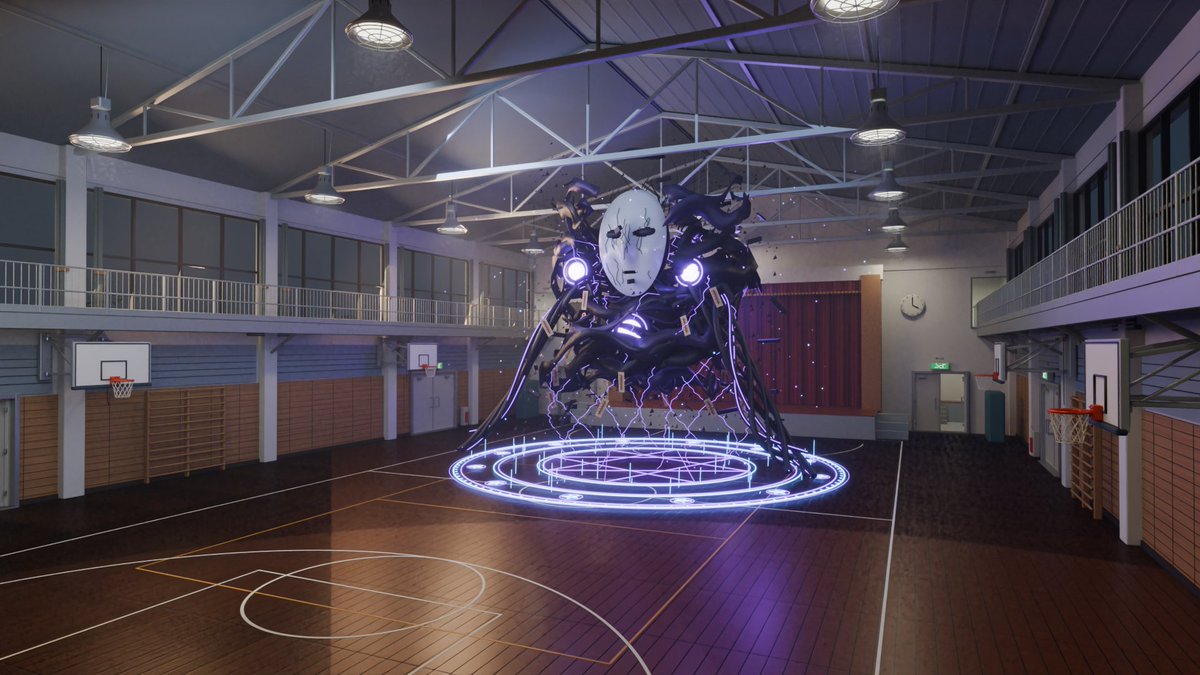
3D School Gym Boss Arena
Transforms a game-style school gym battle screenshot into a clean realistic 3D environment render without UI or player character.
This is a GPT Image 2 prompt case for Anime & Game. Use the copy-ready prompt below to generate similar visuals, and review Awesome GPT Image 2 Prompts attribution plus commercial-use rights before reuse.
Free 1K preview
Generate one preview image instantly, no sign-up required.
Free text preview doesn’t preserve reference-image consistency.
Prompt
Copy-ready prompt
Using REFERENCE_0 as the source scene, convert the game screenshot into a clean, explorable 3D environment render of the same old school gym battle arena, as if rebuilt in Blender/real-time 3D. Remove all game UI, dialogue, HUD elements, text overlays, minimap, health bars, and the player character. Keep only the gym setting and the central masked shadow spirit with its glowing purple sealing magic circle, but make the monster more like a solid 3D asset hovering above the court rather than a 2D effects-heavy apparition.

Environment changes: make the gymnasium architecturally realistic and detailed, with a polished wooden basketball court, accurate court markings, wall padding, wooden wall bars, doors, a stage with closed red curtains at the far end, side balconies/upper walkways with railings, large windows, visible steel roof trusses, and hanging industrial ceiling lamps. Include exactly 4 visible basketball hoops: two on the left wall, one at the far back, and one on the right wall. Use cool indoor evening lighting with subtle purple spill from the spirit and magic circle, realistic reflections on the lacquered floor, and a wide cinematic camera angle from an elevated spectator viewpoint.

Style: realistic 3D anime-game environment render, clean composition, high fidelity school gym details, no characters besides the summoned spirit, no interface, no captions, no watermark. The result should feel like a playable UE5/Blender level based on the reference image.
Best for
- - Anime & Game visual exploration
- - Image generation and reference-image edits
- - Reusable briefs that keep source attribution visible
Change these parts
- - Subject, product, character, or scene
- - Aspect ratio, camera, lighting, and background
- - Brand, text, color, and output constraints
Recommended model and settings
- - Model: gpt-image-2
- - Input mode: Image to Image
- - Aspect ratio: source
- - Commercial status: review original source
How to use this prompt
- 1. Copy the prompt and preserve its structure for the first test.
- 2. Replace the subject, context, and publishing channel.
- 3. Change one camera, lighting, or style variable per iteration.
- 4. Inspect the output, source, text, and rights before reuse.
Limitations, source, and reuse cautions
- - Generated output is an editable draft, not factual, legal, or rights evidence.
- - Review the linked source, people, brands, logos, text, and third-party media before commercial use.
More cases in this category
Prioritized by category, input mode compatibility, quality, and lower risk.
Reuse and source notes
Use this prompt safely after previewing the case.
- 1.Copy the prompt or open it directly in Dovoo with the generation button.
- 2.Adjust variables, aspect ratio, and reference images for your own use case.
- 3.Before publishing or paid usage, verify source rights, attribution requirements, and brand or likeness risks.
Can I use this prompt commercially?
Commercial-use status is allowed. Review the original source, license, brand constraints, and legal requirements before paid usage.
Where does this case come from?
This case is imported from Awesome GPT Image 2 Prompts; keep attribution visible and check the source URL before reuse.