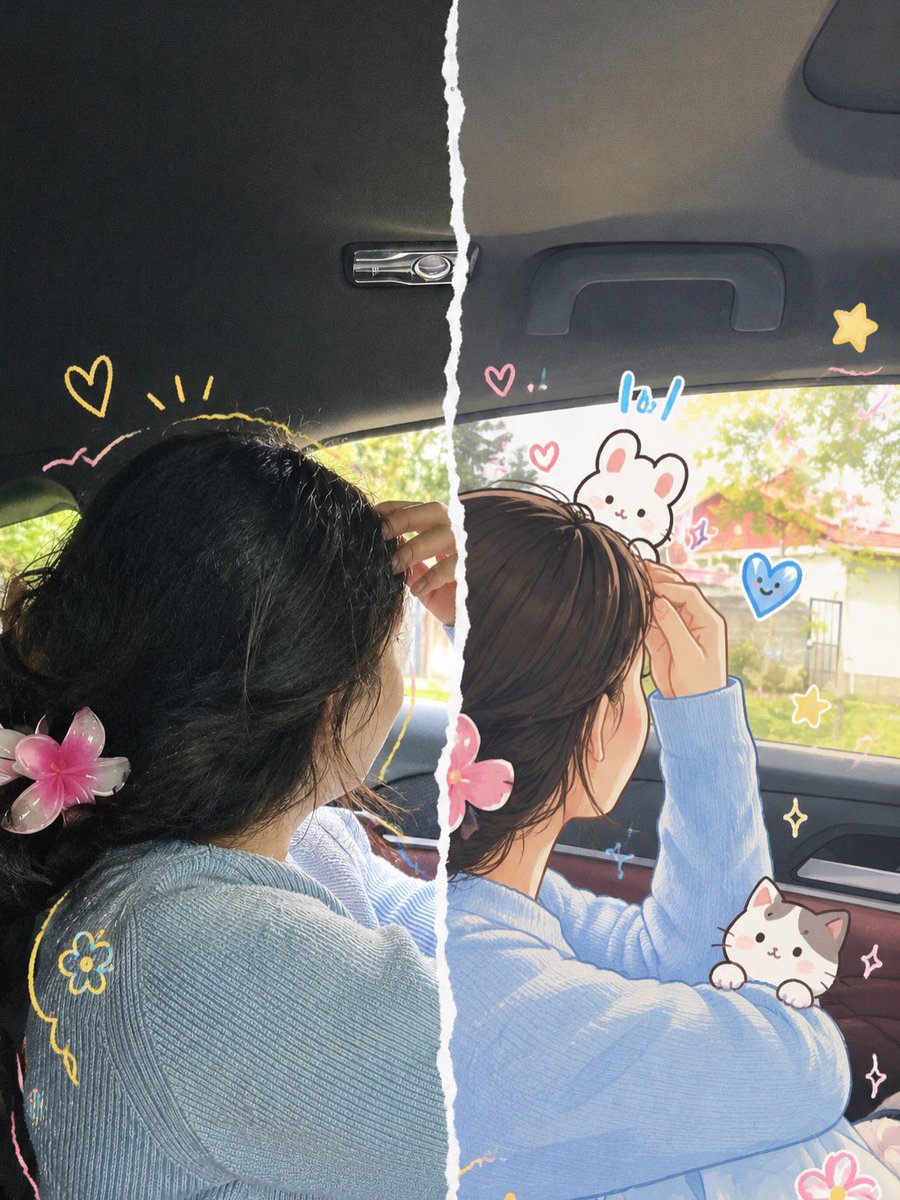
Split-Screen Photo to Anime Transformation Prompt
A prompt for GPT Image 2 that transforms an uploaded photograph into a split-screen image, with the left half remaining realistic and the right half reimagined as a cute anime illustration with hand-drawn doodles.
This is a GPT Image 2 prompt case for Anime & Game. Use the copy-ready prompt below to generate similar visuals, and review Awesome GPT Image 2 Prompts attribution plus commercial-use rights before reuse.
Free 1K preview
Generate one preview image instantly, no sign-up required.
Free text preview doesn’t preserve reference-image consistency.
Prompt
Copy-ready prompt
Transform the uploaded photograph into a beautiful split-screen, half-realistic and half-anime illustration with a cute, playful, hand-drawn aesthetic.

COMPOSITION & FORMAT
Vertical 3:4 aspect ratio. Create one seamless-looking image divided vertically down the center by an irregular, torn white paper edge. The left half shows the original photograph in realistic photographic detail, while the right half reimagines the exact same photograph as a polished, high-quality anime-inspired digital illustration. Both halves must align perfectly, with the same subject, pose, facial direction, hairstyle, clothing, accessories, camera angle, and background placement. The torn-paper edge should look naturally ripped, with rough white fibers and an organic, imperfect shape.

LEFT HALF — ORIGINAL PHOTOGRAPH
Preserve the uploaded photo as faithfully as possible. Maintain the subject's original identity, facial features, skin tone, hairstyle, expression, clothing, accessories, pose, lighting, and surroundings. Keep realistic photographic textures, natural shadows, and authentic colors. Add a few delicate, hand-drawn doodles around the subject without covering important facial features.

RIGHT HALF — ANIME ILLUSTRATION
Recreate the same scene in a sophisticated Japanese anime-inspired illustration style blended with soft Korean webtoon aesthetics. Preserve the subject's recognizable identity and original appearance. Use clean, expressive linework, delicate facial details, softly rendered skin, subtle blush, beautifully illustrated hair strands, gentle highlights, smooth shading, and refined color gradients. Keep the original outfit and accessories recognizable. Translate the background into a softly illustrated version of the original environment, preserving its composition and atmosphere.

CUTE HAND-DRAWN DOODLES
Decorate the illustrated half with charming, colorful doodles drawn directly over the image:
- Small pink and red hearts.
- Yellow and golden stars, sparkles, and flower outlines.
- Tiny white or pastel-colored cartoon cats and bunnies.
- Blue paper airplanes, dotted flight paths, and playful symbols.
- Hand-drawn curved lines, tiny crowns, cheerful accents, and whimsical decorative marks.

Use a loose, sketchbook-inspired drawing style with slightly imperfect outlines, subtle sticker-like borders, and a harmonious pastel color palette of baby blue, blush pink, butter yellow, cream, and white. Arrange the doodles naturally around the subject, following the composition and leaving the face unobstructed.

ART DIRECTION
Cute, dreamy, youthful, romantic, playful, and aesthetically pleasing. Combine authentic photography with premium anime fan-art illustration and scrapbook-inspired doodle art. Use delicate details, soft natural lighting, balanced colors, and a clean, professionally finished appearance.

IMPORTANT RULES
1. Preserve the original person's identity and recognizable appearance.
2. Keep the left half photographic
Best for
- - Anime & Game visual exploration
- - Image generation and reference-image edits
- - Reusable briefs that keep source attribution visible
Change these parts
- - Subject, product, character, or scene
- - Aspect ratio, camera, lighting, and background
- - Brand, text, color, and output constraints
Recommended model and settings
- - Model: gpt-image-2
- - Input mode: Image to Image
- - Aspect ratio: source
- - Commercial status: review original source
How to use this prompt
- 1. Copy the prompt and preserve its structure for the first test.
- 2. Replace the subject, context, and publishing channel.
- 3. Change one camera, lighting, or style variable per iteration.
- 4. Inspect the output, source, text, and rights before reuse.
Limitations, source, and reuse cautions
- - Generated output is an editable draft, not factual, legal, or rights evidence.
- - Review the linked source, people, brands, logos, text, and third-party media before commercial use.
More cases in this category
Prioritized by category, input mode compatibility, quality, and lower risk.
Reuse and source notes
Use this prompt safely after previewing the case.
- 1.Copy the prompt or open it directly in Dovoo with the generation button.
- 2.Adjust variables, aspect ratio, and reference images for your own use case.
- 3.Before publishing or paid usage, verify source rights, attribution requirements, and brand or likeness risks.
Can I use this prompt commercially?
Commercial-use status is allowed. Review the original source, license, brand constraints, and legal requirements before paid usage.
Where does this case come from?
This case is imported from Awesome GPT Image 2 Prompts; keep attribution visible and check the source URL before reuse.