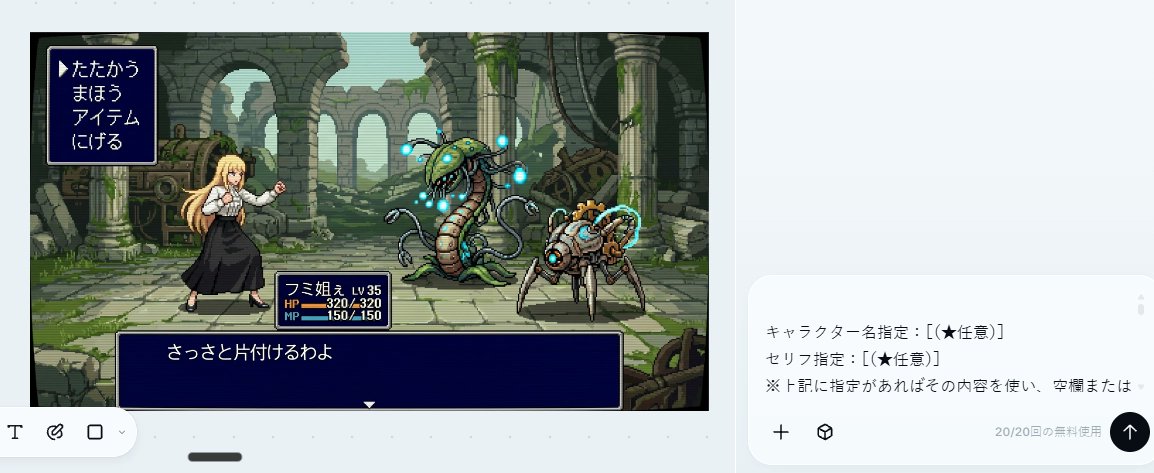
16-Bit RPG Battle Screen
Transforms a reference character into a retro Japanese 16-bit command RPG battle scene with enemies, pixel-art ruins, and classic UI boxes.
This is a GPT Image 2 prompt case for 动漫游戏. Use the copy-ready prompt below to generate similar visuals, and review Awesome GPT Image 2 Prompts attribution plus commercial-use rights before reuse.
Prompt
Copy-ready prompt
以提供的参考图像作为角色来源,将其转换为 16 位元像素风格的指令式 RPG 战斗画面。保留原角色的服装、金色长发、整体轮廓以及无脸/模糊面部的处理方式,但将其重绘为站在左侧、处于战斗准备姿态的可操作战斗精灵。

目标:创作一个复古日式奇幻 RPG 战斗场景,类似于超级任天堂 (Super Famicom) / 16 位元时代的指令式战斗画面。

场景添加:添加一个古老的废墟石制竞技场背景,包含破损的拱门、柱子、苔藓、藤蔓、散落的机械装置以及大气深度感。在右侧放置 2 个怪物:1 个带有发光蓝色球体的高大植物/蛇形机械怪物,以及 1 个带有青色能量环的小型蜘蛛状机械生物。

UI 布局:添加 3 个带有细白边框的深蓝色 RPG 界面框:左上角 1 个指令菜单,左下方附近 1 个角色状态框,底部 1 个对话框。

文本:指令菜单必须包含 4 个垂直排列的日文选项:「たたかう」、「まほう」、「アイテム」、「にげる」,并带有一个指向第一个选项的三角形光标。状态框应显示 {argument name="character name" default="フミ姐ぇ"}、LV 35、HP 320/320 以及 MP 150/150。底部对话框应显示 {argument name="battle line" default="さっさと片付けるわよ"}。

风格限制:使用清晰的 16 位元像素艺术、有限的调色板、可见的像素边缘、侧视 RPG 构图,禁止使用现代 UI、禁止写实风格、禁止添加额外角色、禁止添加额外菜单项、禁止添加水印。
Prompt variables
Editable argument placeholders found in the prompt, with their default values.
More cases in this category
Prioritized by category, input mode compatibility, quality, and lower risk.



Reuse and source notes
Use this prompt safely after previewing the case.
- 1.Copy the prompt or open it directly in Dovoo with the generation button.
- 2.Adjust variables, aspect ratio, and reference images for your own use case.
- 3.Before publishing or paid usage, verify source rights, attribution requirements, and brand or likeness risks.
Can I use this prompt commercially?
Commercial-use status is allowed. Review the original source, license, brand constraints, and legal requirements before paid usage.
Where does this case come from?
This case is imported from Awesome GPT Image 2 Prompts; keep attribution visible and check the source URL before reuse.