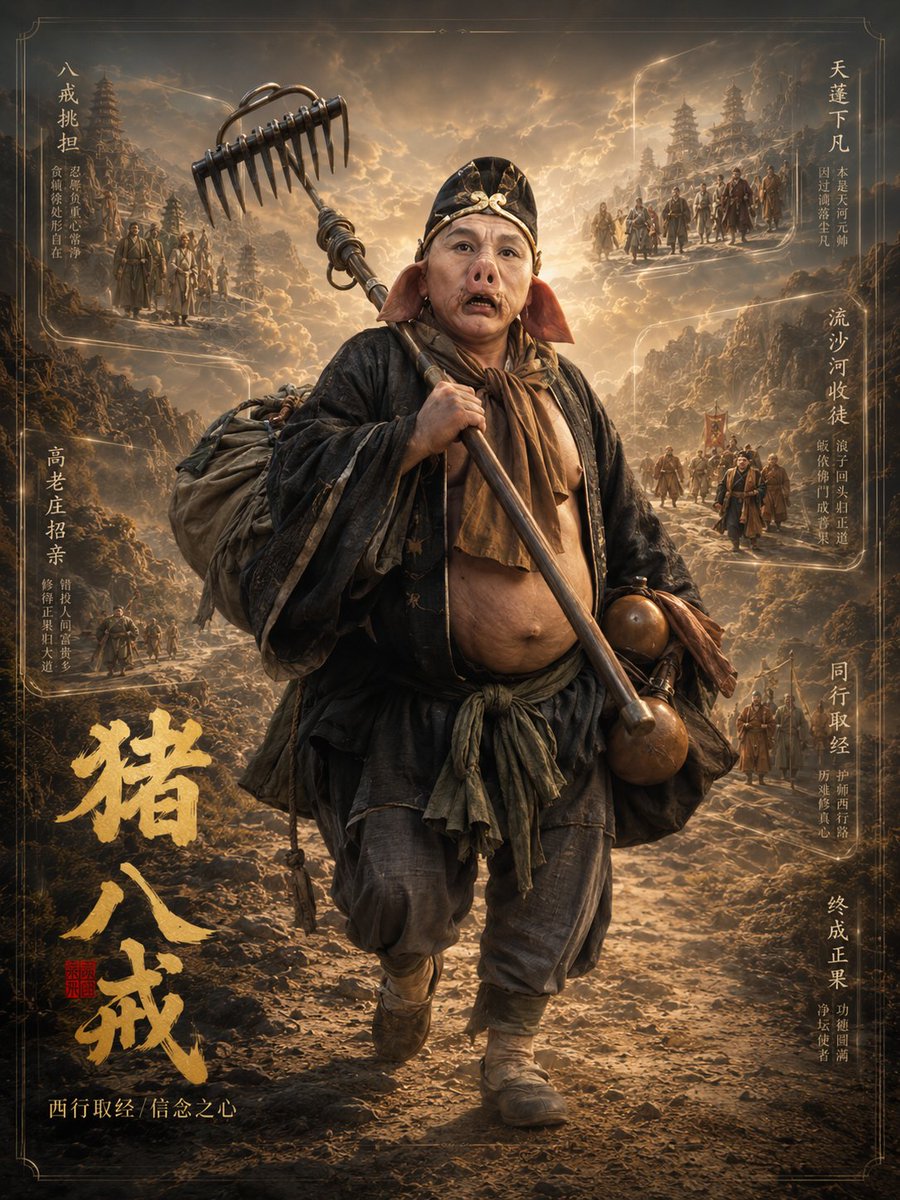
Zhu Bajie 3D Character Poster
A cinematic 3D fantasy character-profile poster of Zhu Bajie from Journey to the West with ornate Chinese calligraphy and mythic story vignettes.
This is a GPT Image 2 prompt case for 人像角色. Use the copy-ready prompt below to generate similar visuals, and review Awesome GPT Image 2 Prompts attribution plus commercial-use rights before reuse.
Prompt
Copy-ready prompt
目标:为 {argument name="character name" default="Pigsy"} 创作一张电影级竖版奇幻角色档案海报,灵感源自《西游记》,将角色呈现为超写实 3D 全身立像,周围环绕充满神话色彩的叙事小图。

画布:竖版海报,3:4 比例,深青铜色与金色调,带有精致的细边框和边角装饰,高细节奇幻电影主视觉图。使用温暖的夕阳逆光、烟雾缭绕的云层、崎岖的山路、古老的中国宝塔、尘埃以及闪耀的金色高光。

主体:中央为一个全身立像,一位体型魁梧的僧侣战士正沿着岩石小路向观众走来。他身材敦实,露出肚皮,身穿层叠破旧的黑褐色长袍、围巾、布腰带、宽松长裤、裹腿靴,背着一个巨大的行囊。他的面部被一个平滑的矩形模糊/遮罩刻意遮挡,而身体其余部分保持清晰写实。他肩上斜扛着 {argument name="weapon" default="九齿钉耙"};金属耙头向上延伸,突破主画框,营造出强烈的 3D 出框效果。腰间挂着两个棕色葫芦和一些小型旅行用品。

背景与叙事元素:在中央人物周围包含 6 个电影级叙事小图,融入朦胧的景观中,如同发光的记忆画框。左侧有 2 个标注小图:左上角为取经队伍场景,标注「戒挑担」,配有较小的装饰性竖排Chinese;中左侧为村庄或婚嫁相关场景,标注「高老庄招亲」,配有较小的装饰性竖排Chinese。右侧有 4 个标注小图:右上角为天庭降临场景,标注「天蓬下凡」;中右侧为河中相遇场景,标注「流沙河收徒」;中下右侧为取经团队场景,标注「同行取经」;右下角为成就/觉悟场景,标注「终成正果」,每个小图均配有小型竖排Chinese注释。所有小图应展示山路或梯田上微小的僧侣身影,并与整体的深褐色-金色电影光影保持一致。

文字内容:在左下方添加一个醒目的金色粗体毛笔书法标题,内容为 {argument name="large title text" default="Pigsy"}。在标题旁添加一枚红色小印章。在左下角沿底部添加一行金色小字副标题,内容为 {argument name="subtitle text" default="西行取经/信念之心"}。保留上述列出的 6 个Chinese小图标签,按垂直排列,仅允许添加额外的较小Chinese填充文字作为海报装饰排版。

视觉风格:超细节 3D 角色渲染与中国神话绘景相结合,史诗级奇幻写实风格,戏剧性的体积光,做旧的织物纹理,华丽的历史海报设计,金色尘埃颗粒,高对比度,电影级景深,油画质感的云雾与山峦。

约束:仅使用一个中心角色,仅使用一件主武器,精确包含 6 个带标签的叙事小图,一个大书法标题,以及一枚红印章。不要添加现代物品、Logo 或前景中的额外角色。保持面部模糊/遮罩作为构图的一部分。
Prompt variables
Editable argument placeholders found in the prompt, with their default values.
More cases in this category
Prioritized by category, input mode compatibility, quality, and lower risk.
Reuse and source notes
Use this prompt safely after previewing the case.
- 1.Copy the prompt or open it directly in Dovoo with the generation button.
- 2.Adjust variables, aspect ratio, and reference images for your own use case.
- 3.Before publishing or paid usage, verify source rights, attribution requirements, and brand or likeness risks.
Can I use this prompt commercially?
Commercial-use status is allowed. Review the original source, license, brand constraints, and legal requirements before paid usage.
Where does this case come from?
This case is imported from Awesome GPT Image 2 Prompts; keep attribution visible and check the source URL before reuse.