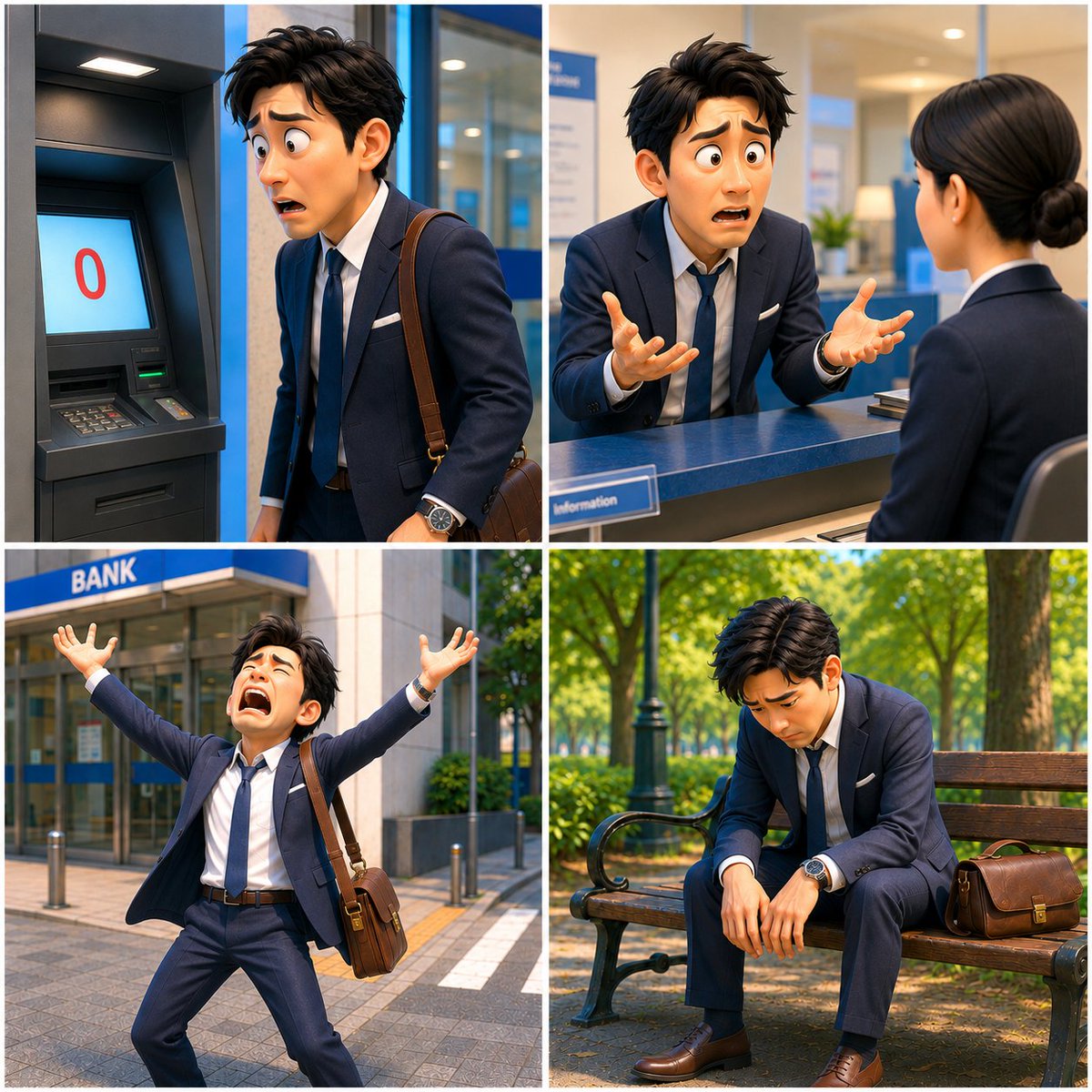
Zero Balance Bank Storyboard
A four-panel photorealistic storyboard of a Japanese businessman discovering a zero bank balance and spiraling into despair.
This is a GPT Image 2 prompt case for Illustration & Art. Use the copy-ready prompt below to generate similar visuals, and review Awesome GPT Image 2 Prompts attribution plus commercial-use rights before reuse.
Free 1K preview
Generate one preview image instantly, no sign-up required.
Free text preview doesn’t preserve reference-image consistency.
Prompt
Copy-ready prompt
Goal: Create a cinematic 2x2 storyboard collage for a short dramatic video titled {argument name="story title" default="Zero Balance Despair"}, showing one Japanese salaryman discovering he has no money and falling into despair.

Canvas: Square 1:1 image, divided into exactly 4 equal panels with thin white gutters. Photorealistic, high-resolution, cinematic lighting, realistic Japanese urban bank environment. Keep the same main character, outfit, hairstyle, watch, and brown leather shoulder bag across all panels. Show every face clearly with natural, detailed facial features.

Main character: A young adult Japanese businessman, {argument name="character description" default="messy black hair, navy suit, white dress shirt, loosened navy tie, brown dress shoes, silver wristwatch, brown leather shoulder bag"}. He looks exhausted, panicked, and emotionally overwhelmed.

Panel count and contents: Use exactly 4 panels.
1. Top-left panel: Inside or beside a bank ATM booth. The ATM screen clearly displays a large red “0” on a pale blue screen, indicating a zero balance. The businessman stands close to the ATM, shoulders tense, looking devastated, with his leather bag strap over one shoulder.
2. Top-right panel: At a bank service counter. The businessman leans forward toward a female bank clerk in a navy uniform, gesturing desperately with both hands open. The bank interior is clean and modern, with a blue counter, glass partitions, small signage, and warm office lighting.
3. Bottom-left panel: Outside the bank entrance. A blue sign above the door reads {argument name="bank sign text" default="BANK"}. The businessman stands on the sidewalk in front of the bank with both arms thrown upward in panic, tie loosened, jacket open, brown shoulder bag hanging at his side. Bright daylight, urban street details, bollards, paving stones, and greenery.
4. Bottom-right panel: In a quiet park. The businessman sits slumped on a wooden bench, head bowed, arms hanging down, defeated. His brown leather bag rests on the bench beside him. Include trees, dappled sunlight, green shrubs, and a calm background that contrasts with his despair.

Visual style: Photorealistic Japanese commercial-drama stills, consistent character continuity, natural depth of field, sharp clothing detail, realistic bank and park locations, vivid but believable colors, emotional storytelling. No cartoon style, no extra panels, no captions except the ATM “0” and the exterior bank sign.
Prompt variables
Editable argument placeholders found in the prompt, with their default values.
Best for
- - Illustration & Art visual exploration
- - Image generation and reference-image edits
- - Reusable briefs that keep source attribution visible
Change these parts
- - Subject, product, character, or scene
- - Aspect ratio, camera, lighting, and background
- - Brand, text, color, and output constraints
Recommended model and settings
- - Model: gpt-image-2
- - Input mode: Image to Image
- - Aspect ratio: source
- - Commercial status: review original source
How to use this prompt
- 1. Copy the prompt and preserve its structure for the first test.
- 2. Replace the subject, context, and publishing channel.
- 3. Change one camera, lighting, or style variable per iteration.
- 4. Inspect the output, source, text, and rights before reuse.
Limitations, source, and reuse cautions
- - Generated output is an editable draft, not factual, legal, or rights evidence.
- - Review the linked source, people, brands, logos, text, and third-party media before commercial use.
More cases in this category
Prioritized by category, input mode compatibility, quality, and lower risk.


Reuse and source notes
Use this prompt safely after previewing the case.
- 1.Copy the prompt or open it directly in Dovoo with the generation button.
- 2.Adjust variables, aspect ratio, and reference images for your own use case.
- 3.Before publishing or paid usage, verify source rights, attribution requirements, and brand or likeness risks.
Can I use this prompt commercially?
Commercial-use status is allowed. Review the original source, license, brand constraints, and legal requirements before paid usage.
Where does this case come from?
This case is imported from Awesome GPT Image 2 Prompts; keep attribution visible and check the source URL before reuse.