Anti-AI Rhetoric Reactions Part 1
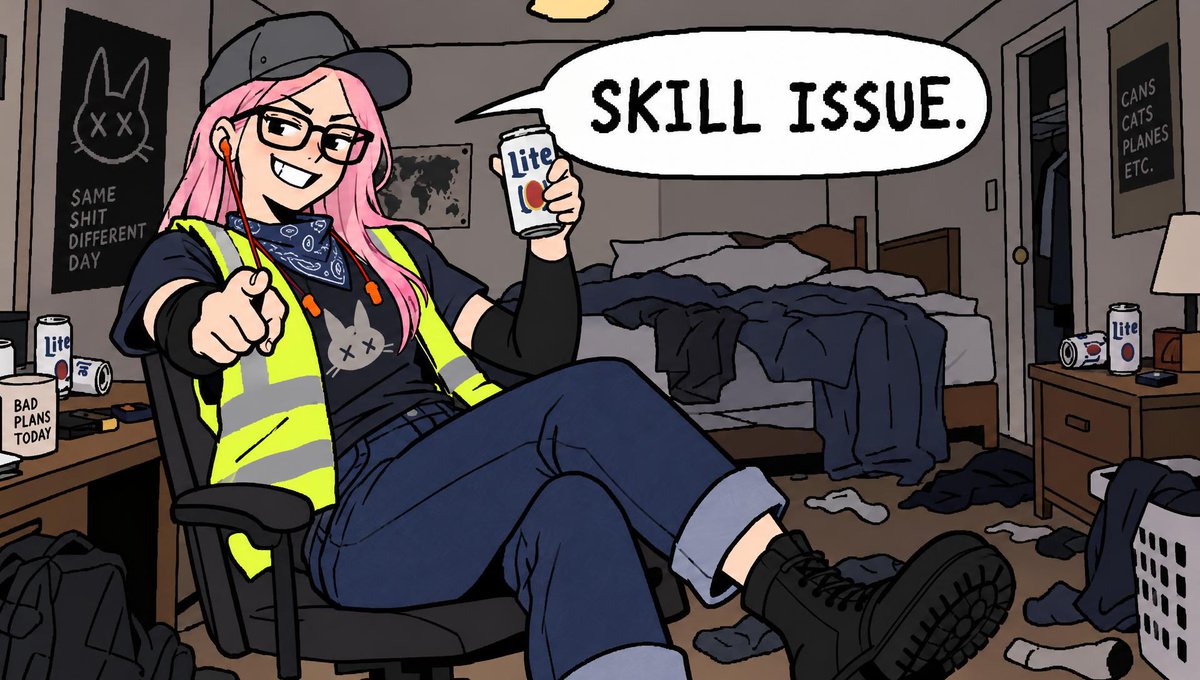
A comic-style illustration of a pink-haired woman in a hi-vis vest sitting in an office chair, holding a beer and pointing at the viewer with a speech bubble saying 'Skill Issue.'
This is a GPT Image 2 prompt case for Illustration & Art. Use the copy-ready prompt below to generate similar visuals, and review Awesome GPT Image 2 Prompts attribution plus commercial-use rights before reuse.
Free 1K preview
Generate one preview image instantly, no sign-up required.
Free text preview doesn’t preserve reference-image consistency.
Prompt
Copy-ready prompt
Using the provided reference image, regenerate the character in a new pose and context. Keep the character's appearance (pink hair, glasses, cap, hi-vis vest) unchanged.

**Transformation Instructions:**
1. **Pose & Expression:** Change the character from standing to sitting casually in an office chair with legs crossed. Update her expression from angry/shouting to a smug, confident smirk. She is now pointing directly at the viewer with one hand while holding a can up in the other.
2. **Dialogue:** Replace the original speech bubble text with "SKILL ISSUE." in bold, black capital letters.
3. **Props & Details:**
   - Swap the "Steel Reserve" can for a generic white "Lite" beer can.
   - Add red wired earphones hanging from her ears.
   - Place a small grey cat plushie on her chest/vest area.
4. **Background Changes:**
   - Modify the poster on the left wall to feature a simple line-drawing of a cat face with X eyes above the text "SAME SHIT DIFFERENT DAY".
   - Add a new poster on the right wall that reads "CANS CATS PLANES ETC.".
   - Include a mug on the desk that says "BAD PLANS TODAY".
Best for
- - Illustration & Art visual exploration
- - Image generation and reference-image edits
- - Reusable briefs that keep source attribution visible
Change these parts
- - Subject, product, character, or scene
- - Aspect ratio, camera, lighting, and background
- - Brand, text, color, and output constraints
Recommended model and settings
- - Model: gpt-image-2
- - Input mode: Image to Image
- - Aspect ratio: source
- - Commercial status: review original source
How to use this prompt
- 1. Copy the prompt and preserve its structure for the first test.
- 2. Replace the subject, context, and publishing channel.
- 3. Change one camera, lighting, or style variable per iteration.
- 4. Inspect the output, source, text, and rights before reuse.
Limitations, source, and reuse cautions
- - Generated output is an editable draft, not factual, legal, or rights evidence.
- - Review the linked source, people, brands, logos, text, and third-party media before commercial use.
More cases in this category
Prioritized by category, input mode compatibility, quality, and lower risk.




Reuse and source notes
Use this prompt safely after previewing the case.
- 1.Copy the prompt or open it directly in Dovoo with the generation button.
- 2.Adjust variables, aspect ratio, and reference images for your own use case.
- 3.Before publishing or paid usage, verify source rights, attribution requirements, and brand or likeness risks.
Can I use this prompt commercially?
Commercial-use status is allowed. Review the original source, license, brand constraints, and legal requirements before paid usage.
Where does this case come from?
This case is imported from Awesome GPT Image 2 Prompts; keep attribution visible and check the source URL before reuse.