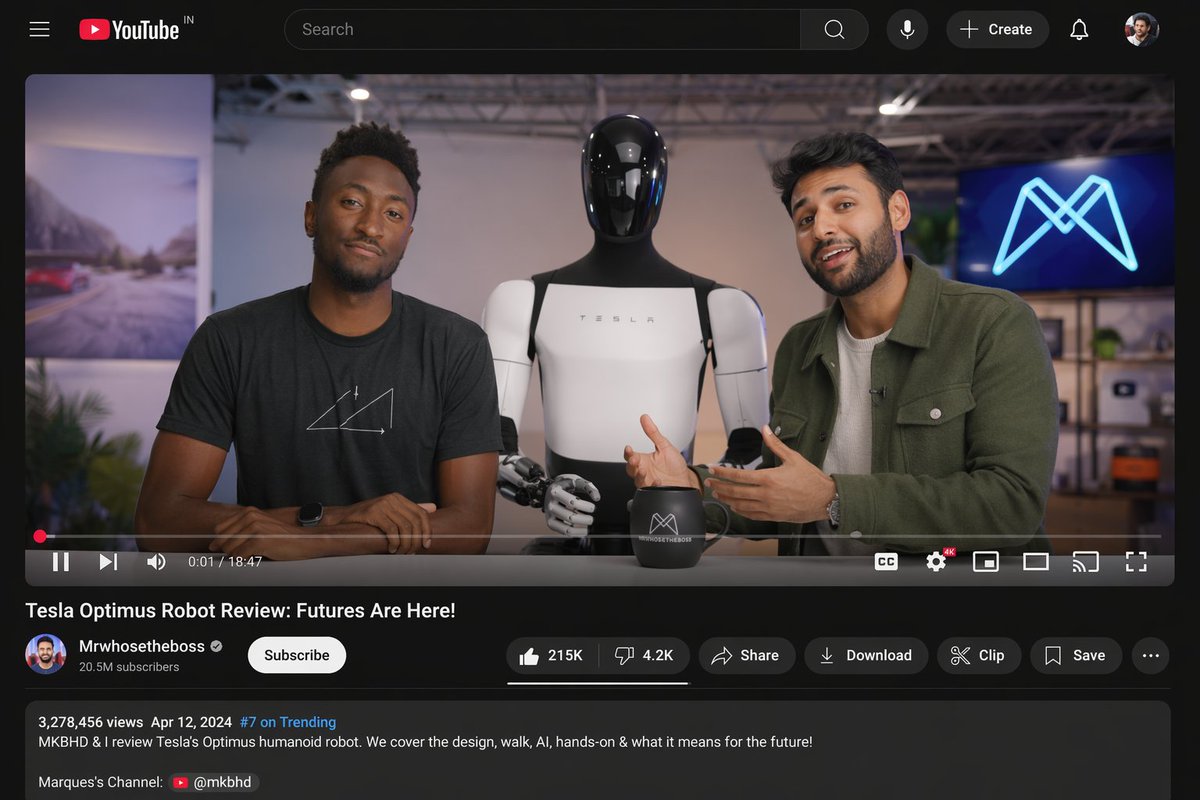
YouTube Video Interface Mockup
Generates a realistic desktop YouTube interface featuring a tech review video with customizable hosts, robot subject, and video metadata.
This is a GPT Image 2 prompt case for Graphic & Poster. Use the copy-ready prompt below to generate similar visuals, and review Awesome GPT Image 2 Prompts attribution plus commercial-use rights before reuse.
Free 1K preview
Generate one preview image instantly, no sign-up required.
Prompt
Copy-ready prompt
{
  "type": "desktop video platform UI mockup",
  "theme": "dark mode",
  "header": {
    "logo": "YouTube IN",
    "search_bar": "centered, with magnifying glass icon",
    "right_icons": {
      "count": 4,
      "items": [
        "mic",
        "+ Create button",
        "notifications bell",
        "user profile picture"
      ]
    }
  },
  "video_player": {
    "scene": "Studio setting with two tech reviewers at a desk.",
    "subjects": [
      "{argument name=\"left person\" default=\"Marques Brownlee (MKBHD)\"} in black t-shirt",
      "{argument name=\"right person\" default=\"Arun Maini (Mrwhosetheboss)\"} in green overshirt",
      "{argument name=\"robot model\" default=\"Tesla Optimus humanoid robot\"} standing between them"
    ],
    "props": [
      "black mug with logo",
      "background screen with glowing blue neon M logo"
    ],
    "controls_bar": {
      "progress_bar": "red, near the beginning",
      "timestamp": "0:01 / 18:47",
      "left_icons": {
        "count": 3,
        "items": [
          "play/pause",
          "next track",
          "volume"
        ]
      },
      "right_icons": {
        "count": 6,
        "items": [
          "CC",
          "settings with 4K badge",
          "miniplayer",
          "theater mode",
          "cast",
          "fullscreen"
        ]
      }
    }
  },
  "video_details": {
    "title": "{argument name=\"video title\" default=\"Tesla Optimus Robot Review: Futures Are Here!\"}",
    "channel_info": {
      "name": "{argument name=\"channel name\" default=\"Mrwhosetheboss\"}",
      "badges": [
        "verified checkmark"
      ],
      "subscribers": "20.5M subscribers",
      "button": "white Subscribe button"
    },
    "action_buttons": {
      "count": 6,
      "items": [
        "Like (215K) / Dislike (4.2K) pill",
        "share",
        "Download",
        "Clip",
        "Save",
        "More (...)"
      ]
    }
  },
  "description_box": {
    "metadata": "3,278,456 views Apr 12, 2024 #7 on Trending",
    "text": "MKBHD & I review Tesla's Optimus humanoid robot. We cover the design, walk, AI, hands-on & what it means for the future!",
    "links": [
      "Marques's Channel: @mkbhd"
    ]
  }
}
Prompt variables
Editable argument placeholders found in the prompt, with their default values.
Best for
- - Graphic & Poster visual exploration
- - Image generation and reference-image edits
- - Reusable briefs that keep source attribution visible
Change these parts
- - Subject, product, character, or scene
- - Aspect ratio, camera, lighting, and background
- - Brand, text, color, and output constraints
Recommended model and settings
- - Model: gpt-image-2
- - Input mode: Text to Image
- - Aspect ratio: source
- - Commercial status: review original source
How to use this prompt
- 1. Copy the prompt and preserve its structure for the first test.
- 2. Replace the subject, context, and publishing channel.
- 3. Change one camera, lighting, or style variable per iteration.
- 4. Inspect the output, source, text, and rights before reuse.
Limitations, source, and reuse cautions
- - Generated output is an editable draft, not factual, legal, or rights evidence.
- - Review the linked source, people, brands, logos, text, and third-party media before commercial use.
More cases in this category
Prioritized by category, input mode compatibility, quality, and lower risk.
Reuse and source notes
Use this prompt safely after previewing the case.
- 1.Copy the prompt or open it directly in Dovoo with the generation button.
- 2.Adjust variables, aspect ratio, and reference images for your own use case.
- 3.Before publishing or paid usage, verify source rights, attribution requirements, and brand or likeness risks.
Can I use this prompt commercially?
Commercial-use status is allowed. Review the original source, license, brand constraints, and legal requirements before paid usage.
Where does this case come from?
This case is imported from Awesome GPT Image 2 Prompts; keep attribution visible and check the source URL before reuse.