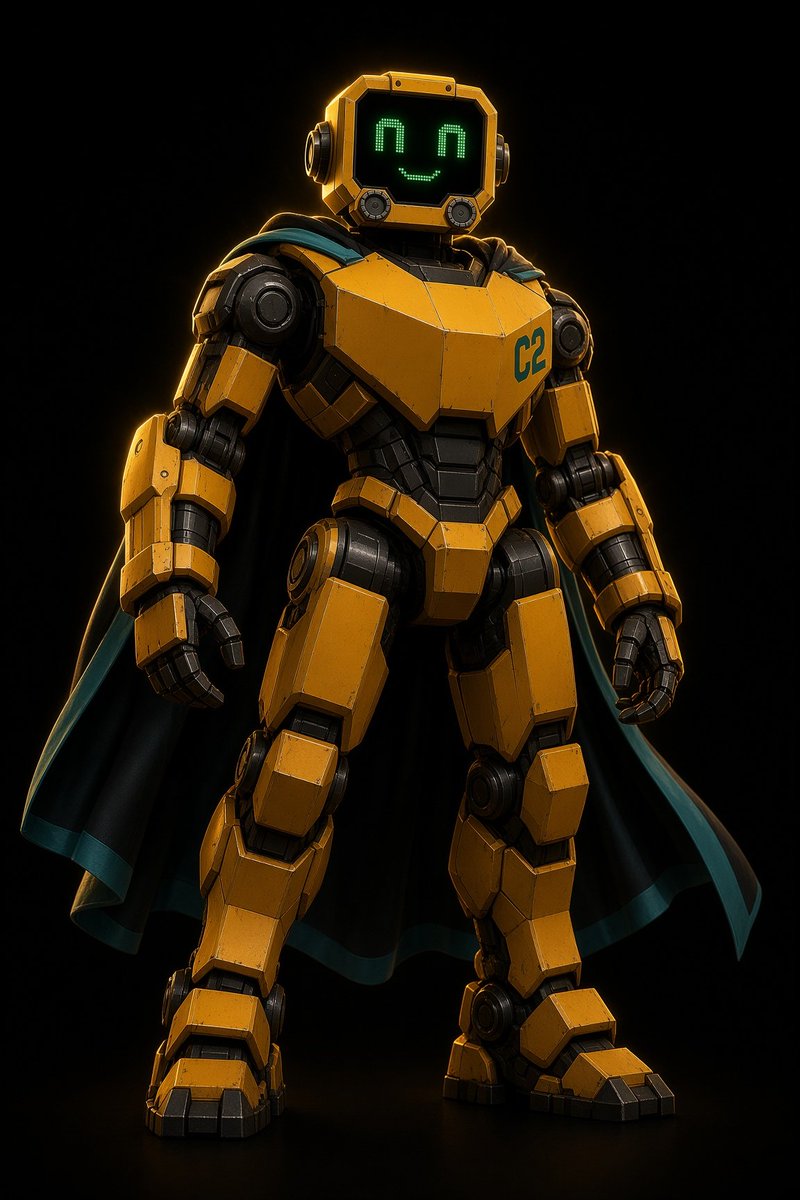
Heroic Yellow Robot with Cape
A cinematic full-body render prompt for creating a clean armored yellow robot mascot with a pixel smile and dramatic cape.
This is a GPT Image 2 prompt case for Portrait & Character. Use the copy-ready prompt below to generate similar visuals, and review Awesome GPT Image 2 Prompts attribution plus commercial-use rights before reuse.
Free 1K preview
Generate one preview image instantly, no sign-up required.
Prompt
Copy-ready prompt
Create a clean, high-detail full-body 3D character render of {argument name="character name" default="Solip"}, a friendly heroic humanoid robot standing in a confident front-facing pose against a pure black studio background. The robot has a bulky armored mech body made of angular mustard-yellow metal panels with black mechanical joints, subtle scratches, beveled edges, and realistic wear. Its head is a square yellow helmet-like monitor with rounded corners, side circular ear modules, a glossy black screen face, and a cute green LED pixel expression: exactly 2 upside-down U-shaped eyes and 1 smiling curved mouth. Add the teal marking {argument name="chest label" default="C2"} on the upper right chest plate. The robot wears exactly 1 dramatic black cape flowing behind both shoulders, with a teal inner lining and teal trim visible along the edges. Include detailed segmented arms, articulated black fingers, large shoulder rings, piston-like elbows, thick armored thighs, knee plates, heavy boot-like feet, and exposed dark understructure between plates. Use cinematic low-key lighting with warm golden rim light from the upper left, crisp reflections on metal, deep shadows, a subtle floor reflection, and an ultra-clean premium sci-fi toy/film render look. Center the character vertically in a portrait composition, slightly low camera angle, sharp focus, no background props, no extra characters, no text except the chest label.Prompt variables
Editable argument placeholders found in the prompt, with their default values.
Best for
- - Portrait & Character visual exploration
- - Image generation and reference-image edits
- - Reusable briefs that keep source attribution visible
Change these parts
- - Subject, product, character, or scene
- - Aspect ratio, camera, lighting, and background
- - Brand, text, color, and output constraints
Recommended model and settings
- - Model: gpt-image-2
- - Input mode: Text to Image
- - Aspect ratio: source
- - Commercial status: review original source
How to use this prompt
- 1. Copy the prompt and preserve its structure for the first test.
- 2. Replace the subject, context, and publishing channel.
- 3. Change one camera, lighting, or style variable per iteration.
- 4. Inspect the output, source, text, and rights before reuse.
Limitations, source, and reuse cautions
- - Generated output is an editable draft, not factual, legal, or rights evidence.
- - Review the linked source, people, brands, logos, text, and third-party media before commercial use.
More cases in this category
Prioritized by category, input mode compatibility, quality, and lower risk.

Reuse and source notes
Use this prompt safely after previewing the case.
- 1.Copy the prompt or open it directly in Dovoo with the generation button.
- 2.Adjust variables, aspect ratio, and reference images for your own use case.
- 3.Before publishing or paid usage, verify source rights, attribution requirements, and brand or likeness risks.
Can I use this prompt commercially?
Commercial-use status is allowed. Review the original source, license, brand constraints, and legal requirements before paid usage.
Where does this case come from?
This case is imported from Awesome GPT Image 2 Prompts; keep attribution visible and check the source URL before reuse.