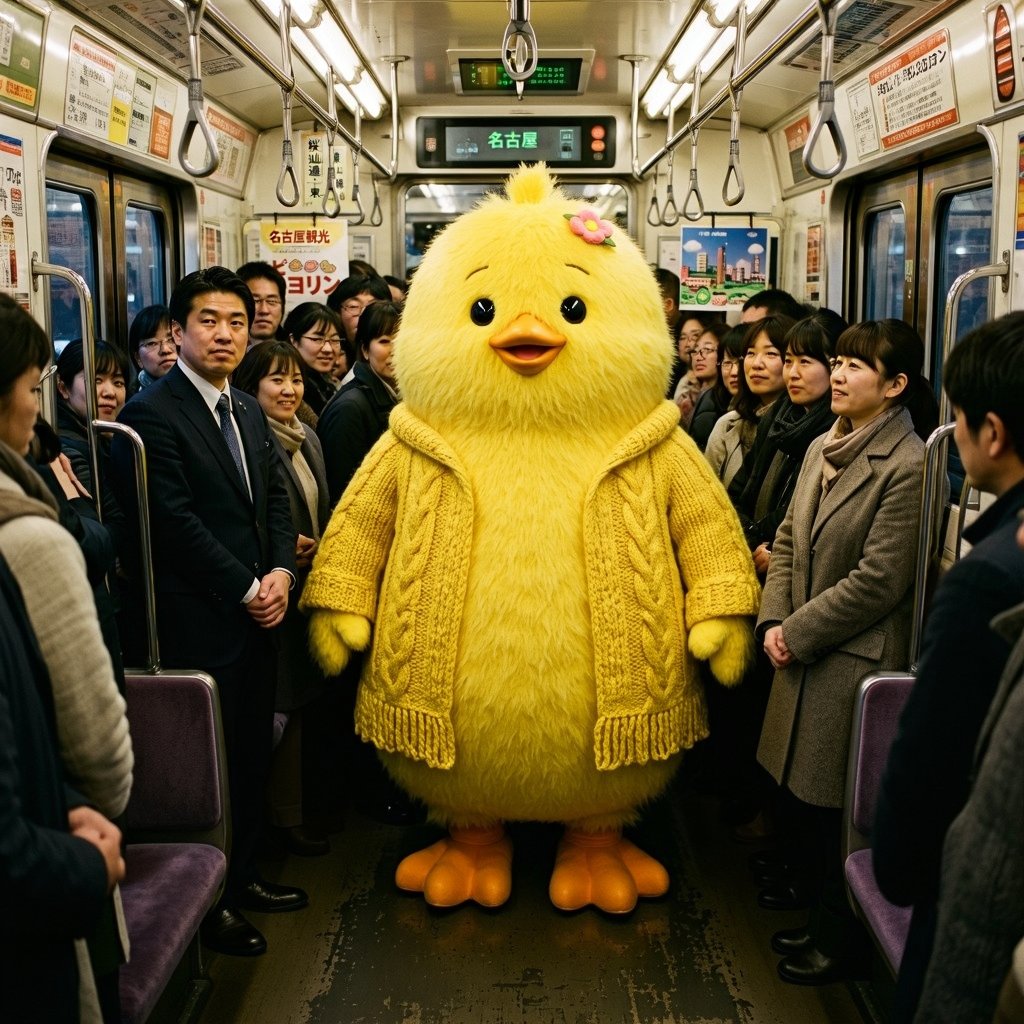
Yellow Chick Mascot on Japanese Train
A photorealistic surreal commuter-train scene featuring a giant fluffy yellow chick mascot among anonymized passengers.
This is a GPT Image 2 prompt case for Portrait & Character. Use the copy-ready prompt below to generate similar visuals, and review Awesome GPT Image 2 Prompts attribution plus commercial-use rights before reuse.
Free 1K preview
Generate one preview image instantly, no sign-up required.
Prompt
Copy-ready prompt
Create a photorealistic, slightly whimsical scene inside a crowded Japanese commuter train in {argument name="city" default="Nagoya"}. In the exact center aisle stands a large life-size mascot character: a round fluffy {argument name="animal" default="yellow chick"} with soft shaggy fur, black glossy eyes, a small orange beak, orange webbed feet, tiny wings, and a small pink flower hair clip near the top of its head. Dress the mascot in a chunky knitted {argument name="clothing item" default="mustard-yellow cable-knit cardigan"} with visible braided patterns and fringe at the hem, matching the body color. Surround it with standing adult commuters in winter business attire and coats, lined along both sides of the aisle; their faces should appear intentionally blurred or anonymized. The train interior should be realistic and dense: silver handrails, hanging strap handles, fluorescent ceiling lights, purple seats at the sides, worn dark floor, windows and sliding doors, and Japanese advertisement posters throughout. Include overhead digital route signs, one prominently showing {argument name="destination text" default="Nagoya"} in green Japanese text. Use a wide-angle eye-level composition, symmetrical perspective down the train car, warm indoor lighting, high detail, documentary street-photography realism mixed with surreal mascot humor. No extra characters in the aisle, no watermark, no captions, no cartoon rendering.Prompt variables
Editable argument placeholders found in the prompt, with their default values.
Best for
- - Portrait & Character visual exploration
- - Image generation and reference-image edits
- - Reusable briefs that keep source attribution visible
Change these parts
- - Subject, product, character, or scene
- - Aspect ratio, camera, lighting, and background
- - Brand, text, color, and output constraints
Recommended model and settings
- - Model: gpt-image-2
- - Input mode: Text to Image
- - Aspect ratio: source
- - Commercial status: review original source
How to use this prompt
- 1. Copy the prompt and preserve its structure for the first test.
- 2. Replace the subject, context, and publishing channel.
- 3. Change one camera, lighting, or style variable per iteration.
- 4. Inspect the output, source, text, and rights before reuse.
Limitations, source, and reuse cautions
- - Generated output is an editable draft, not factual, legal, or rights evidence.
- - Review the linked source, people, brands, logos, text, and third-party media before commercial use.
More cases in this category
Prioritized by category, input mode compatibility, quality, and lower risk.

Reuse and source notes
Use this prompt safely after previewing the case.
- 1.Copy the prompt or open it directly in Dovoo with the generation button.
- 2.Adjust variables, aspect ratio, and reference images for your own use case.
- 3.Before publishing or paid usage, verify source rights, attribution requirements, and brand or likeness risks.
Can I use this prompt commercially?
Commercial-use status is allowed. Review the original source, license, brand constraints, and legal requirements before paid usage.
Where does this case come from?
This case is imported from Awesome GPT Image 2 Prompts; keep attribution visible and check the source URL before reuse.