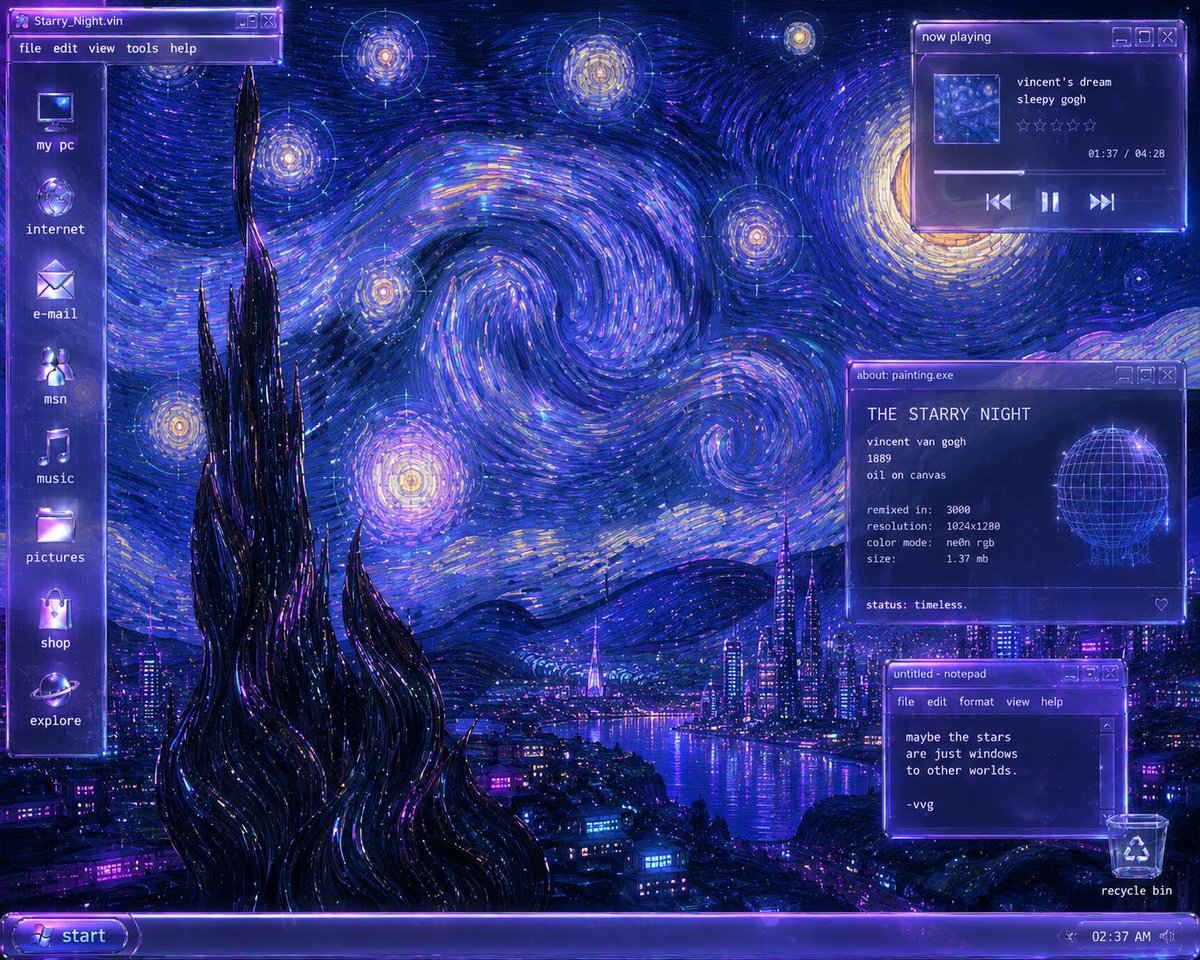
Y2K Starry Night Desktop
A detailed prompt for creating a neon Y2K Windows-style desktop remix of Van Gogh’s The Starry Night with cyberpunk UI panels.
This is a GPT Image 2 prompt case for Illustration & Art. Use the copy-ready prompt below to generate similar visuals, and review Awesome GPT Image 2 Prompts attribution plus commercial-use rights before reuse.
Free 1K preview
Generate one preview image instantly, no sign-up required.
Free text preview doesn’t preserve reference-image consistency.
Prompt
Copy-ready prompt
Create a Y2K futurist Windows desktop remix of Van Gogh’s The Starry Night as a glowing cyberpunk operating-system screenshot. The canvas is a 4:3 desktop wallpaper in deep ultramarine, neon violet, electric blue, cyan, and gold, with painterly impasto brush strokes forming huge swirling star vortices across the sky. Preserve the Starry Night composition: a tall black cypress-like spire in the lower left foreground, rolling dark hills, a glowing village transformed into a futuristic city, and a river or bay reflecting purple-blue neon lights. Add transparent glassmorphism Windows-2000/XP style UI overlays with violet chrome, bloom, scanline shimmer, pixel fonts, and small title-bar buttons.

Desktop layout: a vertical translucent sidebar on the far left with exactly 8 desktop icons, from top to bottom labeled: “my pc”, “internet”, “e-mail”, “msn”, “music”, “pictures”, “shop”, “explore”. At the very top left place a window title bar labeled “Starry_Night.vin” with menu items “file”, “edit”, “view”, “tools”, “help”. Along the bottom place a glowing purple taskbar with a rounded “start” button on the left and a system tray on the right showing “02:37 AM”; include a recycle bin icon and label “recycle bin” near the bottom right.

Add exactly 3 floating windows on the right side. Window 1, top right: a music player titled “now playing”, with a small square album thumbnail, track text “vincent’s dream” and “sleepy gogh”, five empty star-rating outlines, timestamp “01:37 / 04:28”, a progress bar, and previous / pause / next controls. Window 2, mid-right: an info panel titled “about: painting.exe”, headed “THE STARRY NIGHT”, listing “vincent van gogh”, “1889”, “oil on canvas”, “remixed in: 3000”, “resolution: 1024x1280”, “color mode: neon rgb”, “size: 1.37 mb”, and bottom text “status: timeless.”; include a glowing wireframe globe graphic on the right side of this panel and a small heart outline in the lower right. Window 3, lower right: a notepad window titled “untitled - notepad” with menu items “file”, “edit”, “format”, “view”, “help”, containing the text “maybe the stars / are just windows / to other worlds. / / -vvg”.

Style constraints: make the whole image look like a nostalgic early-2000s vaporwave desktop interface merged with expressive oil paint; use luminous edges, transparent purple panels, crisp readable white pixel text, soft CRT glow, and no modern flat design. Keep all visible text exactly as specified and avoid adding extra windows, characters, logos, or watermarks.
Best for
- - Illustration & Art visual exploration
- - Image generation and reference-image edits
- - Reusable briefs that keep source attribution visible
Change these parts
- - Subject, product, character, or scene
- - Aspect ratio, camera, lighting, and background
- - Brand, text, color, and output constraints
Recommended model and settings
- - Model: gpt-image-2
- - Input mode: Image to Image
- - Aspect ratio: source
- - Commercial status: review original source
How to use this prompt
- 1. Copy the prompt and preserve its structure for the first test.
- 2. Replace the subject, context, and publishing channel.
- 3. Change one camera, lighting, or style variable per iteration.
- 4. Inspect the output, source, text, and rights before reuse.
Limitations, source, and reuse cautions
- - Generated output is an editable draft, not factual, legal, or rights evidence.
- - Review the linked source, people, brands, logos, text, and third-party media before commercial use.
More cases in this category
Prioritized by category, input mode compatibility, quality, and lower risk.




Reuse and source notes
Use this prompt safely after previewing the case.
- 1.Copy the prompt or open it directly in Dovoo with the generation button.
- 2.Adjust variables, aspect ratio, and reference images for your own use case.
- 3.Before publishing or paid usage, verify source rights, attribution requirements, and brand or likeness risks.
Can I use this prompt commercially?
Commercial-use status is allowed. Review the original source, license, brand constraints, and legal requirements before paid usage.
Where does this case come from?
This case is imported from Awesome GPT Image 2 Prompts; keep attribution visible and check the source URL before reuse.