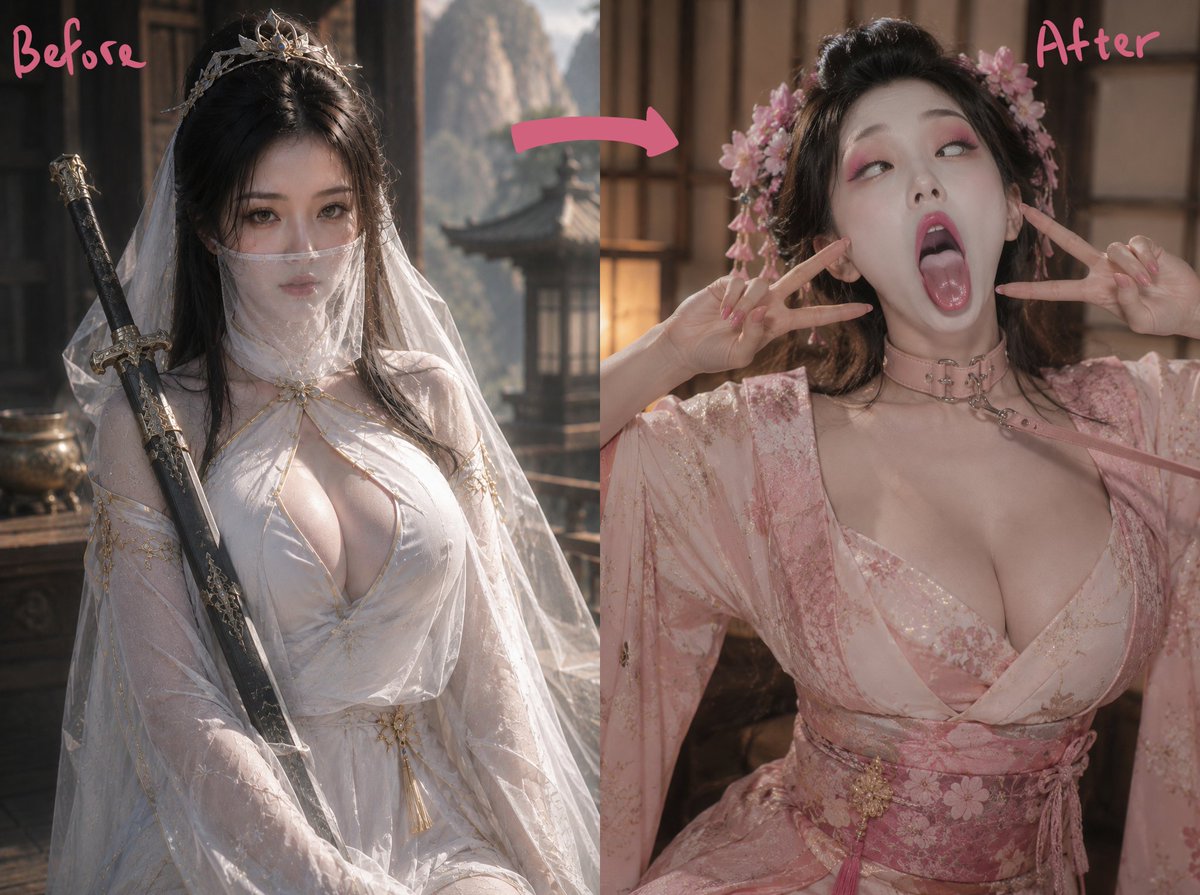
Ancient Fantasy Before After Diptych
Generates a realistic wuxia-style before-and-after transformation comparison image with handwritten labels, arrow, and ornate Chinese fantasy costumes.
This is a GPT Image 2 prompt case for Portrait & Character. Use the copy-ready prompt below to generate similar visuals, and review Awesome GPT Image 2 Prompts attribution plus commercial-use rights before reuse.
This prompt is designed for multiple reference images. We will open Dovoo with the prompt and the available preview image; add the remaining references in Dovoo before generating.
Free 1K preview
Generate one preview image instantly, no sign-up required.
Free text preview doesn’t preserve reference-image consistency.
Prompt
Copy-ready prompt
Create a cinematic before-and-after transformation diptych featuring an adult woman in ancient Chinese fantasy styling. Canvas: horizontal 4:3 image split vertically into exactly 2 equal panels with a clean center seam. Left panel: write the pink handwritten label “Before” in the upper left; show the woman seated in a dark wooden pavilion, wearing a flowing white hanfu with translucent veils, gold embroidery, and an elegant silver hair crown, with long black hair and a decorative sword leaning diagonally along her left side; the mood is solemn wuxia fantasy, with mountains and traditional architecture softly visible in the background. Right panel: write the pink handwritten label “After” in the upper right; show the same woman transformed into a softer pink floral hanfu look with a pink choker, layered robe, embroidered sash, flower hair ornaments, and long black hair styled with loose volume; she poses playfully with both hands making V-signs near her cheeks. Add exactly 1 thick curved pink arrow across the top center pointing from the left panel to the right panel. Cover the face in each panel with an opaque rectangular censor block in muted brown, exactly 2 censor rectangles total, while keeping the hair, outfit, pose, and body visible. Visual style: realistic high-detail cosplay photography, warm indoor sunlight, shallow depth of field, soft filmic color grading, ornate historical Chinese room details, polished fantasy costume textures, no extra text besides the two labels. Customizable subject details: {argument name="character name" default="ancient fantasy heroine"}, {argument name="before outfit color" default="white"}, {argument name="after outfit color" default="pink"}, {argument name="before label" default="Before"}, {argument name="after label" default="After"}.Prompt variables
Editable argument placeholders found in the prompt, with their default values.
Best for
- - Portrait & Character visual exploration
- - Image generation and reference-image edits
- - Reusable briefs that keep source attribution visible
Change these parts
- - Subject, product, character, or scene
- - Aspect ratio, camera, lighting, and background
- - Brand, text, color, and output constraints
Recommended model and settings
- - Model: gpt-image-2
- - Input mode: Multi Image to Image
- - Aspect ratio: source
- - Commercial status: review original source
How to use this prompt
- 1. Copy the prompt and preserve its structure for the first test.
- 2. Replace the subject, context, and publishing channel.
- 3. Change one camera, lighting, or style variable per iteration.
- 4. Inspect the output, source, text, and rights before reuse.
Limitations, source, and reuse cautions
- - Generated output is an editable draft, not factual, legal, or rights evidence.
- - Review the linked source, people, brands, logos, text, and third-party media before commercial use.
More cases in this category
Prioritized by category, input mode compatibility, quality, and lower risk.

Reuse and source notes
Use this prompt safely after previewing the case.
- 1.Copy the prompt or open it directly in Dovoo with the generation button.
- 2.Adjust variables, aspect ratio, and reference images for your own use case.
- 3.Before publishing or paid usage, verify source rights, attribution requirements, and brand or likeness risks.
Can I use this prompt commercially?
Commercial-use status is allowed. Review the original source, license, brand constraints, and legal requirements before paid usage.
Where does this case come from?
This case is imported from Awesome GPT Image 2 Prompts; keep attribution visible and check the source URL before reuse.