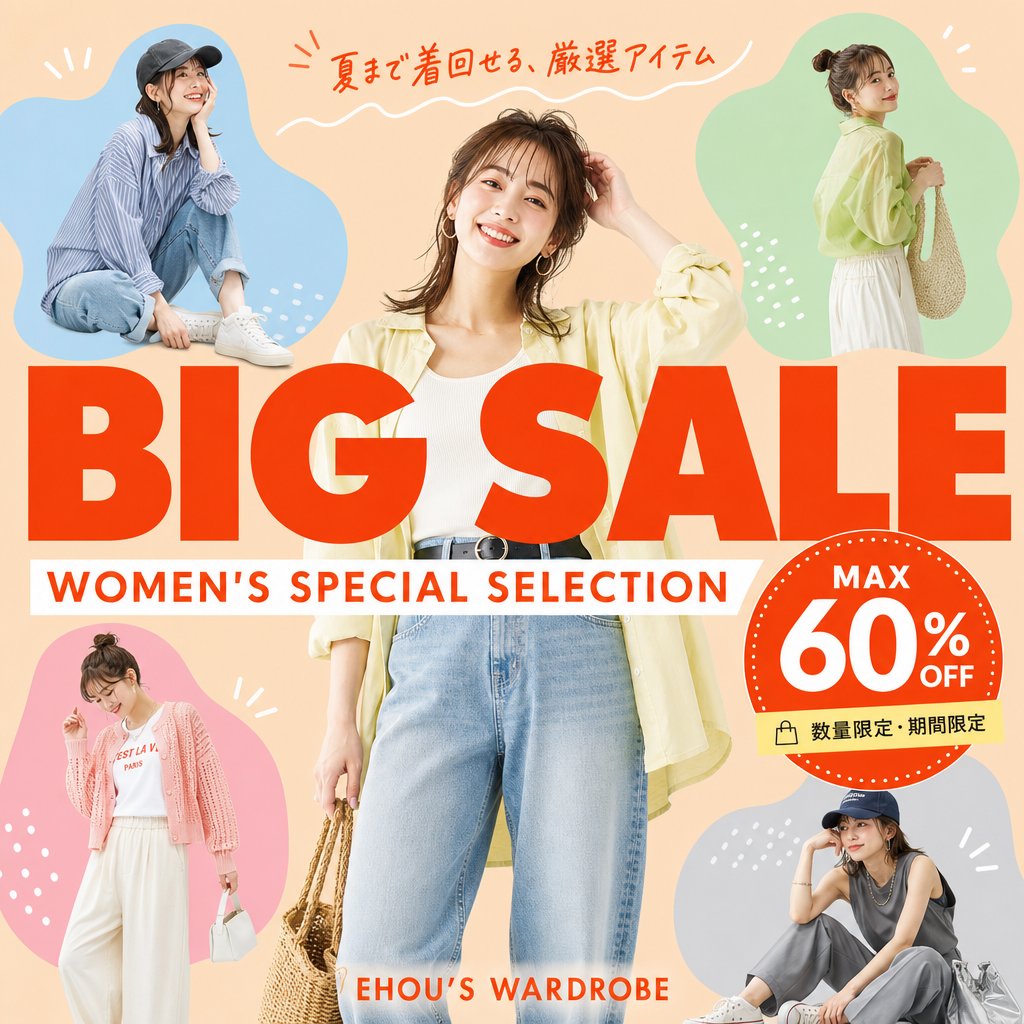
Women's Summer Big Sale Banner
A square Japanese fashion sale banner featuring five women's outfit cutouts, bold BIG SALE typography, and a 60% off discount badge for social media advertising.
This is a GPT Image 2 prompt case for Graphic & Poster. Use the copy-ready prompt below to generate similar visuals, and review Awesome GPT Image 2 Prompts attribution plus commercial-use rights before reuse.
Free 1K preview
Generate one preview image instantly, no sign-up required.
Prompt
Copy-ready prompt
Goal: Create a square fashion e-commerce sale banner for a women's summer clothing promotion, with accurate Japanese text and a cheerful catalog-ad look.

Canvas: 1:1 square social media graphic, peach-beige background, bright summer palette, clean commercial layout, no border or watermark.

Layout: Place one large central full-body female fashion model in front, cropped slightly at the top and bottom, wearing {argument name="central outfit" default="a pale yellow open shirt, white ribbed tank top, high-waisted light blue jeans, black belt, hoop earrings, and holding a woven straw bag"}. Surround her with exactly 4 smaller fashion model cutouts inside soft organic color blobs: top-left blue blob with a seated casual model in a striped shirt, jeans, white sneakers, and dark cap; top-right green blob with a standing side-view model in a pale yellow blouse, white skirt, and woven shoulder bag; bottom-left pink blob with a standing model in a pink cardigan, white graphic tee, wide white pants, and small white handbag; bottom-right gray-blue blob with a seated model in a dark sleeveless top, gray pants, white sneakers, cap, and silver tote bag. Use simple white decorative doodles around the blobs: short rays, dots, and small curved strokes.

Main text: Huge bold red-orange uppercase headline across the center reading {argument name="main title" default="BIG SALE"}, overlapping the central model slightly. Directly underneath, add a white horizontal banner with red-orange uppercase subtitle reading {argument name="subtitle" default="WOMEN'S SPECIAL SELECTION"}. At the very top, add handwritten red-orange Japanese copy reading {argument name="top Japanese copy" default="夏まで着回せる、厳選アイテム"} with a white wavy underline. Near the bottom center, add small red-orange brand text reading {argument name="brand text" default="EHOU’S WARDROBE"}.

Discount badge: On the right side overlapping the headline, create one large red-orange circular badge with a dotted white rim. Inside it, include exactly 3 text elements: “MAX” at the top, very large “60%” in the center, and “OFF” to the right/bottom of the percent. Attach a small pale yellow label strip below the badge with a shopping bag icon and Japanese text reading {argument name="limited offer text" default="数量限定・期間限定"}.

Visual style: Photorealistic fashion models composited with bold flat graphic shapes, magazine-sale flyer aesthetic, warm lighting, saturated red-orange typography, crisp cutout edges, playful but polished Japanese retail advertising design.

Constraints: Include exactly 5 women total: 1 central model plus 4 smaller surrounding models. Include exactly 4 colored blob backgrounds: blue, green, pink, and gray-blue. Keep all text sharp, correctly spelled, and readable. Do not add extra models, extra badges, extra logos, or unnecessary text.
Prompt variables
Editable argument placeholders found in the prompt, with their default values.
Best for
- - Graphic & Poster visual exploration
- - Image generation and reference-image edits
- - Reusable briefs that keep source attribution visible
Change these parts
- - Subject, product, character, or scene
- - Aspect ratio, camera, lighting, and background
- - Brand, text, color, and output constraints
Recommended model and settings
- - Model: gpt-image-2
- - Input mode: Text to Image
- - Aspect ratio: source
- - Commercial status: review original source
How to use this prompt
- 1. Copy the prompt and preserve its structure for the first test.
- 2. Replace the subject, context, and publishing channel.
- 3. Change one camera, lighting, or style variable per iteration.
- 4. Inspect the output, source, text, and rights before reuse.
Limitations, source, and reuse cautions
- - Generated output is an editable draft, not factual, legal, or rights evidence.
- - Review the linked source, people, brands, logos, text, and third-party media before commercial use.
More cases in this category
Prioritized by category, input mode compatibility, quality, and lower risk.
Reuse and source notes
Use this prompt safely after previewing the case.
- 1.Copy the prompt or open it directly in Dovoo with the generation button.
- 2.Adjust variables, aspect ratio, and reference images for your own use case.
- 3.Before publishing or paid usage, verify source rights, attribution requirements, and brand or likeness risks.
Can I use this prompt commercially?
Commercial-use status is allowed. Review the original source, license, brand constraints, and legal requirements before paid usage.
Where does this case come from?
This case is imported from Awesome GPT Image 2 Prompts; keep attribution visible and check the source URL before reuse.