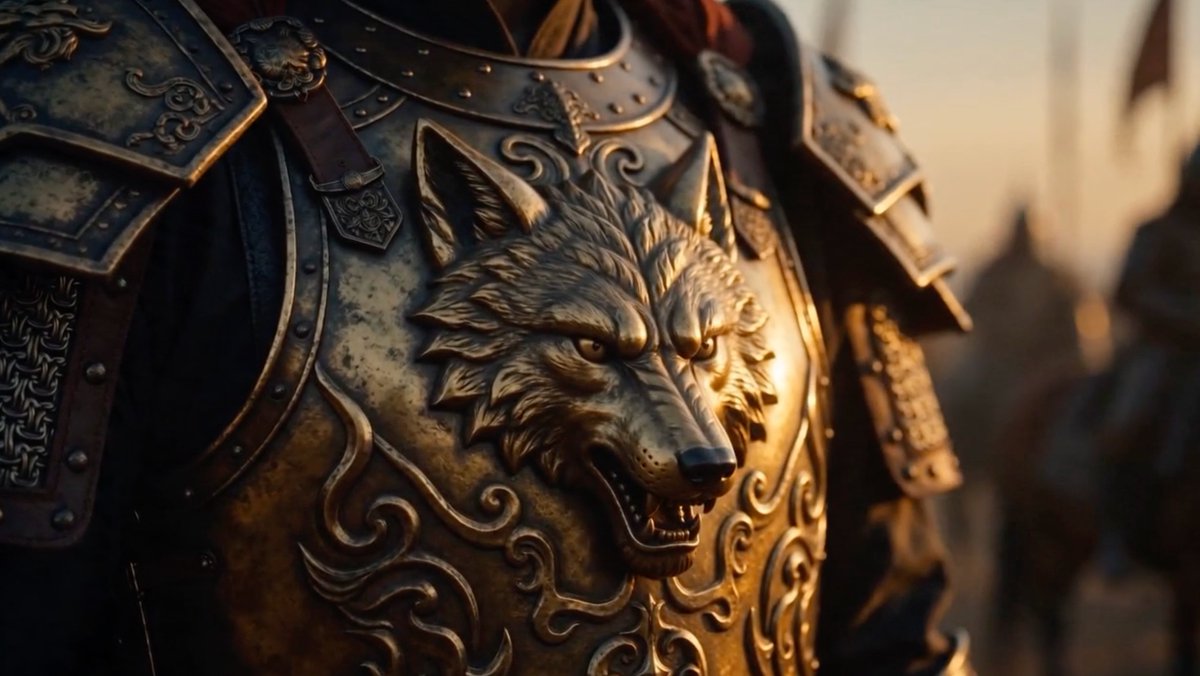
Cinematic Wolf Armor Close-Up
A realistic widescreen cinematic close-up of ornate ancient warrior armor with a raised snarling wolf emblem, ideal for historical fantasy trailer visuals.
This is a GPT Image 2 prompt case for Portrait & Character. Use the copy-ready prompt below to generate similar visuals, and review Awesome GPT Image 2 Prompts attribution plus commercial-use rights before reuse.
Free 1K preview
Generate one preview image instantly, no sign-up required.
Prompt
Copy-ready prompt
Create a cinematic close-up of an ancient Turkic/Oghuz warrior’s ornate bronze-gold armor, focusing on the chest plate rather than the face. The breastplate features a large raised snarling wolf head emblem at the center, with pointed ears, sharp eyes, open mouth, visible teeth, and sculpted fur details. Surround the wolf with embossed swirling ornamental patterns, rivets, dark leather straps, and weathered metal plates. Show both shoulder pauldrons partially in frame, decorated with engraved motifs and layered armor segments. Use {argument name="armor material" default="aged bronze and darkened steel"} with tarnish, scratches, patina, and realistic battle-worn texture. The warrior is mostly cropped from the neck down, with only a hint of long dark reddish hair above the collar. Set the scene in a blurred medieval battlefield or fortress environment at sunset, with warm golden rim light from the right and deep shadows on the left. Use shallow depth of field, dramatic cinematic lighting, anamorphic film look, ultra-realistic detail, 16:9 widescreen composition, no text, no logos, no modern elements.Prompt variables
Editable argument placeholders found in the prompt, with their default values.
Best for
- - Portrait & Character visual exploration
- - Image generation and reference-image edits
- - Reusable briefs that keep source attribution visible
Change these parts
- - Subject, product, character, or scene
- - Aspect ratio, camera, lighting, and background
- - Brand, text, color, and output constraints
Recommended model and settings
- - Model: gpt-image-2
- - Input mode: Text to Image
- - Aspect ratio: source
- - Commercial status: review original source
How to use this prompt
- 1. Copy the prompt and preserve its structure for the first test.
- 2. Replace the subject, context, and publishing channel.
- 3. Change one camera, lighting, or style variable per iteration.
- 4. Inspect the output, source, text, and rights before reuse.
Limitations, source, and reuse cautions
- - Generated output is an editable draft, not factual, legal, or rights evidence.
- - Review the linked source, people, brands, logos, text, and third-party media before commercial use.
More cases in this category
Prioritized by category, input mode compatibility, quality, and lower risk.


Reuse and source notes
Use this prompt safely after previewing the case.
- 1.Copy the prompt or open it directly in Dovoo with the generation button.
- 2.Adjust variables, aspect ratio, and reference images for your own use case.
- 3.Before publishing or paid usage, verify source rights, attribution requirements, and brand or likeness risks.
Can I use this prompt commercially?
Commercial-use status is allowed. Review the original source, license, brand constraints, and legal requirements before paid usage.
Where does this case come from?
This case is imported from Awesome GPT Image 2 Prompts; keep attribution visible and check the source URL before reuse.