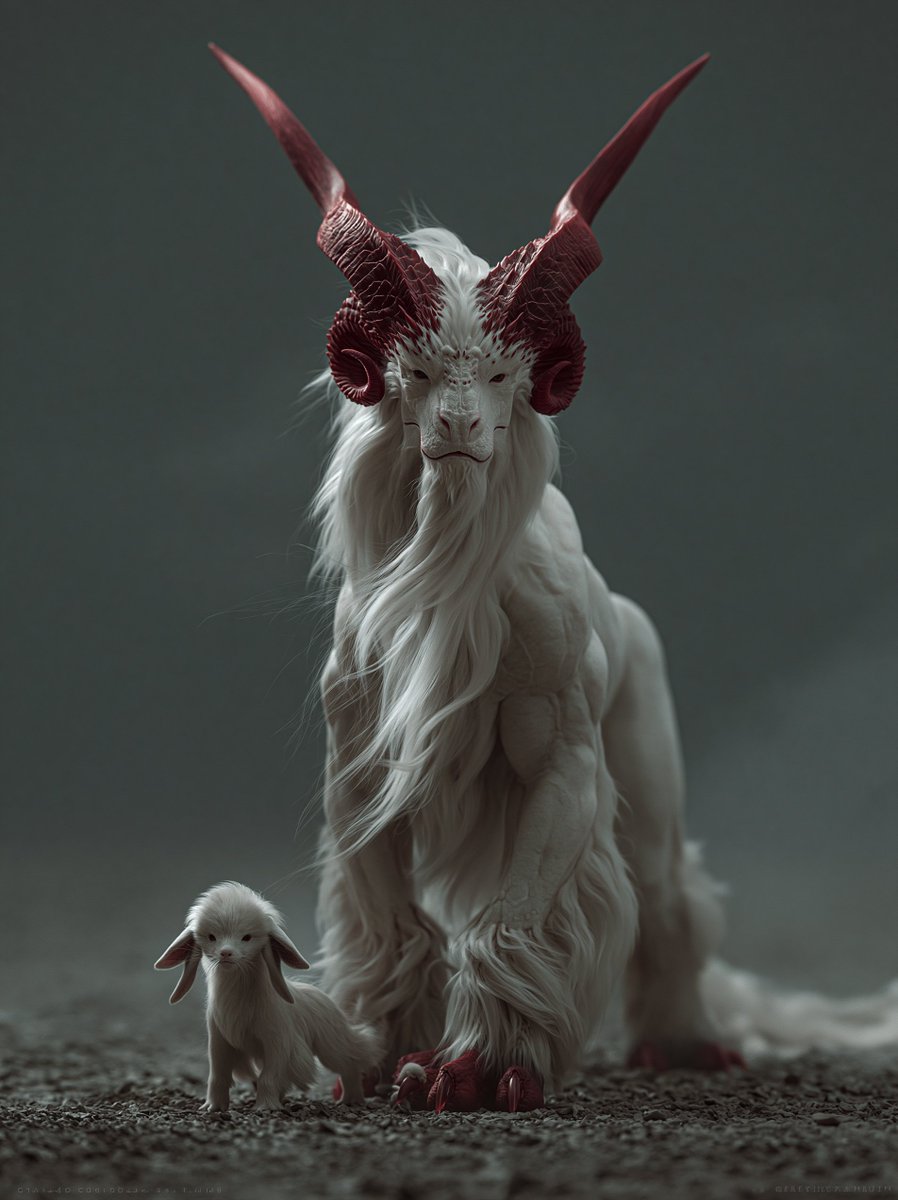
White Horned Fantasy Guardian
A cinematic dark fantasy creature portrait featuring a majestic white horned guardian and its tiny companion walking through a misty gravel landscape.
This is a GPT Image 2 prompt case for Portrait & Character. Use the copy-ready prompt below to generate similar visuals, and review Awesome GPT Image 2 Prompts attribution plus commercial-use rights before reuse.
Free 1K preview
Generate one preview image instantly, no sign-up required.
Prompt
Copy-ready prompt
Create a dark cinematic fantasy creature portrait in a vertical 3:4 frame. Show exactly two creatures walking toward the viewer on rough gravel: one large majestic chimera-like guardian centered in the frame and one tiny baby companion at its front-left side. The large creature should resemble an elegant white goat-dragon hybrid with a long narrow goat face, pale skin, heavy flowing white mane and beard, shaggy fur around the legs and chest, muscular front legs, a low sweeping tail, and two enormous deep crimson horns rising from the head and curving outward then sharply upward into long pointed tips. Add curled ram-like horn bases around the ears, red horn ridges and textured grooves, small intense eyes, crimson claws and hoof-like toes. The baby creature should be a miniature pale white version with soft fluffy fur, oversized drooping ears, a tiny face, and small red claws, walking close beside the guardian. Use moody low-key studio lighting, shallow depth of field, muted gray-green foggy background, ground-level camera angle, centered symmetrical composition, realistic fantasy creature design, ultra-detailed fur strands, sculptural anatomy, atmospheric haze, subdued color palette of white, gray, charcoal, and dark red. No text, no humans, no armor, no buildings, no bright daylight.
Best for
- - Portrait & Character visual exploration
- - Image generation and reference-image edits
- - Reusable briefs that keep source attribution visible
Change these parts
- - Subject, product, character, or scene
- - Aspect ratio, camera, lighting, and background
- - Brand, text, color, and output constraints
Recommended model and settings
- - Model: gpt-image-2
- - Input mode: Text to Image
- - Aspect ratio: source
- - Commercial status: review original source
How to use this prompt
- 1. Copy the prompt and preserve its structure for the first test.
- 2. Replace the subject, context, and publishing channel.
- 3. Change one camera, lighting, or style variable per iteration.
- 4. Inspect the output, source, text, and rights before reuse.
Limitations, source, and reuse cautions
- - Generated output is an editable draft, not factual, legal, or rights evidence.
- - Review the linked source, people, brands, logos, text, and third-party media before commercial use.
More cases in this category
Prioritized by category, input mode compatibility, quality, and lower risk.

Reuse and source notes
Use this prompt safely after previewing the case.
- 1.Copy the prompt or open it directly in Dovoo with the generation button.
- 2.Adjust variables, aspect ratio, and reference images for your own use case.
- 3.Before publishing or paid usage, verify source rights, attribution requirements, and brand or likeness risks.
Can I use this prompt commercially?
Commercial-use status is allowed. Review the original source, license, brand constraints, and legal requirements before paid usage.
Where does this case come from?
This case is imported from Awesome GPT Image 2 Prompts; keep attribution visible and check the source URL before reuse.