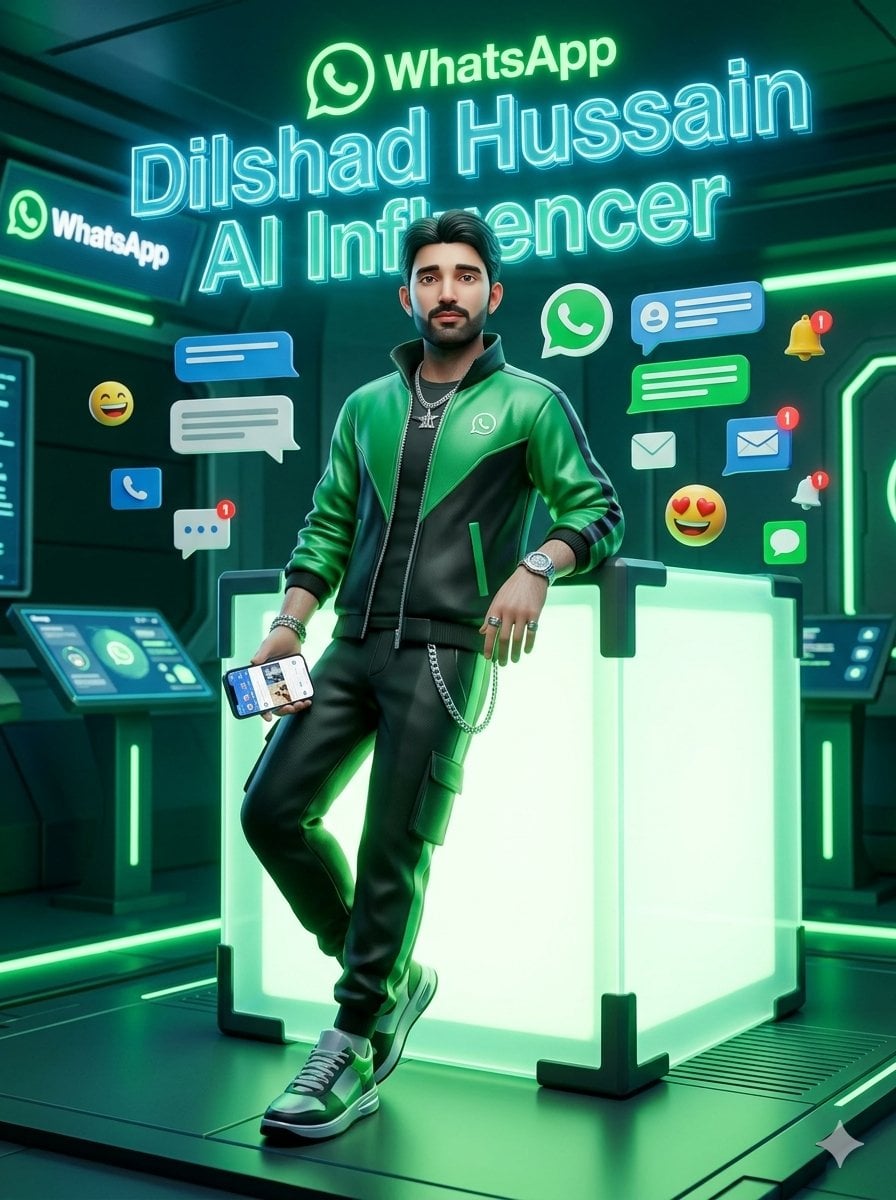
WhatsApp AI Influencer 3D 海报
Source-attributed GPT Image 2 image prompt from the Awesome GPT Image 2 Prompts repository.
This is a GPT Image 2 prompt case for Graphic & Poster. Use the copy-ready prompt below to generate similar visuals, and review Awesome GPT Image 2 Prompts attribution plus commercial-use rights before reuse.
Free 1K preview
Generate one preview image instantly, no sign-up required.
Free text preview doesn’t preserve reference-image consistency.
Prompt
Copy-ready prompt
创作一张电影质感的风格化 3D 渲染图,场景设定在充满未来感的 WhatsApp 风格数字通讯中心。一位名叫 {argument name="character name" default="Dilshad Hussain"} 的自信年轻男性 AI Influencer 全身像位于画面中心,随意地倚靠在一个巨大的发光半透明立方体上,立方体内部散发着霓虹绿光,并带有黑色加固边角。他身穿一件亮面绿黑配色的棒球夹克,胸前印有小巧的 WhatsApp 标志,内搭黑色 T 恤,下身穿着带有侧边工装口袋和银色链条的黑色慢跑裤,脚踩绿白配色运动鞋,佩戴手表、手链、戒指和叠戴银项链。他的姿势轻松且充满魅力:一只手肘靠在立方体上,一条腿交叉在前,另一只手拿着一部显示着社交媒体/聊天界面的智能手机。采用高度抛光、类似玩具质感但又写实的 3D 角色风格,运用戏剧性的青色和祖母绿轮廓光,搭配反光的科幻地板、发光的绿色灯带,以及带有墙面显示器和控制台的深色高科技房间。 在他上方和身后放置明亮的全息文字:顶部为 WhatsApp 标志和“WhatsApp”字样,下方是一个巨大的青色霓虹轮廓名称,显示为“{argument name="headline name" default="Dilshad Hussain"}”,再下方为“{argument name="subtitle text" default="AI Influencer"}”。在角色周围放置 13 个悬浮的通讯元素:1 个巨大的绿色 WhatsApp 图标,1 个墙面屏幕上的左侧 WhatsApp 标志,3 个蓝色聊天/消息气泡,2 个白色聊天/消息气泡,2 个带有红色通知徽章的蓝色信封/消息图标,1 个白色信封图标,1 个带有红色通知徽章的黄色铃铛,1 个带有红色通知徽章的白色铃铛,以及 2 个表情符号反应(一个大笑表情和一个爱心眼表情)。保持构图垂直、海报感、居中、充满活力且高度发光,以祖母绿、青色、黑色和深青色为主色调。营造出一种高端未来感社交媒体工作室的氛围,具有浅景深和锐利的霓虹高光。请勿添加额外人物,请勿添加水印,并将所有可见文字限制为 WhatsApp、名称以及 AI Influencer。Prompt variables
Editable argument placeholders found in the prompt, with their default values.
Best for
- - Graphic & Poster visual exploration
- - Image generation and reference-image edits
- - Reusable briefs that keep source attribution visible
Change these parts
- - Subject, product, character, or scene
- - Aspect ratio, camera, lighting, and background
- - Brand, text, color, and output constraints
Recommended model and settings
- - Model: gpt-image-2
- - Input mode: Image to Image
- - Aspect ratio: source
- - Commercial status: restricted
How to use this prompt
- 1. Copy the prompt and preserve its structure for the first test.
- 2. Replace the subject, context, and publishing channel.
- 3. Change one camera, lighting, or style variable per iteration.
- 4. Inspect the output, source, text, and rights before reuse.
Limitations, source, and reuse cautions
- - Generated output is an editable draft, not factual, legal, or rights evidence.
- - Review the linked source, people, brands, logos, text, and third-party media before commercial use.
More cases in this category
Prioritized by category, input mode compatibility, quality, and lower risk.

Reuse and source notes
Use this prompt safely after previewing the case.
- 1.Copy the prompt or open it directly in Dovoo with the generation button.
- 2.Adjust variables, aspect ratio, and reference images for your own use case.
- 3.Before publishing or paid usage, verify source rights, attribution requirements, and brand or likeness risks.
Can I use this prompt commercially?
Commercial-use status is allowed. Review the original source, license, brand constraints, and legal requirements before paid usage.
Where does this case come from?
This case is imported from Awesome GPT Image 2 Prompts; keep attribution visible and check the source URL before reuse.