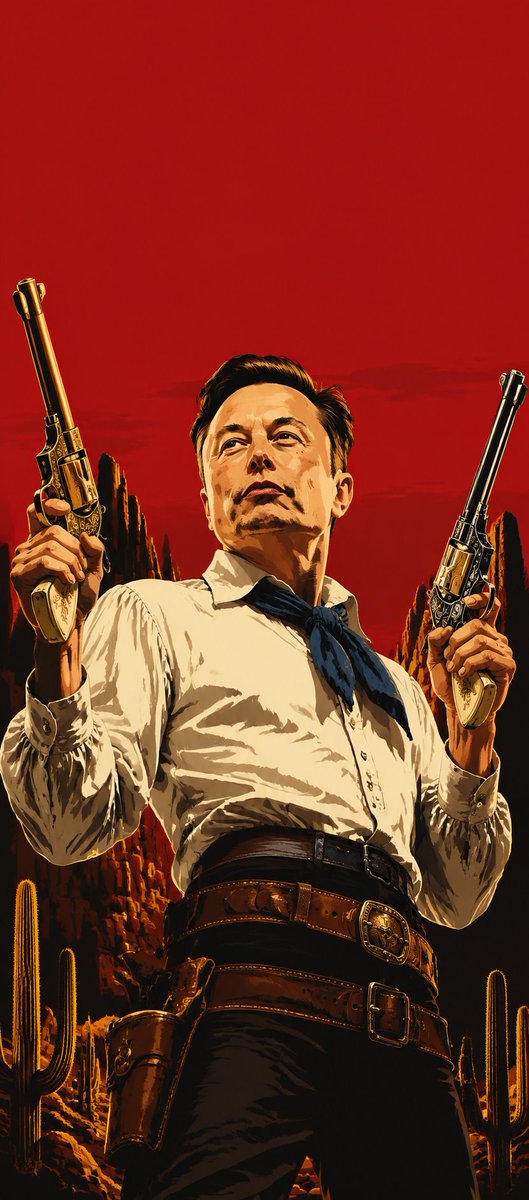
Blood Red Western Gunslinger
A vertical hard-boiled graphic novel style Western gunslinger portrait with dual revolvers and a stark blood-red empty header area.
This is a GPT Image 2 prompt case for Portrait & Character. Use the copy-ready prompt below to generate similar visuals, and review Awesome GPT Image 2 Prompts attribution plus commercial-use rights before reuse.
Free 1K preview
Generate one preview image instantly, no sign-up required.
Prompt
Copy-ready prompt
Create a vertical portrait in polished hard-boiled graphic novel concept-art style inspired by Rockstar Games key art: a stern adult Western gunslinger fills the lower 75% of the frame, viewed from a low heroic angle, centered and cropped from thighs upward. The top 25% of the image must be strictly empty solid {argument name="background color" default="blood red"}, with no text or objects. Show every face clearly with natural, detailed facial features. Pose: both arms raised, each hand holding one ornate long-barrel revolver vertically beside the head, barrels angled slightly outward; exactly 2 visible revolvers, one in each hand, with engraved metal details and ivory grips. Attire: {argument name="shirt color" default="cream white"} long-sleeve button-up shirt with rolled cuffs, dark blue neckerchief tied at the collar, high-waisted black trousers, wide double leather gun belt with two large buckles, and one visible brown holster on the left hip. Setting: stylized desert canyon at sunset behind the figure, with jagged red rock formations and exactly 6 visible saguaro cacti distributed near the lower left and lower right edges. Use dramatic golden rim light, deep black shadows, heavy ink-like outlines, painterly poster texture, high contrast, cinematic Western mood, no typography, no logo, no watermark.Prompt variables
Editable argument placeholders found in the prompt, with their default values.
Best for
- - Portrait & Character visual exploration
- - Image generation and reference-image edits
- - Reusable briefs that keep source attribution visible
Change these parts
- - Subject, product, character, or scene
- - Aspect ratio, camera, lighting, and background
- - Brand, text, color, and output constraints
Recommended model and settings
- - Model: gpt-image-2
- - Input mode: Text to Image
- - Aspect ratio: source
- - Commercial status: review original source
How to use this prompt
- 1. Copy the prompt and preserve its structure for the first test.
- 2. Replace the subject, context, and publishing channel.
- 3. Change one camera, lighting, or style variable per iteration.
- 4. Inspect the output, source, text, and rights before reuse.
Limitations, source, and reuse cautions
- - Generated output is an editable draft, not factual, legal, or rights evidence.
- - Review the linked source, people, brands, logos, text, and third-party media before commercial use.
More cases in this category
Prioritized by category, input mode compatibility, quality, and lower risk.
Reuse and source notes
Use this prompt safely after previewing the case.
- 1.Copy the prompt or open it directly in Dovoo with the generation button.
- 2.Adjust variables, aspect ratio, and reference images for your own use case.
- 3.Before publishing or paid usage, verify source rights, attribution requirements, and brand or likeness risks.
Can I use this prompt commercially?
Commercial-use status is allowed. Review the original source, license, brand constraints, and legal requirements before paid usage.
Where does this case come from?
This case is imported from Awesome GPT Image 2 Prompts; keep attribution visible and check the source URL before reuse.