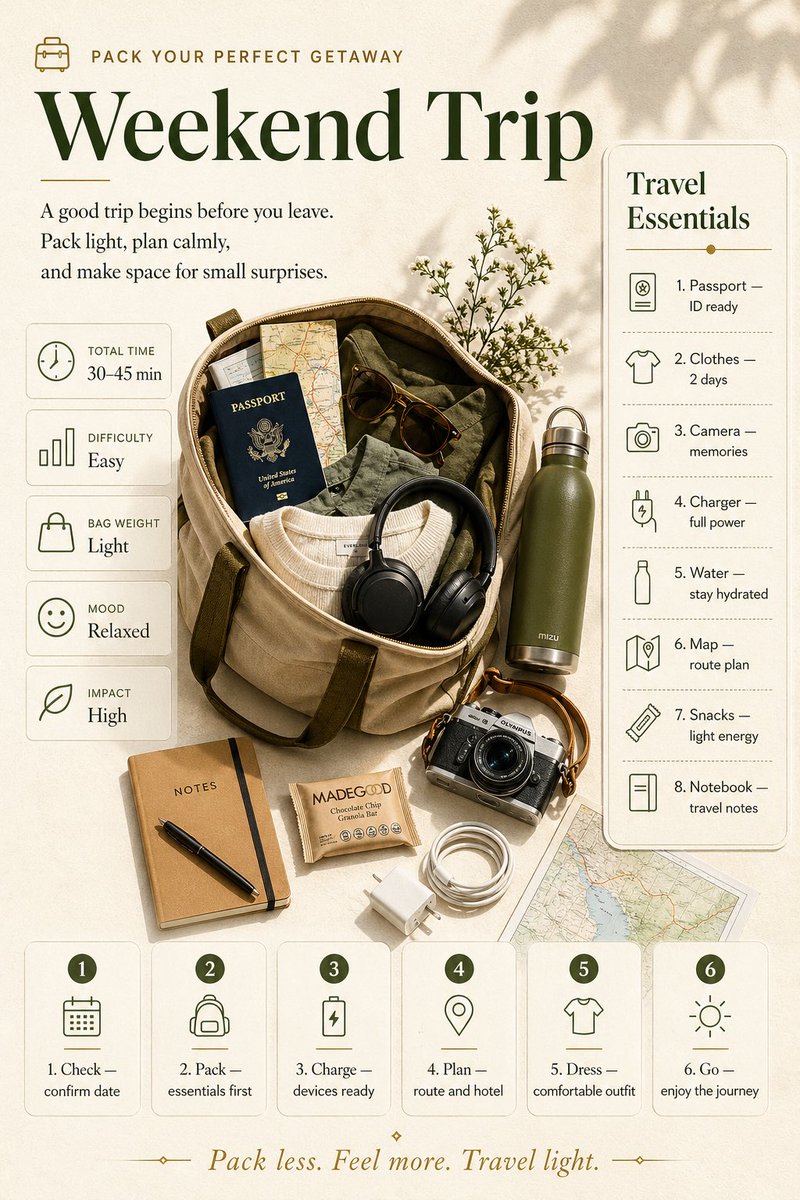
Weekend Trip Packing Infographic
A warm editorial-style travel packing poster showing a flat-lay duffel bag scene with labeled checklist panels and step cards, ideal for lifestyle infographics, travel guides, and packing-themed social content.
This is a GPT Image 2 prompt case for Graphic & Poster. Use the copy-ready prompt below to generate similar visuals, and review Awesome GPT Image 2 Prompts attribution plus commercial-use rights before reuse.
Free 1K preview
Generate one preview image instantly, no sign-up required.
Prompt
Copy-ready prompt
{
  "type": "editorial travel packing infographic poster",
  "style": "minimalist lifestyle flat-lay with warm natural sunlight, soft botanical shadows, premium magazine aesthetic, muted earth-tone palette, elegant serif headline paired with clean sans-serif body text, spacious cream background, refined line icons, subtle rounded cards and panels",
  "canvas": {
    "orientation": "portrait",
    "aspect_ratio": "4:5",
    "background_color": "warm ivory textured paper"
  },
  "headline": {
    "eyebrow": {
      "icon": "small suitcase line icon",
      "text": "{argument name=\"eyebrow text\" default=\"PACK YOUR PERFECT GETAWAY\"}"
    },
    "title": "{argument name=\"headline text\" default=\"Weekend Trip\"}",
    "subtitle": "{argument name=\"intro text\" default=\"A good trip begins before you leave. Pack light, plan calmly, and make space for small surprises.\"}"
  },
  "centerpiece": {
    "type": "open duffel bag flat lay",
    "position": "center-left",
    "bag": {
      "material": "beige canvas",
      "trim": "olive straps",
      "opening": "wide open, viewed from above at a slight angle"
    },
    "contents_count": 6,
    "contents": [
      "folded olive clothing",
      "folded cream knit sweater",
      "dark blue passport",
      "paper road map partially visible",
      "brown sunglasses",
      "black over-ear headphones draped at the opening"
    ],
    "surrounding_items_count": 8,
    "surrounding_items": [
      "olive metal water bottle standing upright on the right",
      "silver vintage camera near lower right",
      "tan notebook labeled NOTES at lower left",
      "black pen placed diagonally on the notebook",
      "small wrapped snack bar beside notebook",
      "coiled white charging cable",
      "white wall charger block",
      "large map sheet peeking from the lower right corner"
    ],
    "botanical_detail": "delicate sprig of tiny flowers tucked behind the bag near the upper right"
  },
  "layout": {
    "sections": [
      {
        "title": "left stats column",
        "position": "left side, stacked vertically",
        "count": 5,
        "cards": [
          {
            "icon": "clock",
            "label": "TOTAL TIME",
            "value": "30–45 min"
          },
          {
            "icon": "bar chart",
            "label": "DIFFICULTY",
            "value": "Easy"
          },
          {
            "icon": "bag",
            "label": "BAG WEIGHT",
            "value": "Light"
          },
          {
            "icon": "smile face",
            "label": "MOOD",
            "value": "Relaxed"
          },
          {
            "icon": "leaf",
            "label": "IMPACT",
            "value": "High"
          }
        ]
      },
      {
        "title": "right checklist panel",
        "position": "right side tall rounded panel",
        "count": 8,
        "heading": "Travel Essentials",
        "items": [
          {
            "number": 1,
            "icon": "passport document",
            "text": "Passport — ID ready"
          },
          {
            "number": 2,
            "icon": "t-shirt",
            "text": "Clothes — 2 days"
          },
          {
            "number": 3,
            "icon": "camera",
            "text": "Camera — memories"
          },
          {
            "number": 4,
            "icon": "charger plug",
            "text": "Charger — full power"
          },
          {
            "number": 5,
            "icon": "water bottle",
            "text": "Water — stay hydrated"
          },
          {
            "number": 6,
            "icon": "folded map",
            "text": "Map — route plan"
          },
          {
            "number": 7,
            "icon": "snack bar",
            "text": "Snacks — light energy"
          },
          {
            "number": 8,
            "icon": "notebook",
            "text": "Notebook — travel notes"
          }
        ]
      },
      {
        "title": "bottom step cards",
        "position": "bottom row across the page",
        "count": 6,
        "cards": [
          {
            "number": 1,
            "icon": "calendar",
            "text": "Check — confirm date"
          },
          {
            "number": 2,
            "icon": "backpack",
            "text": "Pack — essentials first"
          },
          {
            "number": 3,
            "icon": "battery with lightning",
            "text": "Charge — devices ready"
          },
          {
            "number": 4,
            "icon": "location pin",
            "text": "Plan — route and hotel"
          },
          {
            "number": 5,
            "icon": "t-shirt",
            "text": "Dress — comfortable outfit"
          },
          {
            "number": 6,
            "icon": "sun",
            "text": "Go — enjoy the journey"
          }
        ]
      }
    ],
    "footer_quote": "{argument name=\"footer quote\" default=\"Pack less. Feel more. Travel light.\"}"
  },
  "typography": {
    "headline_font": "high-contrast elegant serif",
    "body_font": "clean readable serif or humanist sans-serif",
    "headline_color": "deep forest green",
    "text_color": "dark olive gray",
    "accent_color": "muted gold"
  },
  "color_palette": {
    "count": 6,
    "colors": [
      "cream",
      "beige",
      "forest green",
      "olive",
      "tan",
      "muted gold"
    ]
  },
  "lighting": {
    "type": "soft daylight from upper left",
    "effects": [
      "gentle shadows from foliage",
      "soft object shadows",
      "calm premium lifestyle mood"
    ]
  },
  "composition": {
    "balance": "editorial and symmetrical with slight organic asymmetry from objects",
    "camera_angle": "top-down flat lay with minor perspective",
    "detail_level": "high, crisp product styling, realistic textures"
  }
}
Prompt variables
Editable argument placeholders found in the prompt, with their default values.
Best for
- - Graphic & Poster visual exploration
- - Image generation and reference-image edits
- - Reusable briefs that keep source attribution visible
Change these parts
- - Subject, product, character, or scene
- - Aspect ratio, camera, lighting, and background
- - Brand, text, color, and output constraints
Recommended model and settings
- - Model: gpt-image-2
- - Input mode: Text to Image
- - Aspect ratio: source
- - Commercial status: review original source
How to use this prompt
- 1. Copy the prompt and preserve its structure for the first test.
- 2. Replace the subject, context, and publishing channel.
- 3. Change one camera, lighting, or style variable per iteration.
- 4. Inspect the output, source, text, and rights before reuse.
Limitations, source, and reuse cautions
- - Generated output is an editable draft, not factual, legal, or rights evidence.
- - Review the linked source, people, brands, logos, text, and third-party media before commercial use.
More cases in this category
Prioritized by category, input mode compatibility, quality, and lower risk.





Reuse and source notes
Use this prompt safely after previewing the case.
- 1.Copy the prompt or open it directly in Dovoo with the generation button.
- 2.Adjust variables, aspect ratio, and reference images for your own use case.
- 3.Before publishing or paid usage, verify source rights, attribution requirements, and brand or likeness risks.
Can I use this prompt commercially?
Commercial-use status is allowed. Review the original source, license, brand constraints, and legal requirements before paid usage.
Where does this case come from?
This case is imported from Awesome GPT Image 2 Prompts; keep attribution visible and check the source URL before reuse.