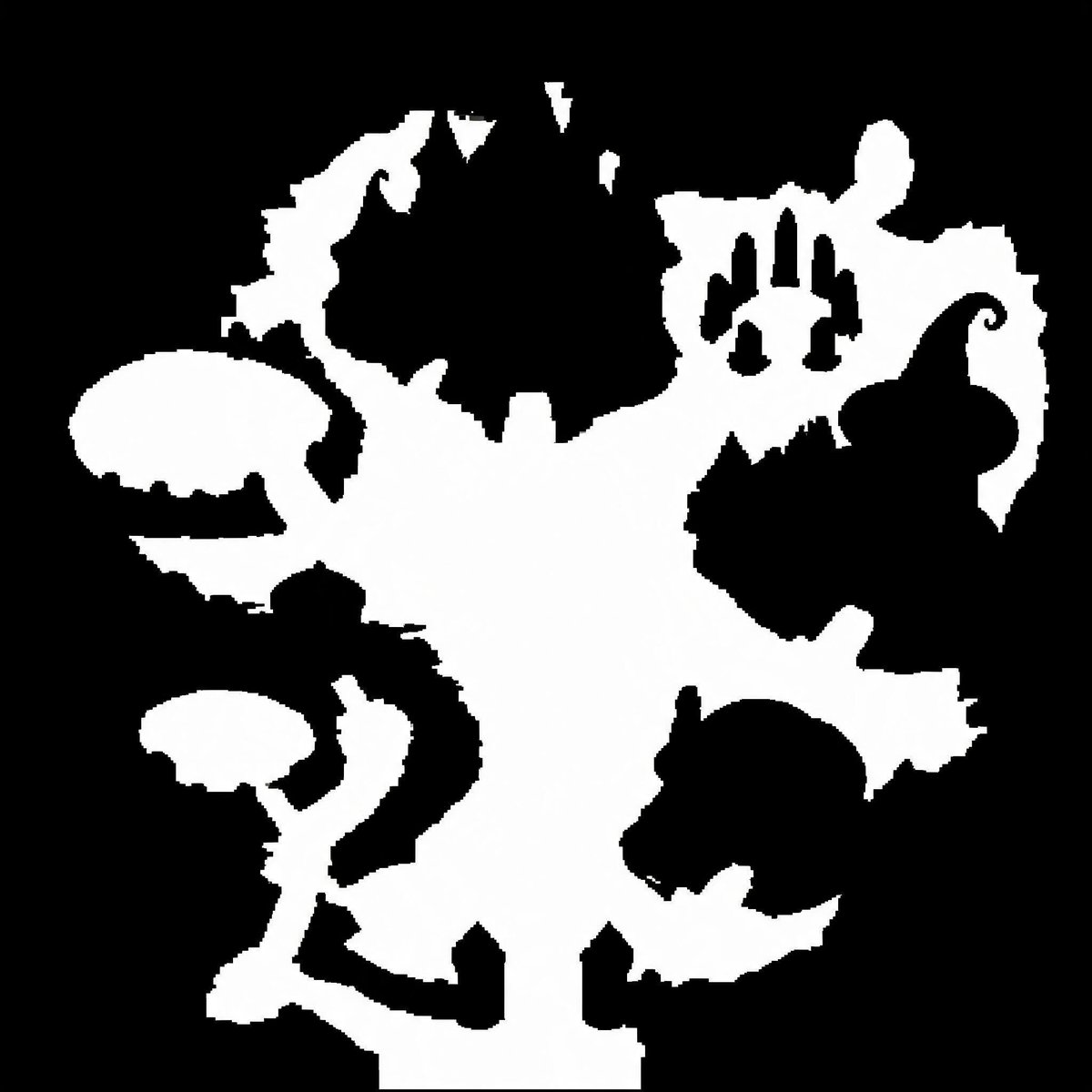
Binary Walkable Area Mask
Generates a stark black-and-white top-down walkable-area mask for game maps, collision layouts, or SDF conversion tests.
This is a GPT Image 2 prompt case for Anime & Game. Use the copy-ready prompt below to generate similar visuals, and review Awesome GPT Image 2 Prompts attribution plus commercial-use rights before reuse.
Need the full prompt set? Use the Anime & Game topic hub for more related examples, or open the GPT Image 2 prompt library for the full example index, reusable structures, and source attribution.
Free 1K preview
Generate one preview image instantly, no sign-up required.
1364/4000
Prompt
Copy-ready prompt
Create a pure black-and-white binary walkable-area mask for a top-down video game map. Use a square 1:1 canvas, about 768×768 pixels, with a solid black background and a single connected irregular white region representing traversable ground. The white shape should resemble a fantasy dungeon/island silhouette: a broad central vertical open area, jagged organic edges, narrow corridors and protruding rooms branching left and right. Include exactly 6 prominent side features around the central white mass: 1 large rounded oval platform on the upper left connected by a thin neck, 1 smaller mushroom-like platform on the lower left connected by a winding corridor, 1 jagged crescent-shaped protrusion at the upper left edge, 1 irregular upper-right chamber with three narrow black vertical cutouts inside it, 1 large black enclosed blob-like obstacle intruding from the right-center edge with a curled hook tip, and 1 round lower-right room-like protrusion partially separated by black negative space. Add several small triangular notches and pixel-stepped jagged edges, but keep the image strictly two colors only: pure white for walkable space and pure black for non-walkable space. No text, no grayscale, no antialiasing, no shadows, no perspective, no texture; make the edges slightly pixelated and mask-like as if intended for SDF or collision-map conversion.
Best for
- - Anime & Game visual exploration
- - Image generation and reference-image edits
- - Reusable briefs that keep source attribution visible
Change these parts
- - Subject, product, character, or scene
- - Aspect ratio, camera, lighting, and background
- - Brand, text, color, and output constraints
Recommended model and settings
- - Model: gpt-image-2
- - Input mode: Text to Image
- - Aspect ratio: source
- - Commercial status: review original source
How to use this prompt
- 1. Copy the prompt and preserve its structure for the first test.
- 2. Replace the subject, context, and publishing channel.
- 3. Change one camera, lighting, or style variable per iteration.
- 4. Inspect the output, source, text, and rights before reuse.
Limitations, source, and reuse cautions
- - Generated output is an editable draft, not factual, legal, or rights evidence.
- - Review the linked source, people, brands, logos, text, and third-party media before commercial use.
Imported from Awesome GPT Image 2 Prompts. Attribution is required. Commercial-use status is allowed; review source rights before paid usage.
More cases in this category
Prioritized by category, input mode compatibility, quality, and lower risk.

Reuse and source notes
Use this prompt safely after previewing the case.
- 1.Copy the prompt or open it directly in Dovoo with the generation button.
- 2.Adjust variables, aspect ratio, and reference images for your own use case.
- 3.Before publishing or paid usage, verify source rights, attribution requirements, and brand or likeness risks.
Can I use this prompt commercially?
Commercial-use status is allowed. Review the original source, license, brand constraints, and legal requirements before paid usage.
Where does this case come from?
This case is imported from Awesome GPT Image 2 Prompts; keep attribution visible and check the source URL before reuse.