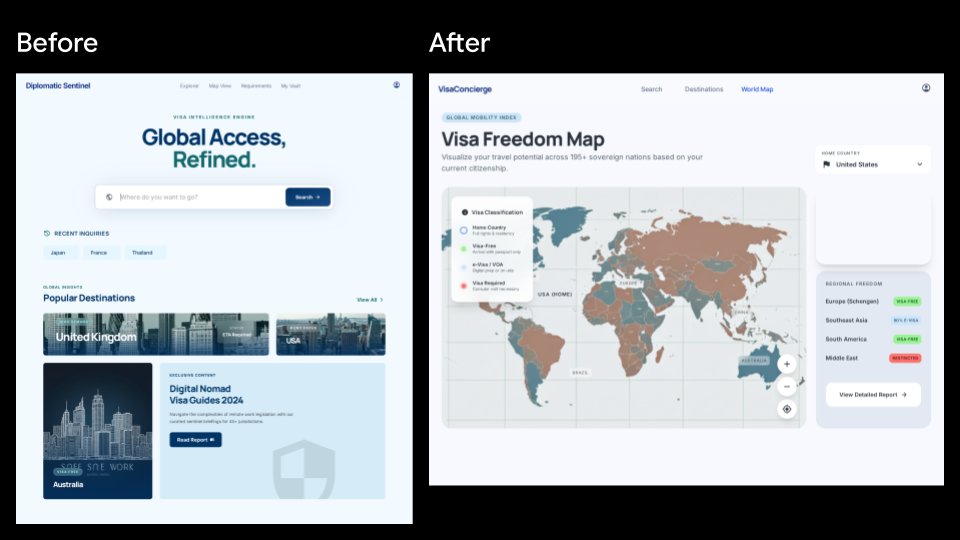
Visa App UI Before and After
Generates a side-by-side SaaS redesign comparison showing an old visa travel landing page transformed into a modern visa freedom map dashboard.
This is a GPT Image 2 prompt case for Graphic & Poster. Use the copy-ready prompt below to generate similar visuals, and review Awesome GPT Image 2 Prompts attribution plus commercial-use rights before reuse.
This prompt is designed for multiple reference images. We will open Dovoo with the prompt and the available preview image; add the remaining references in Dovoo before generating.
Free 1K preview
Generate one preview image instantly, no sign-up required.
Free text preview doesn’t preserve reference-image consistency.
Prompt
Copy-ready prompt
{
  "type": "side-by-side product UI comparison mockup",
  "canvas": {
    "aspect_ratio": "16:9 widescreen",
    "background": "solid black",
    "style": "clean SaaS presentation slide, crisp vector UI, high-fidelity web app screenshots"
  },
  "layout": {
    "sections": [
      {
        "title": "Before",
        "position": "left",
        "count": 1,
        "description": "A pale blue travel visa intelligence landing page inside a white browser-like frame, labeled Before in large white text above the frame."
      },
      {
        "title": "After",
        "position": "right",
        "count": 1,
        "description": "A redesigned visa freedom map dashboard inside a white browser-like frame, labeled After in large white text above the frame."
      }
    ],
    "comparison_count": 2
  },
  "left_before_screen": {
    "brand": "Diplomatic Sentinel",
    "navigation_count": 4,
    "navigation_labels": [
      "Explore",
      "Visa View",
      "Requirements",
      "My Vault"
    ],
    "main_badge": "VISA INTELLIGENCE ENGINE",
    "headline": "{argument name=\"before headline text\" default=\"Global Access, Refined.\"}",
    "search_bar": {
      "placeholder": "Where do you want to go?",
      "button": "Search"
    },
    "recent_inquiries_count": 3,
    "recent_inquiries": [
      "Japan",
      "France",
      "Thailand"
    ],
    "popular_destinations_count": 3,
    "popular_destinations": [
      "United Kingdom",
      "United States",
      "Australia"
    ],
    "feature_card": {
      "title": "Digital Nomad Visa Guides 2024",
      "button": "Read Report",
      "visual": "minimal shield watermark and pale blue editorial card"
    },
    "visual_style": "soft shadows, rounded cards, pale blue background, navy and teal typography, travel destination photo thumbnails"
  },
  "right_after_screen": {
    "brand": "VisaConcierge",
    "navigation_count": 3,
    "navigation_labels": [
      "Search",
      "Destinations",
      "World Map"
    ],
    "main_badge": "GLOBAL MOBILITY INDEX",
    "headline": "{argument name=\"after headline text\" default=\"Visa Freedom Map\"}",
    "subheading": "Visualize your travel potential across 195+ sovereign nations based on your current citizenship.",
    "map_panel": {
      "description": "large interactive world map centered on the dashboard with muted teal, tan, gray, and red country classifications",
      "legend_count": 4,
      "legend_labels": [
        "Home Country",
        "Visa Free",
        "eVisa / VOA",
        "Visa Required"
      ],
      "map_controls_count": 3,
      "map_controls": [
        "zoom in",
        "zoom out",
        "locate target"
      ]
    },
    "right_sidebar": {
      "cards_count": 2,
      "cards": [
        {
          "title": "Home Country",
          "selected_value": "{argument name=\"home country\" default=\"United States\"}"
        },
        {
          "title": "Regional Freedom",
          "regions_count": 4,
          "regions": [
            "Europe (Schengen) — VISA FREE",
            "Southeast Asia — VISA FREE",
            "South America — VISA FREE",
            "Middle East — RESTRICTED"
          ],
          "button": "View Detailed Report"
        }
      ]
    },
    "visual_style": "modern analytics dashboard, rounded white cards, soft gray background, subtle shadows, compact sans-serif typography"
  },
  "overall_direction": "Generate a polished before-and-after redesign comparison slide for a travel visa web product. The left screen should feel like a generic destination-search landing page, while the right screen should look more useful and data-rich, emphasizing an interactive global visa freedom map and sidebar insights."
}
Prompt variables
Editable argument placeholders found in the prompt, with their default values.
Best for
- - Graphic & Poster visual exploration
- - Image generation and reference-image edits
- - Reusable briefs that keep source attribution visible
Change these parts
- - Subject, product, character, or scene
- - Aspect ratio, camera, lighting, and background
- - Brand, text, color, and output constraints
Recommended model and settings
- - Model: gpt-image-2
- - Input mode: Multi Image to Image
- - Aspect ratio: source
- - Commercial status: review original source
How to use this prompt
- 1. Copy the prompt and preserve its structure for the first test.
- 2. Replace the subject, context, and publishing channel.
- 3. Change one camera, lighting, or style variable per iteration.
- 4. Inspect the output, source, text, and rights before reuse.
Limitations, source, and reuse cautions
- - Generated output is an editable draft, not factual, legal, or rights evidence.
- - Review the linked source, people, brands, logos, text, and third-party media before commercial use.
More cases in this category
Prioritized by category, input mode compatibility, quality, and lower risk.


Reuse and source notes
Use this prompt safely after previewing the case.
- 1.Copy the prompt or open it directly in Dovoo with the generation button.
- 2.Adjust variables, aspect ratio, and reference images for your own use case.
- 3.Before publishing or paid usage, verify source rights, attribution requirements, and brand or likeness risks.
Can I use this prompt commercially?
Commercial-use status is allowed. Review the original source, license, brand constraints, and legal requirements before paid usage.
Where does this case come from?
This case is imported from Awesome GPT Image 2 Prompts; keep attribution visible and check the source URL before reuse.