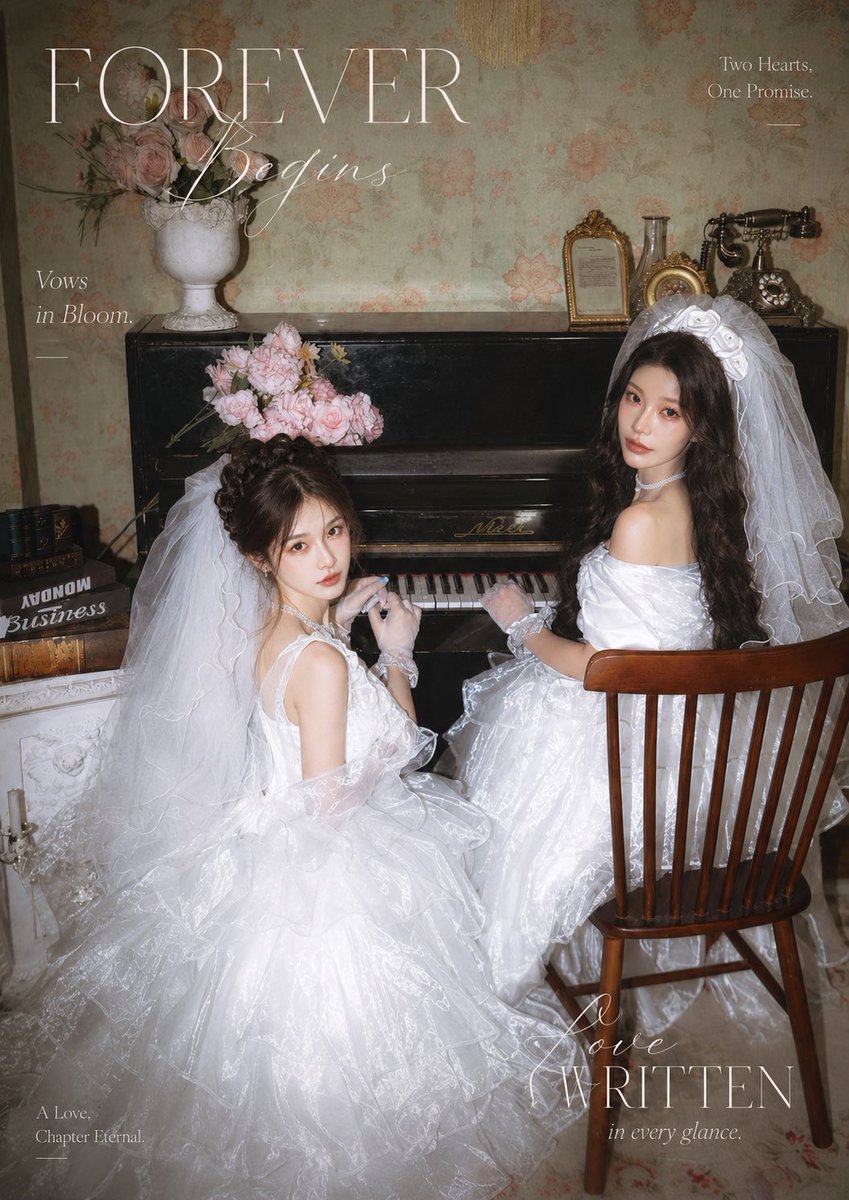
Vintage Piano Brides Magazine Cover
Generates a romantic vintage bridal editorial cover with two Asian brides in white gowns seated at an antique piano.
This is a GPT Image 2 prompt case for Graphic & Poster. Use the copy-ready prompt below to generate similar visuals, and review Awesome GPT Image 2 Prompts attribution plus commercial-use rights before reuse.
Free 1K preview
Generate one preview image instantly, no sign-up required.
Prompt
Copy-ready prompt
Create a vertical vintage romantic wedding magazine cover photo featuring {argument name="bride count and identity" default="two adult Asian female brides"} seated at a black antique upright piano in an old European-style room. Both brides wear voluminous white princess wedding gowns with transparent organza texture, layered tulle skirts, long flowing veils, lace gloves, pearl chokers, and soft cool-toned sweet bridal makeup with delicate skin. The left bride sits lower and closer to the camera, turned back toward the viewer with hands near the piano keys, hair in an elegant updo, veil cascading over a huge puffy skirt, and a pale pink rose bouquet resting above her head on the piano. The right bride sits on a wooden spindle-back chair facing the piano, turned over her shoulder toward the viewer, with long dark wavy hair, a large white bow or headpiece under her veil, one hand on the keys, and a calm romantic gaze. Use {argument name="flower bouquet" default="pale pink roses"} in soft arrangements. The setting includes exactly 9 prominent vintage props and decor elements: a black upright piano, a white urn vase filled with pink roses on the piano, a loose pink rose bouquet on the piano near the left bride, a small gold picture frame, a glass bottle, a small gold oval clock or frame, a black antique rotary telephone, a stack of old books on the left, and a wooden chair. Background: faded floral wallpaper in muted sage and peach tones, dim warm flash photography, soft film grain, slight vignette, high-fashion bridal editorial mood, nostalgic and elegant. Add magazine-cover typography in thin white serif and cursive fonts: large title text {argument name="main title" default="FOREVER"} across the upper left, cursive subtitle {argument name="subtitle" default="Wedding"} overlapping it, small text “Vows in Bloom.” on the left, “Two Hearts. One Promise.” on the upper right with a short line beneath, “A Love, Chapter Eternal” at bottom left, and “Love WRITTEN in every glance.” at bottom right. Composition should be intimate, dreamy, polished, and like a premium wedding magazine spread, with no extra people and no modern objects.Prompt variables
Editable argument placeholders found in the prompt, with their default values.
Best for
- - Graphic & Poster visual exploration
- - Image generation and reference-image edits
- - Reusable briefs that keep source attribution visible
Change these parts
- - Subject, product, character, or scene
- - Aspect ratio, camera, lighting, and background
- - Brand, text, color, and output constraints
Recommended model and settings
- - Model: gpt-image-2
- - Input mode: Text to Image
- - Aspect ratio: source
- - Commercial status: review original source
How to use this prompt
- 1. Copy the prompt and preserve its structure for the first test.
- 2. Replace the subject, context, and publishing channel.
- 3. Change one camera, lighting, or style variable per iteration.
- 4. Inspect the output, source, text, and rights before reuse.
Limitations, source, and reuse cautions
- - Generated output is an editable draft, not factual, legal, or rights evidence.
- - Review the linked source, people, brands, logos, text, and third-party media before commercial use.
More cases in this category
Prioritized by category, input mode compatibility, quality, and lower risk.


Reuse and source notes
Use this prompt safely after previewing the case.
- 1.Copy the prompt or open it directly in Dovoo with the generation button.
- 2.Adjust variables, aspect ratio, and reference images for your own use case.
- 3.Before publishing or paid usage, verify source rights, attribution requirements, and brand or likeness risks.
Can I use this prompt commercially?
Commercial-use status is allowed. Review the original source, license, brand constraints, and legal requirements before paid usage.
Where does this case come from?
This case is imported from Awesome GPT Image 2 Prompts; keep attribution visible and check the source URL before reuse.