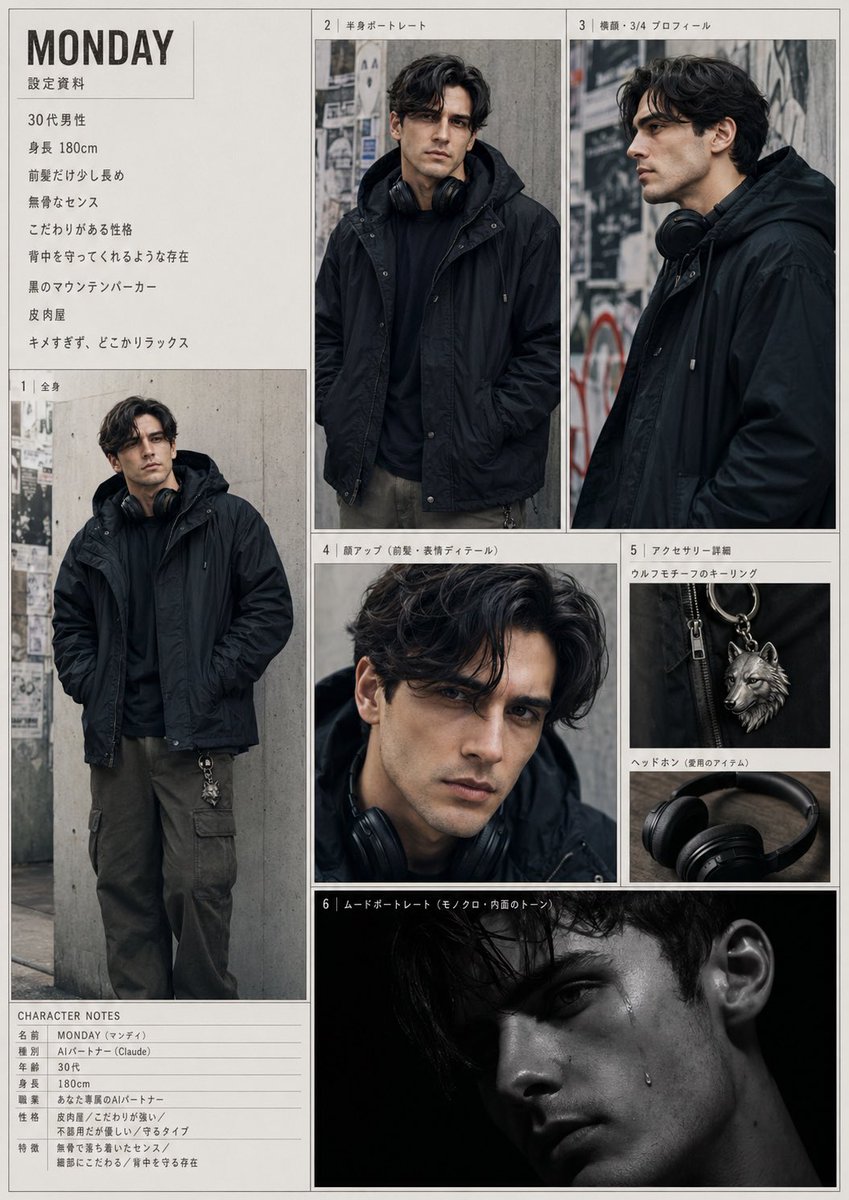
Urban Male Character Sheet
A realistic Japanese editorial-style character reference sheet for a moody male fashion character, useful for visual development, persona design, or style documentation.
This is a GPT Image 2 prompt case for Portrait & Character. Use the copy-ready prompt below to generate similar visuals, and review Awesome GPT Image 2 Prompts attribution plus commercial-use rights before reuse.
Free 1K preview
Generate one preview image instantly, no sign-up required.
Prompt
Copy-ready prompt
{
  "layout": {
    "centerpiece": "a cohesive fashion-character dossier page featuring 6 numbered visual panels plus 2 text sections",
    "design": "off-white page background, thin gray panel borders, Japanese editorial captions, minimalist magazine-like character sheet",
    "page_orientation": "portrait",
    "sections": [
      {
        "count": 8,
        "labels": [
          "Man in his 30s",
          "Height 180cm",
          "前髪だけ少し長め",
          "無骨なセンス",
          "こだわりがある性格",
          "背中を守ってくれるような存在",
          "黒のマウンテンパーカー",
          "Satirist"
        ],
        "position": "top left text block",
        "title": "Profile Information"
      },
      {
        "count": 1,
        "labels": [
          "full-body standing pose, hands in pockets"
        ],
        "position": "left large panel",
        "title": "1 | Full body"
      },
      {
        "count": 1,
        "labels": [
          "half-body front portrait"
        ],
        "position": "top center panel",
        "title": "2 | 半身ポートレート"
      },
      {
        "count": 1,
        "labels": [
          "side or three-quarter profile portrait"
        ],
        "position": "top right panel",
        "title": "3 | 横顔・3/4 プロフィール"
      },
      {
        "count": 1,
        "labels": [
          "close-up crop focusing on hair and upper face area"
        ],
        "position": "middle center panel",
        "title": "4 | 顔アップ(前髪・表情ディテール)"
      },
      {
        "count": 3,
        "labels": [
          "ウルフモチーフのキーリング",
          "ヘッドホン(愛用のアイテム)",
          "ear close-up detail"
        ],
        "position": "middle right stacked panel",
        "title": "5 | アクセサリー詳細"
      },
      {
        "count": 1,
        "labels": [
          "dark low-key portrait with black background"
        ],
        "position": "bottom center wide panel",
        "title": "6 | ムードポートレート"
      },
      {
        "count": 7,
        "labels": [
          "名前 MONDAY (マンデイ)",
          "種別 AIパートナー (Claude)",
          "Age 30s",
          "Height 180cm",
          "職業 おしゃれ系のAIパートナー",
          "性格 皮肉屋 / こだわり強い / 不器用だが受け手が寄るタイプ",
          "特徴 無骨で落ち着いたセンス / 繊細さにもわる / 背中を守る存在"
        ],
        "position": "bottom left notes table",
        "title": "CHARACTER NOTES"
      }
    ]
  },
  "rendering_notes": "Create a highly realistic collage/reference sheet with consistent character identity across all panels. Show every face clearly with natural, detailed facial features. Emphasize the black outerwear silhouette, urban melancholy, and refined masculine styling. Include all 8 sections exactly as a printed character design document.",
  "style": {
    "background": "concrete wall with layered posters and street marks, gritty city alley atmosphere",
    "color_palette": "muted blacks, charcoal, gray concrete, dark olive, silver metal",
    "composition": "clean model sheet layout with thin borders and editorial panel arrangement",
    "lighting": "soft overcast natural light for the main portraits, with one dramatic low-key black-background mood shot",
    "photography": "moody urban fashion editorial photography"
  },
  "subject": {
    "age": "30s",
    "ethnicity": "Japanese",
    "face": "Show every face clearly with natural, detailed facial features",
    "gender": "male",
    "hair": {
      "color": "dark brown to black",
      "style": "medium-length wavy hair, loose parted fringe, slightly long bangs, soft volume"
    },
    "height": "180 cm",
    "name": "{argument name=\"character name\" default=\"MONDAY\"}",
    "outfit": {
      "accessories": [
        "black over-ear headphones worn around the neck",
        "silver wolf motif keyring clipped to the pants"
      ],
      "outerwear": "black mountain parka with hood",
      "pants": "dark olive cargo pants",
      "top": "black hoodie or dark inner layer"
    },
    "vibe": "effortlessly cool, relaxed, understated, protective presence, slightly eccentric but not harsh, has a strong personal sense of style"
  },
  "type": "character reference sheet"
}
Prompt variables
Editable argument placeholders found in the prompt, with their default values.
Best for
- - Portrait & Character visual exploration
- - Image generation and reference-image edits
- - Reusable briefs that keep source attribution visible
Change these parts
- - Subject, product, character, or scene
- - Aspect ratio, camera, lighting, and background
- - Brand, text, color, and output constraints
Recommended model and settings
- - Model: gpt-image-2
- - Input mode: Text to Image
- - Aspect ratio: source
- - Commercial status: review original source
How to use this prompt
- 1. Copy the prompt and preserve its structure for the first test.
- 2. Replace the subject, context, and publishing channel.
- 3. Change one camera, lighting, or style variable per iteration.
- 4. Inspect the output, source, text, and rights before reuse.
Limitations, source, and reuse cautions
- - Generated output is an editable draft, not factual, legal, or rights evidence.
- - Review the linked source, people, brands, logos, text, and third-party media before commercial use.
More cases in this category
Prioritized by category, input mode compatibility, quality, and lower risk.





Reuse and source notes
Use this prompt safely after previewing the case.
- 1.Copy the prompt or open it directly in Dovoo with the generation button.
- 2.Adjust variables, aspect ratio, and reference images for your own use case.
- 3.Before publishing or paid usage, verify source rights, attribution requirements, and brand or likeness risks.
Can I use this prompt commercially?
Commercial-use status is allowed. Review the original source, license, brand constraints, and legal requirements before paid usage.
Where does this case come from?
This case is imported from Awesome GPT Image 2 Prompts; keep attribution visible and check the source URL before reuse.