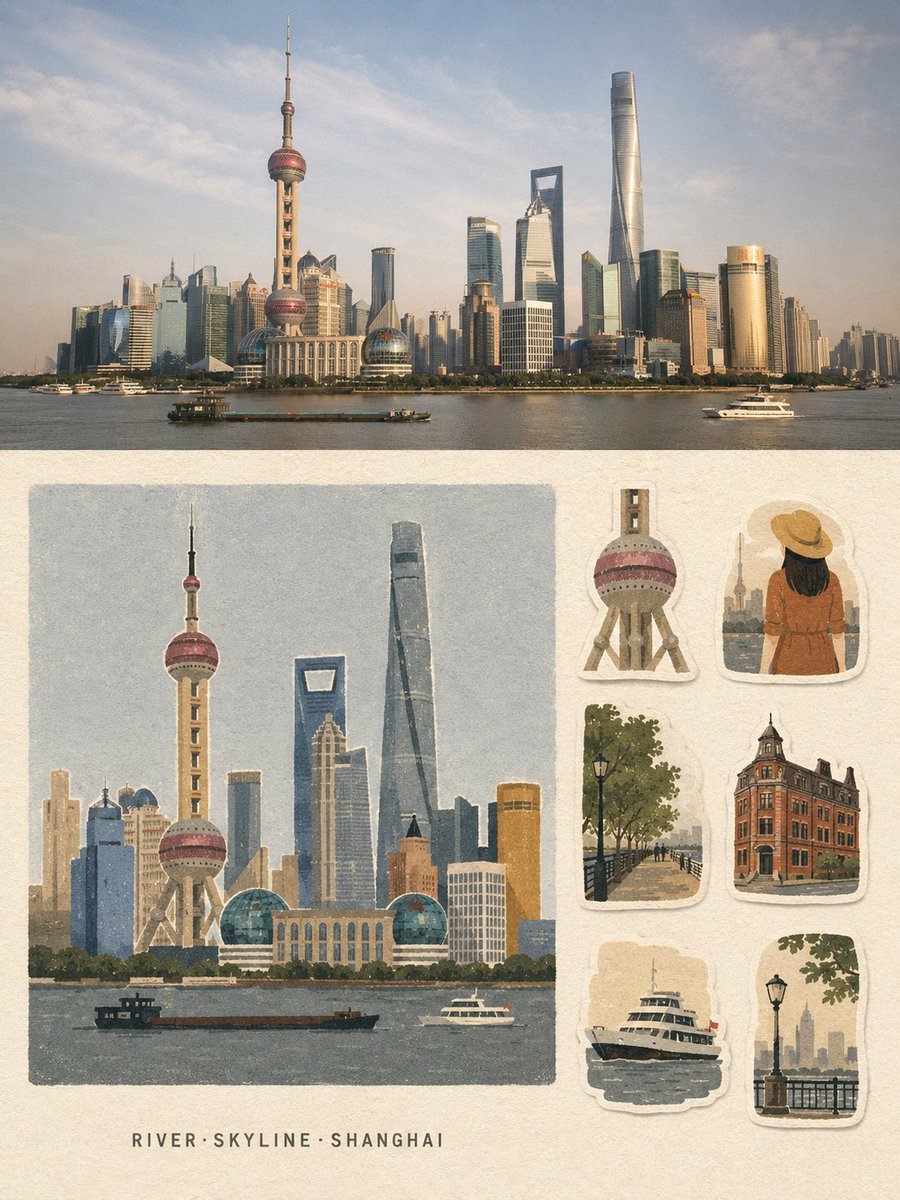
Vintage Travel Memory Poster
Generates a dual-layout travel poster combining a cinematic photograph with a handmade journal-style sticker sheet illustration.
This is a GPT Image 2 prompt case for Graphic & Poster. Use the copy-ready prompt below to generate similar visuals, and review Awesome GPT Image 2 Prompts attribution plus commercial-use rights before reuse.
Free 1K preview
Generate one preview image instantly, no sign-up required.
Prompt
Copy-ready prompt
Create a strict 3:4 vertical travel-memory collage poster based entirely on the written description of {argument name="location" default="[LOCATION]"}.

Divide the poster into two horizontal halves.

TOP HALF - ~50%: Create a premium travel photograph-style scene of {argument name="location" default="[LOCATION]"}, showing its most recognizable landmark, environment, atmosphere, architecture, and local character. Make the scene realistic, cinematic, naturally composed, and geographically recognizable.

BOTTOM HALF — ~50%: Create a handmade travel-memory illustration of the same location on warm off-white uncoated paper, with a continuous 4–5% blank margin. On the left 66–68%, place one large, near-square, borderless illustration featuring the main recognizable landmark or subject. Below it, leave a pale paper strip and center exactly 3 short English keywords in the format “Keyword1·Keyword2·Keyword3”.

On the right 30–32%, arrange exactly 6 separate travel-journal stickers inspired by authentic visual elements of {argument name="location" default="[LOCATION]"}: landmark detail, person/animal variation, environment, architecture/structure, functional object, and atmosphere/scale element. Give each sticker a slightly irregular warm-white hand-cut border and subtle paper shadow.

Use a unified {argument name="aesthetic style" default="matte gouache + cut-paper + risograph/screen-print"} aesthetic with coarse grain, slightly rough edges, subtle print-registration shifts, generous negative space, and only 5–8 low-saturation colors. Reduce the scene into large clean shapes, calm color fields, grouped vegetation, flat architectural forms, and simple faceless silhouettes.

Keep the most recognizable landmark of {argument name="location" default="[LOCATION]"} as the Identification Anchor, preserving its distinctive silhouette, proportions, and signature colors. Fully redraw everything in the same flat, grainy medium.

Include only the 3 keywords and, if essential, one landmark word. No other readable text, titles, dates, captions, addresses, prices, watermarks, or signatures.

Avoid gradients, 3D effects, anime, polished vector art, clip-art, watercolor bloom, wet-marker texture, photographic rendering in the illustration half, or unrelated elements.

The final design should feel quiet, restrained, vintage, handmade, tactile, and premium - a travel postcard combined with a collectible sticker sheet.
Prompt variables
Editable argument placeholders found in the prompt, with their default values.
Best for
- - Graphic & Poster visual exploration
- - Image generation and reference-image edits
- - Reusable briefs that keep source attribution visible
Change these parts
- - Subject, product, character, or scene
- - Aspect ratio, camera, lighting, and background
- - Brand, text, color, and output constraints
Recommended model and settings
- - Model: gpt-image-2
- - Input mode: Text to Image
- - Aspect ratio: source
- - Commercial status: review original source
How to use this prompt
- 1. Copy the prompt and preserve its structure for the first test.
- 2. Replace the subject, context, and publishing channel.
- 3. Change one camera, lighting, or style variable per iteration.
- 4. Inspect the output, source, text, and rights before reuse.
Limitations, source, and reuse cautions
- - Generated output is an editable draft, not factual, legal, or rights evidence.
- - Review the linked source, people, brands, logos, text, and third-party media before commercial use.
More cases in this category
Prioritized by category, input mode compatibility, quality, and lower risk.

Reuse and source notes
Use this prompt safely after previewing the case.
- 1.Copy the prompt or open it directly in Dovoo with the generation button.
- 2.Adjust variables, aspect ratio, and reference images for your own use case.
- 3.Before publishing or paid usage, verify source rights, attribution requirements, and brand or likeness risks.
Can I use this prompt commercially?
Commercial-use status is allowed. Review the original source, license, brand constraints, and legal requirements before paid usage.
Where does this case come from?
This case is imported from Awesome GPT Image 2 Prompts; keep attribution visible and check the source URL before reuse.