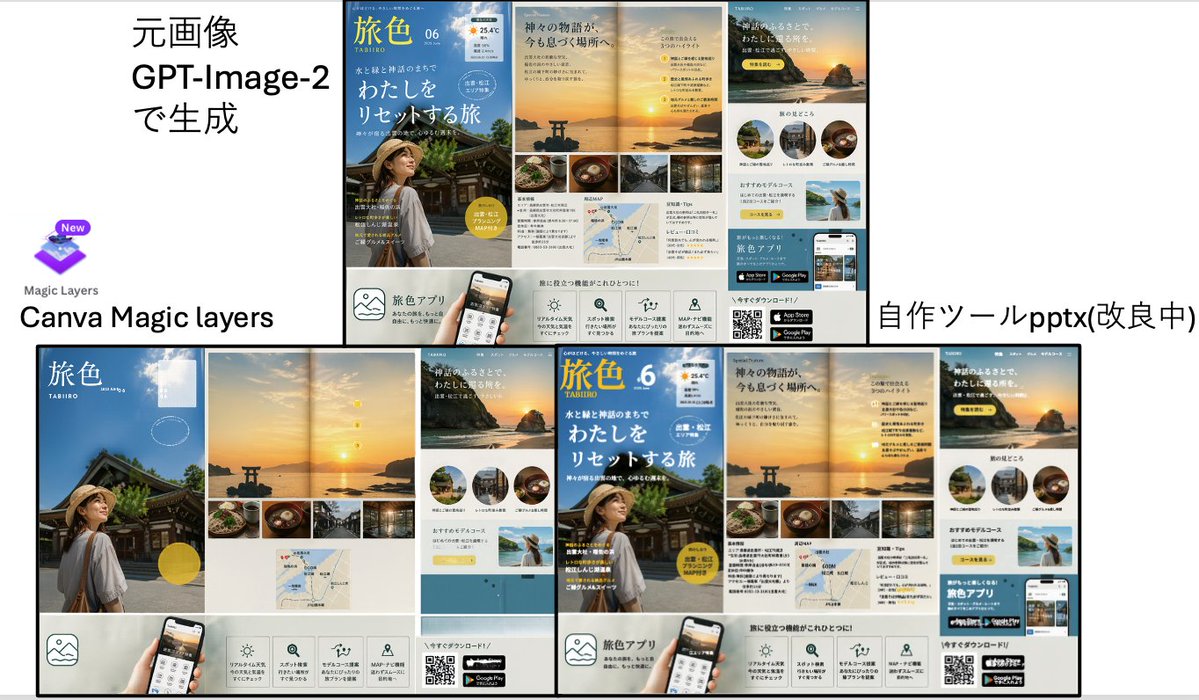
Travel Ad Conversion Comparison Slide
A Japanese presentation-style comparison slide showing a GPT-Image-2-generated travel brochure ad versus Canva Magic Layers and a custom PPTX conversion tool, useful for demos of editable layer reconstruction.
This is a GPT Image 2 prompt case for Other Inspiration. Use the copy-ready prompt below to generate similar visuals, and review Awesome GPT Image 2 Prompts attribution plus commercial-use rights before reuse.
Free 1K preview
Generate one preview image instantly, no sign-up required.
Prompt
Copy-ready prompt
{
  "type": "comparison presentation slide with two large poster-layout travel advertisements",
  "style": "clean Japanese business presentation, white background, black divider lines, screenshot-like composite layout",
  "canvas": {
    "aspect_ratio": "16:9",
    "background": "white"
  },
  "layout": {
    "sections": [
      {
        "title": "left comparison area",
        "position": "top-left and bottom-left",
        "count": 3,
        "labels": [
          "元画像 GPT-Image-2で生成",
          "Canva Magic layers",
          "Magic Layers"
        ]
      },
      {
        "title": "right comparison area",
        "position": "top-right and bottom-right",
        "count": 2,
        "labels": [
          "自作ツールpptx(改良中)"
        ]
      }
    ],
    "dividers": "one thick vertical divider near center and one thick horizontal divider across the middle, with thin black borders around the ad boards",
    "composition": "top row shows source on the left and converted output on the right; bottom row shows enlarged reconstructed layouts side by side"
  },
  "text_elements": {
    "top_left_heading": "元画像 GPT-Image-2で生成",
    "bottom_left_brand": "Canva Magic layers",
    "bottom_right_label": "自作ツールpptx(改良中)"
  },
  "embedded_ad_design": {
    "type": "Japanese travel magazine / tourism app promotional brochure",
    "count": 4,
    "brand_name": "Tabi-iro",
    "issue": "06",
    "subtitle": "TABIIRO",
    "theme": "sunset coastal shrine trip in Japan",
    "color_palette": [
      "sky blue",
      "sunset gold",
      "warm beige",
      "white",
      "black"
    ],
    "main_pages": 4,
    "page_descriptions": [
      "cover page with blue sky background, traditional shrine building, and a woman in a straw hat seen from behind in the lower left, large white Japanese headline text, yellow circular badge, and small weather-style icon at the top right",
      "double-page sunset spread with a torii gate in the water, glowing sun near the horizon, a vertical sequence of 4 small yellow numbered markers, and a bottom strip of 4 rectangular food and travel photos",
      "page featuring a large sunset cliff image with Japanese copy, 3 circular destination thumbnails in a row, a pale yellow recommendation box, and a small scenic photo of a woman raising her arms by the sea",
      "bottom information strip with 5 square feature icons, a smartphone mockup held by a hand, a QR code, and 2 app store badges"
    ]
  },
  "visual_details": {
    "canva_logo": {
      "present": true,
      "position": "left center",
      "description": "purple layered square icon with a small New badge above, and the words Magic Layers below"
    },
    "reconstruction_difference": "the right-side output arranges the same ad components as separated editable blocks with tighter alignment and visible modularity",
    "ad_components_count": {
      "circular_thumbnails": 3,
      "bottom_feature_icons": 5,
      "app_store_badges": 2,
      "qr_codes": 1,
      "small_bottom_strip_photos": 4
    }
  },
  "rendering": "flat presentation screenshot, crisp typography, high-resolution UI/document mockup aesthetic"
}
Best for
- - Other Inspiration visual exploration
- - Image generation and reference-image edits
- - Reusable briefs that keep source attribution visible
Change these parts
- - Subject, product, character, or scene
- - Aspect ratio, camera, lighting, and background
- - Brand, text, color, and output constraints
Recommended model and settings
- - Model: gpt-image-2
- - Input mode: Text to Image
- - Aspect ratio: source
- - Commercial status: review original source
How to use this prompt
- 1. Copy the prompt and preserve its structure for the first test.
- 2. Replace the subject, context, and publishing channel.
- 3. Change one camera, lighting, or style variable per iteration.
- 4. Inspect the output, source, text, and rights before reuse.
Limitations, source, and reuse cautions
- - Generated output is an editable draft, not factual, legal, or rights evidence.
- - Review the linked source, people, brands, logos, text, and third-party media before commercial use.
More cases in this category
Prioritized by category, input mode compatibility, quality, and lower risk.
Reuse and source notes
Use this prompt safely after previewing the case.
- 1.Copy the prompt or open it directly in Dovoo with the generation button.
- 2.Adjust variables, aspect ratio, and reference images for your own use case.
- 3.Before publishing or paid usage, verify source rights, attribution requirements, and brand or likeness risks.
Can I use this prompt commercially?
Commercial-use status is allowed. Review the original source, license, brand constraints, and legal requirements before paid usage.
Where does this case come from?
This case is imported from Awesome GPT Image 2 Prompts; keep attribution visible and check the source URL before reuse.