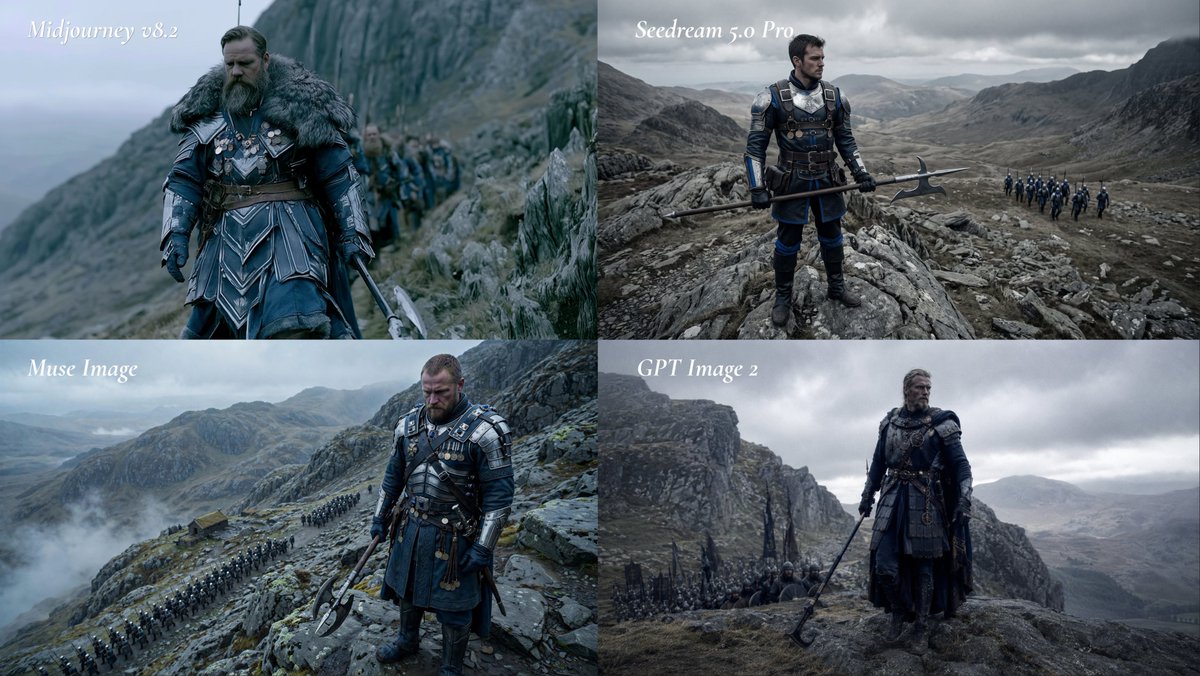
Fantasy Model Comparison Grid
Creates a four-panel cinematic comparison collage of a medieval commander in stormy mountains with model-style labels.
This is a GPT Image 2 prompt case for Other Inspiration. Use the copy-ready prompt below to generate similar visuals, and review Awesome GPT Image 2 Prompts attribution plus commercial-use rights before reuse.
Free 1K preview
Generate one preview image instantly, no sign-up required.
Prompt
Copy-ready prompt
Goal: Create a cinematic 2x2 comparison grid showing the same dark medieval-fantasy scene rendered as if by four different image models, with a white italic label in the upper-left of each panel.

Canvas: Wide 16:9 collage, four equal rectangular panels arranged in a 2 by 2 grid, no borders or gutters, each panel cropped like a film still. Cold desaturated blue-gray color grading, overcast sky, misty highland mountains, rocky cliffs, wet grass, distant valleys, dramatic natural light.

Layout: Exactly 4 panels. Top-left label: “Midjourney v8.2”. Top-right label: “Seedream 5.0 Pro”. Bottom-left label: “Muse Image”. Bottom-right label: “GPT Image 2”. Use elegant white italic serif text, small-to-medium size, placed near the top-left corner of each panel with slight softness, no text boxes.

Subject: Each panel depicts the same core scene: a rugged middle-aged male commander, {argument name="character type" default="a bearded medieval warlord"}, standing on a rocky mountain path with soldiers following behind him. He wears dark navy and black armor with steel plates, leather belts, medals, layered tunic or skirt armor, gloves, boots, and heavy weathered fantasy-war costume details. He carries {argument name="weapon" default="a long halberd or poleaxe"}. His expression is stern and battle-worn, with windblown hair and a serious posture.

Panel details: Top-left panel should feel like the most polished cinematic fantasy still: close three-quarter view of the commander walking along a cliffside path, thick fur mantle around his shoulders, blue armor, sword or pole weapon partly visible, a column of soldiers blurred behind him, steep cliff rising to the right and foggy sea or valley to the left. Top-right panel should show a wider heroic full-body view: the commander stands on jagged rocks holding the halberd horizontally, distant troop formation marching on a mountain road at the right, vast gray valley and storm clouds behind him. Bottom-left panel should be a high-angle mountain pass scene: commander in the foreground looking downward, armored and holding a double-headed poleaxe, long visible line of troops snaking across the rocky landscape below, low clouds and mist over the mountains. Bottom-right panel should be moody and spacious: commander in dark armor standing on a rocky ledge with poleaxe angled downward, smaller soldiers behind him, towering cliff wall on the left, bleak valley on the right, heavy storm clouds.

Visual style: Ultra-cinematic live-action fantasy realism, epic historical drama atmosphere, high detail armor and fabric textures, subdued contrast, shallow depth of field in some panels, realistic mist, no bright colors. The overall prompt theme is {argument name="scene theme" default="a grim medieval commander leading an army through a stormy mountain pass"}.

Constraints: Keep exactly 4 labeled panels and exactly the four visible labels listed above. Avoid logos, watermarks, extra captions, modern objects, sci-fi elements, cartoon styling, or additional panels.
Prompt variables
Editable argument placeholders found in the prompt, with their default values.
Best for
- - Other Inspiration visual exploration
- - Image generation and reference-image edits
- - Reusable briefs that keep source attribution visible
Change these parts
- - Subject, product, character, or scene
- - Aspect ratio, camera, lighting, and background
- - Brand, text, color, and output constraints
Recommended model and settings
- - Model: gpt-image-2
- - Input mode: Text to Image
- - Aspect ratio: source
- - Commercial status: review original source
How to use this prompt
- 1. Copy the prompt and preserve its structure for the first test.
- 2. Replace the subject, context, and publishing channel.
- 3. Change one camera, lighting, or style variable per iteration.
- 4. Inspect the output, source, text, and rights before reuse.
Limitations, source, and reuse cautions
- - Generated output is an editable draft, not factual, legal, or rights evidence.
- - Review the linked source, people, brands, logos, text, and third-party media before commercial use.
More cases in this category
Prioritized by category, input mode compatibility, quality, and lower risk.

Reuse and source notes
Use this prompt safely after previewing the case.
- 1.Copy the prompt or open it directly in Dovoo with the generation button.
- 2.Adjust variables, aspect ratio, and reference images for your own use case.
- 3.Before publishing or paid usage, verify source rights, attribution requirements, and brand or likeness risks.
Can I use this prompt commercially?
Commercial-use status is allowed. Review the original source, license, brand constraints, and legal requirements before paid usage.
Where does this case come from?
This case is imported from Awesome GPT Image 2 Prompts; keep attribution visible and check the source URL before reuse.